





She did erase it, or rather her copy of Resscan erased it. When you use the Resscan program to change the settings on the S9 it automatically wipes out all the other stuff on the card. The way the S9 and Resscan are designed you cannot have data and new machine settings on the same card. Get another card. You may ask the DME to just send you another card so you'll have one to put into the machine while you send the other one in. Their response will give you a good idea how accommodating they are to you managing your therapy for yourself. Buy the smallest SD card you can find. Even an older 512 mb card is plenty big enough.Elle wrote:She may have erased it. I opened Rescan and inserted the card. My computer recognized the card and when I hit download in the Rescan program nothing happened. I am too busy right now to mess with it and will see what it said tomorrow at doc office but if they did erase it I am P.O.'d
SD card size
Re: SD card size
_________________
| Mask: AirFit™ P10 Nasal Pillow CPAP Mask with Headgear |
| Humidifier: S9™ Series H5i™ Heated Humidifier with Climate Control |
| Additional Comments: Hose management - rubber band tied to casement window crank handle! Hey, it works! S/W is 3.13, not 3.7 |
Re: SD card size
I will get a new one. I managed to do a print screen of all that I got when I downloaded and am now looking for a way to show it here. I will understand all this eventually.

Re: SD card size
Try this way. I use screen shots too.Elle wrote: I managed to do a print screen of all that I got when I downloaded and am now looking for a way to show it here.
Open the image to full size so it is easily read.
I use Vista snipping tool to create a screen shot and crop the image at the same time.
Prt/scr key will also take a screen shot if using XP. If laptop is used sometimes the Fn key has to be pushed at the same time as the prt/scr key
I think windows 7 Home Premium has the snipping tool, Basic may not.
Once the screen shot is created save it in jpg format.
Upload the image to a host site. I use Photobucket it is free, there are others.
Once the image is uploaded then copy the ENTIRE IMG address. Be sure to include the opening and closing IMG in brackets. Paste that copied address into a post here.
Use the preview button. If you can't see the image try again because if you can't see it we can't.
_________________
| Machine: AirCurve™ 10 VAuto BiLevel Machine with HumidAir™ Heated Humidifier |
| Additional Comments: Mask Bleep Eclipse https://bleepsleep.com/the-eclipse/ |
I may have to RISE but I refuse to SHINE.
Re: SD card size
http://www.flickr.com/photos/78167334@N00/6546062143/
Not sure if that will work. I feel bad for anyone having to witness this. haha
Not sure if that will work. I feel bad for anyone having to witness this. haha
Re: SD card size
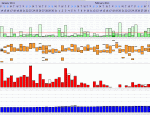
If you click on "actions" and "view all sizes" I think it shows large enough. Anyway, that was all I got from that SD card. I wonder if someone can tell me whether it looks like my pressure stayed around 14ish?
I will get a new SD card and hope to get more detailed information. Thank you again for your help and patience.
I will get a new SD card and hope to get more detailed information. Thank you again for your help and patience.
-
Lizistired
- Posts: 2835
- Joined: Tue Dec 14, 2010 10:47 pm
- Location: Indiana
Re: SD card size
Yep, looks like you are staying around 14. If you go to tools > settings, down near the bottom of that window, you can set the graph range for your AHI. If you set to 0-6 it will be easier to see your AHI. It looks good but your leak line could be better. The leaks might be driving your pressure up. Do you take your mask off before you turn off the machine? If so that wou;d explain the light green line going all the way up.
If you click on the Statistics tab, you can see your pressure and EPR settings and maybe see what she "tweaked".
If you click on the Statistics tab, you can see your pressure and EPR settings and maybe see what she "tweaked".
_________________
| Humidifier: S9™ Series H5i™ Heated Humidifier with Climate Control |
| Additional Comments: Swift FX sometimes, CMS-50F, Cervical collar sometimes, White noise, Zeo... I'm not well, but I'm better. |
ResScan: http://www.resmed.com/int/assets/html/s ... c=patients
ResScan Tutorial- http://montfordhouse.com/cpap/resscan_tutorial/
Machines Video: http://www.cpaplibrary.com/machine-education
ResScan Tutorial- http://montfordhouse.com/cpap/resscan_tutorial/
Machines Video: http://www.cpaplibrary.com/machine-education
-
Lizistired
- Posts: 2835
- Joined: Tue Dec 14, 2010 10:47 pm
- Location: Indiana
Re: SD card size
On the other hand, maybe she didn't tweak anything. Did you put the card back in the machine before you downloaded?
_________________
| Humidifier: S9™ Series H5i™ Heated Humidifier with Climate Control |
| Additional Comments: Swift FX sometimes, CMS-50F, Cervical collar sometimes, White noise, Zeo... I'm not well, but I'm better. |
ResScan: http://www.resmed.com/int/assets/html/s ... c=patients
ResScan Tutorial- http://montfordhouse.com/cpap/resscan_tutorial/
Machines Video: http://www.cpaplibrary.com/machine-education
ResScan Tutorial- http://montfordhouse.com/cpap/resscan_tutorial/
Machines Video: http://www.cpaplibrary.com/machine-education
-
SleepingDVader

- Posts: 120
- Joined: Fri Dec 09, 2011 10:04 am
- Location: S. Central Louisiana
Re: SD card size
Got a loaner respironics (brand new) and I was curious about the card so I checked and it was 32 megabytes.
_________________
| Humidifier: S9™ Series H5i™ Heated Humidifier with Climate Control |
| Additional Comments: Rx pressure is 20/16, Use papcap w/chinstrap and tape. Sleep number bed and Sobakawa pillow. Also use Swift FX & Quattro FX as required. |

Re: SD card size
*
_________________
| Machine: ResMed AirCurve 10 ASV Machine with Heated Humidifier |
| Mask: AirFit™ F40 System - M/STD |
Last edited by Grand-PAP on Wed Dec 28, 2011 10:24 am, edited 1 time in total.
Re: SD card size
I can't remember (short term memory shot) but I think I put it back in the machine before downloading.
I can't believe that hovering at 65 years of age I am worried about getting in trouble with the DME. I can't believe they can get away with treating us like imbeciles. They have told me my warranty will be invalid if I download but since that is unlikely the worst they can do is dump me.....which I will deal with.
I did feel that I was waking up a lot to adjust my mask and I guess that must have been because it wasn't used to a pressure of 14 after years at 8. I did roll up the bottom of my mask strap so that the top one wouldn't ride over the top of my head and that seemed to make a difference. Of course that was when I didn't have a card in the machine so I will see now whether the mask adjustment will make a difference with leaks.
The only thing I have seen is the green smiley face by mask in the 'info' on the front of the screen every morning.
Anyway, a long process but thanks to the group here I will fight on. Thank you again.
I can't believe that hovering at 65 years of age I am worried about getting in trouble with the DME. I can't believe they can get away with treating us like imbeciles. They have told me my warranty will be invalid if I download but since that is unlikely the worst they can do is dump me.....which I will deal with.
I did feel that I was waking up a lot to adjust my mask and I guess that must have been because it wasn't used to a pressure of 14 after years at 8. I did roll up the bottom of my mask strap so that the top one wouldn't ride over the top of my head and that seemed to make a difference. Of course that was when I didn't have a card in the machine so I will see now whether the mask adjustment will make a difference with leaks.
The only thing I have seen is the green smiley face by mask in the 'info' on the front of the screen every morning.
Anyway, a long process but thanks to the group here I will fight on. Thank you again.
-
Lizistired
- Posts: 2835
- Joined: Tue Dec 14, 2010 10:47 pm
- Location: Indiana
Re: SD card size
I always have the green smiley face. And usually have bad leaks.
Good luck with whatever changes she made.
Sleep good
Good luck with whatever changes she made.
Sleep good
_________________
| Humidifier: S9™ Series H5i™ Heated Humidifier with Climate Control |
| Additional Comments: Swift FX sometimes, CMS-50F, Cervical collar sometimes, White noise, Zeo... I'm not well, but I'm better. |
ResScan: http://www.resmed.com/int/assets/html/s ... c=patients
ResScan Tutorial- http://montfordhouse.com/cpap/resscan_tutorial/
Machines Video: http://www.cpaplibrary.com/machine-education
ResScan Tutorial- http://montfordhouse.com/cpap/resscan_tutorial/
Machines Video: http://www.cpaplibrary.com/machine-education
Re: SD card size
Thanks for all your help Liz. Happy leak free dreaming.
-
Randyp1234

- Posts: 245
- Joined: Sat Oct 22, 2011 8:13 am
- Location: Decatur, Illinois
Re: SD card size
Can anyone confirm whether the S9 Autoset can use an SDHC card? I know the capacity isn't an issue but like JeffL pointed out they seem to be the cheapest now.JeffL wrote:A word of caution... if you get anything bigger than 2 gigs, it's probably a High Capacity SD card (SDHC), I'm pretty sure the CPAP can use it, but if you have an older computer, with a build in card reader, or an older external card reader, it may not be able to handle SDHC cards. My computer is about 5 years old, and it's build in card reader won't work with SDHC. The easy work-around is to buy an newer, inexpensive eternal card reader (mine was $8), that plugs into a USB port, and can read SDHC SD cards.

Randy

Re: SD card size
JeffL wrote:A word of caution... if you get anything bigger than 2 gigs, it's probably a High Capacity SD card (SDHC), I'm pretty sure the CPAP can use it, but if you have an older computer, with a build in card reader, or an older external card reader, it may not be able to handle SDHC cards. My computer is about 5 years old, and it's build in card reader won't work with SDHC. The easy work-around is to buy an newer, inexpensive eternal card reader (mine was $8), that plugs into a USB port, and can read SDHC SD cards.
I have an older reader, I was able to download new firmware and flash it so it would read SDHC cards. Sometimes this is an option.
_________________
| Mask: AirFit™ P10 Nasal Pillow CPAP Mask with Headgear |
| Additional Comments: Backup & Travel Machines: PR System One Bipap Auto, S9 VPAP Auto, S9 Autoset, Oximeter CMS-50E |
Diagnosed March 2011, using APAP 14 - 16.5 cm, AFlex+ 2
Alt masks Swift FX pillows, Mirage FX nasal mask, Mirage Quattro full face mask
Alt masks Swift FX pillows, Mirage FX nasal mask, Mirage Quattro full face mask
Re: SD card size
If Resscan downloaded anything at all from it then you had to have put it back into the machine. Using the SD card to change machine settings erases all data from the card. Download will do nothing. Putting the card into the S9 changes the S9 settings, deletes the settings files off the card, and then writes the stored summary data to the card. Resscan can now download from it again.Elle wrote:I can't remember (short term memory shot) but I think I put it back in the machine before downloading.
In case you are not familiar with the data that is on the card here is a short tutorial.
First, DO NOT rely on the card for data storage. All it is good for, really, is to transfer data from the S9 to your, or your DME's, or your doctor's, computer.
The S9 stores only summary data, i.e., the data you see on the summary tab in Resscan. The S9 will store up to 365 days of summary data in the machine memory, and that is what it writes to the SD card. The S9 and the card will never have more than 365 days of summary data.
Detail data is written only to the SD card. The card must be in the machine during the therapy session in order for the S9 to record it. The S9 will record up to 30 days of detail data onto the card and then it deletes the 30 day old file when it writes the current one. Detail data is data that is recorded once every 2 seconds of machine operation.
High resolution data also is written only to the SD card. During therapy, if the card is not in the machine there is no hi-res data recorded. The only hi-res data you will see in Resscan is flow. Pressure is recorded as both detail and hi-res, but only the detail is shown. Hi-res data is recorded 25 times per second. There are up to seven days of hi-res data on the card. Just like detail data, hi-res data is recorded in "round robin" fashion, i.e. the oldest is deleted when the new is written.
The only way to keep all your data for the long term is to download at least once every seven days. Select "Discard" when you download, otherwise Resscan will also delete the old data and keep only 30 days of detail and seven days of hi-res. Make a backup of your patient file every once in awhile. HTH.
_________________
| Mask: AirFit™ P10 Nasal Pillow CPAP Mask with Headgear |
| Humidifier: S9™ Series H5i™ Heated Humidifier with Climate Control |
| Additional Comments: Hose management - rubber band tied to casement window crank handle! Hey, it works! S/W is 3.13, not 3.7 |