1st 2 weeks ever on ASV-SleepyHead Data

General Discussion on any topic relating to CPAP and/or Sleep Apnea.
User avatar
NateS
Posts: 1716
Joined: Wed Dec 14, 2011 8:53 pm
Location: Kaatskill Mts-Washington Irving

Daily Waveforms in ResScan?

Post by NateS » Fri Jan 20, 2012 11:48 am

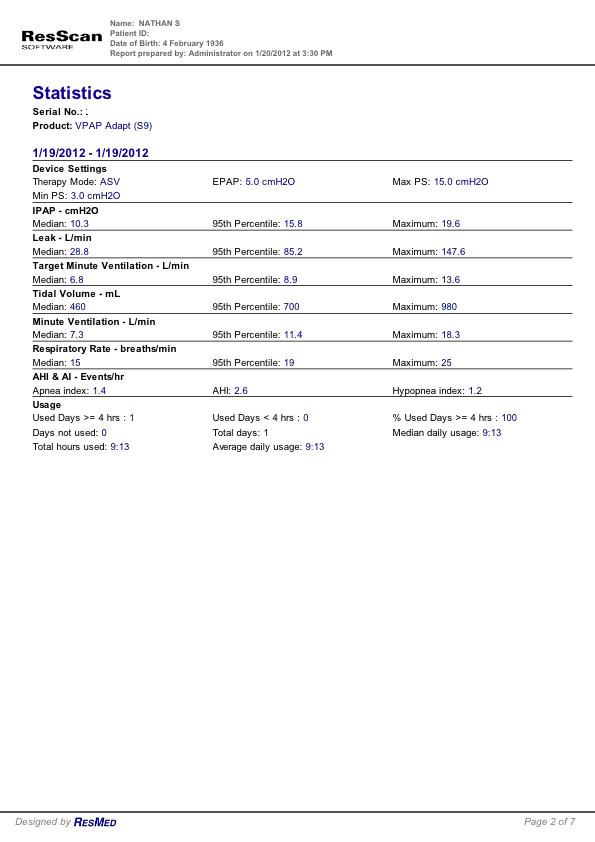
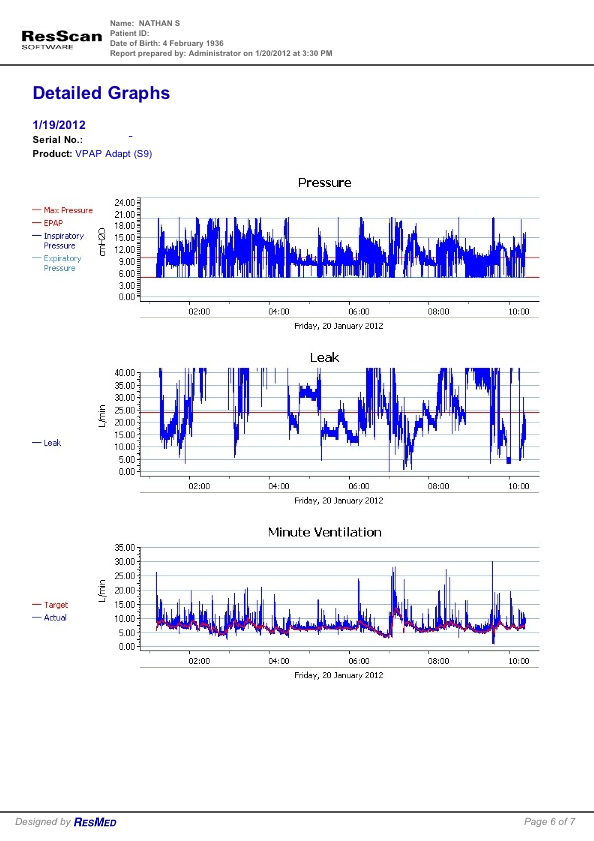
Thanks to Pugsy for her advice and assistance, I have now been able to download and incorporate the detailed data into a report, and therefore respectfully provide herewith the summary and detail waveform report from last night, as suggested by avi.

I look forward to avi's impressions and comments as well as those of anyone else here who has impressions or suggestions.

Many thanks, Nate

Image
Image
Image
Image
Image
Image
Image

_________________
Mask: DreamWear Nasal CPAP Mask with Headgear
Additional Comments: ResMed AirCurve 10 ASV; Dreamwear Nasal Mask Original; CPAPMax Pillow; ResScan & SleepyHead
Last edited by NateS on Fri Jan 20, 2012 6:58 pm, edited 2 times in total.
Central sleep apnea AHI 62.6 pre-VPAP. Now 0 to 1.3
Present Rx: EPAP: 8; IPAPlo:11; IPAPHi: 23; PSMin: 3; PSMax: 15
"I've had a perfectly wonderful evening, but this wasn't it." —Groucho Marx

User avatar
Pugsy
Posts: 65413
Joined: Thu May 14, 2009 9:31 am
Location: Missouri, USA

Re: 1st 2 weeks ever on ASV-SleepyHead Data

Post by Pugsy » Fri Jan 20, 2012 12:02 pm

NateS wrote:I get Summary Graphs all the way back to my first day, but when I click on Detailed Graphs I get "No detailed data available."
In the download process before you do the download I think there is a default to "summary" data and you have to change it to "all data" or similar wording prior to doing the download.
The default download is the summary stuff...you have to tell it to grab the other data.
If you can't find it..this video might help. http://montfordhouse.com/cpap/resscan_tutorial/
I used ResScan briefly during a S9 trial..didn't like it. Prefer SleepyHead.
To get individual breath wave form you have to zoom in and change your daily details (when you get them) to a very small time frame.

Or you can use SleepyHead and do the same thing manually or clicking on the individual events under the Events tab. Have you seen that feature? Events tab...shows the different events category with a number in parenthesis which indicates the number of such events...click on one of the categories and you get all the events in that category along with when they occurred and how long they lasted...click on an individual event say at 01:15....and your graphs will change to show that event up close, zoomed in and individual breaths will show.

_________________
Machine: AirCurve™ 10 VAuto BiLevel Machine with HumidAir™ Heated Humidifier
Additional Comments: Mask Bleep Eclipse https://bleepsleep.com/the-eclipse/
I may have to RISE but I refuse to SHINE.

User avatar
NateS
Posts: 1716
Joined: Wed Dec 14, 2011 8:53 pm
Location: Kaatskill Mts-Washington Irving

Re: 1st 2 weeks ever on ASV-SleepyHead Data

Post by NateS » Fri Jan 20, 2012 2:38 pm

Pugsy wrote:
NateS wrote:I get Summary Graphs all the way back to my first day, but when I click on Detailed Graphs I get "No detailed data available."
In the download process before you do the download I think there is a default to "summary" data and you have to change it to "all data" or similar wording prior to doing the download.
The default download is the summary stuff...you have to tell it to grab the other data.
If you can't find it..this video might help. http://montfordhouse.com/cpap/resscan_tutorial/
I used ResScan briefly during a S9 trial..didn't like it. Prefer SleepyHead.
To get individual breath wave form you have to zoom in and change your daily details (when you get them) to a very small time frame.

Or you can use SleepyHead and do the same thing manually or clicking on the individual events under the Events tab. Have you seen that feature? Events tab...shows the different events category with a number in parenthesis which indicates the number of such events...click on one of the categories and you get all the events in that category along with when they occurred and how long they lasted...click on an individual event say at 01:15....and your graphs will change to show that event up close, zoomed in and individual breaths will show.
That was soooo helpful!

Thank you, Pugsy!

Details w/Graphs to follow.

Best regards, Nate

_________________
Mask: DreamWear Nasal CPAP Mask with Headgear
Additional Comments: ResMed AirCurve 10 ASV; Dreamwear Nasal Mask Original; CPAPMax Pillow; ResScan & SleepyHead
Central sleep apnea AHI 62.6 pre-VPAP. Now 0 to 1.3
Present Rx: EPAP: 8; IPAPlo:11; IPAPHi: 23; PSMin: 3; PSMax: 15
"I've had a perfectly wonderful evening, but this wasn't it." —Groucho Marx

User avatar
avi123
Posts: 4509
Joined: Tue Dec 21, 2010 5:39 pm
Location: NC

Re: 1st 2 weeks ever on ASV-SleepyHead Data

Post by avi123 » Fri Jan 20, 2012 4:24 pm

Nate, I asked to see your results on a ResScan graphs b/c I thought that you have CSAS only and I have been trying to study it in a Rescan wave shape graph. But it turns out that you have Complex SAS which Resmed describes as:

What is complex sleep apnea?

Complex sleep apnea (CompSA) is a form of sleep apnea in which central apneas persist or emerge during attempts to treat obstructive events with a continuous positive airway pressure (CPAP) or bilevel device.

CompSA is characterized by the following:

•The persistence or emergence of central apneas or hypopneas upon exposure to CPAP or bilevel when obstructive events have disappeared
•CompSA patients have predominately obstructive or mixed apneas during the diagnostic sleep study, occurring at least 5 times per hour
•With use of a CPAP or bilevel, they show a pattern of central apneas and hypopneas that meets the Centers for Medicare Services (CMS) definition of CSA (described below)

A diagnosis of central sleep apnea (CSA) requires all of the following:

•An apnea index > 5
•Central apneas/hypopneas > 50% of total apneas/hypopneas
•Central apneas or hypopneas occurring at least 5 times per hour
•Symptoms of either excessive sleepiness or disrupted sleep


The difference between central, mixed and complex sleep apnea CSA is a form of sleep-disordered breathing (SDB) caused by the temporary absence of a signal from the brain’s respiratory center. Without this signal, there is no effort to breathe. Mixed sleep apnea is fairly common and consists of both central and obstructive components. On the other hand, CompSA consists of all or predominantly obstructive apneas which convert to all or predominantly central apneas when treated with a CPAP or bilevel devices.


The challenge to treat CompSA

Patients with CompSA cannot be adequately treated with CPAP or bilevel device. The clinical consequences are residual symptoms (fatigue, sleepiness, depressed mood) and intolerance to therapy.

Patients with CompSA may be seen as those who cannot tolerate conventional CPAP or bilevel therapy both during lab titration and at home. Neither CPAP nor bilevel therapy seems to alleviate their sleep disorders. For CompSA patients, treatment with CPAP or bilevel therapy will leave them with a somewhat elevated AHI, and their disorder will not be completely resolved.

How does the VPAP Adapt SV treat CompSA?

Our VPAP Adapt SV is the first FDA-cleared device designed to treat CSA, CompSA, mixed apnea and periodic breathing. VPAP Adapt SV uses adaptive servo-ventilation to adapt to a patient’s ventilatory needs on a breath-by-breath basis.


Source:

http://www.resmed.com/us/clinicians/abo ... clinicians


So,

to glance at your Complex SAS RescSan graphs would be interesting to see but, at this time, imo, you should better concentrate on John Fisher's suggestions instead of wasting your time on the Rescan graphs.

p.s. if you got the time check this debate on Complex SA:

http://www.ncbi.nlm.nih.gov/pmc/article ... .5.403.pdf

_________________
Humidifier: S9™ Series H5i™ Heated Humidifier with Climate Control
Additional Comments:  S9 Autoset machine; Ruby chinstrap under the mask straps; ResScan 5.6
see my recent set-up and Statistics:
http://i.imgur.com/TewT8G9.png
see my recent ResScan treatment results:
http://i.imgur.com/3oia0EY.png
http://i.imgur.com/QEjvlVY.png

User avatar
NateS
Posts: 1716
Joined: Wed Dec 14, 2011 8:53 pm
Location: Kaatskill Mts-Washington Irving

Re: 1st 2 weeks ever on ASV-SleepyHead Data

Post by NateS » Fri Jan 20, 2012 7:05 pm

avi123 wrote:Nate, So, …

to glance at your Complex SAS RescSan graphs would be interesting to see but, at this time, imo, you should better concentrate on John Fisher's suggestions instead of wasting your time on the Rescan graphs.

p.s. if you got the time check this debate on Complex SA:

http://www.ncbi.nlm.nih.gov/pmc/article ... 5.403.pdfV
Whoops! Too late - I was in the process of posting them above before I saw your new reply of this evening, which I only saw afterwards. My post somehow appears above yours though. I will now read and study your detailed new comments and discussion, for which I am very grateful!

Regards, Nate

_________________
Mask: DreamWear Nasal CPAP Mask with Headgear
Additional Comments: ResMed AirCurve 10 ASV; Dreamwear Nasal Mask Original; CPAPMax Pillow; ResScan & SleepyHead
Central sleep apnea AHI 62.6 pre-VPAP. Now 0 to 1.3
Present Rx: EPAP: 8; IPAPlo:11; IPAPHi: 23; PSMin: 3; PSMax: 15
"I've had a perfectly wonderful evening, but this wasn't it." —Groucho Marx

User avatar
NateS
Posts: 1716
Joined: Wed Dec 14, 2011 8:53 pm
Location: Kaatskill Mts-Washington Irving

Re: 1st 2 weeks ever on ASV-SleepyHead Data

Post by NateS » Fri Jan 20, 2012 7:35 pm

avi123 wrote:Nate, I asked to see your results on a ResScan graphs b/c I thought that you have CSAS only and I have been trying to study it in a Rescan wave shape graph. But it turns out that you have Complex SAS which Resmed describes as:

What is complex sleep apnea?

Complex sleep apnea (CompSA) is a form of sleep apnea in which central apneas persist or emerge during attempts to treat obstructive events with a continuous positive airway pressure (CPAP) or bilevel device.

CompSA is characterized by the following:

•The persistence or emergence of central apneas or hypopneas upon exposure to CPAP or bilevel when obstructive events have disappeared
•CompSA patients have predominately obstructive or mixed apneas during the diagnostic sleep study, occurring at least 5 times per hour
•With use of a CPAP or bilevel, they show a pattern of central apneas and hypopneas that meets the Centers for Medicare Services (CMS) definition of CSA (described below)

A diagnosis of central sleep apnea (CSA) requires all of the following:

•An apnea index > 5
•Central apneas/hypopneas > 50% of total apneas/hypopneas
•Central apneas or hypopneas occurring at least 5 times per hour
•Symptoms of either excessive sleepiness or disrupted sleep


The difference between central, mixed and complex sleep apnea CSA is a form of sleep-disordered breathing (SDB) caused by the temporary absence of a signal from the brain’s respiratory center. Without this signal, there is no effort to breathe. Mixed sleep apnea is fairly common and consists of both central and obstructive components. On the other hand, CompSA consists of all or predominantly obstructive apneas which convert to all or predominantly central apneas when treated with a CPAP or bilevel devices.


The challenge to treat CompSA

Patients with CompSA cannot be adequately treated with CPAP or bilevel device. The clinical consequences are residual symptoms (fatigue, sleepiness, depressed mood) and intolerance to therapy.

Patients with CompSA may be seen as those who cannot tolerate conventional CPAP or bilevel therapy both during lab titration and at home. Neither CPAP nor bilevel therapy seems to alleviate their sleep disorders. For CompSA patients, treatment with CPAP or bilevel therapy will leave them with a somewhat elevated AHI, and their disorder will not be completely resolved.

How does the VPAP Adapt SV treat CompSA?

Our VPAP Adapt SV is the first FDA-cleared device designed to treat CSA, CompSA, mixed apnea and periodic breathing. VPAP Adapt SV uses adaptive servo-ventilation to adapt to a patient’s ventilatory needs on a breath-by-breath basis.


Source:

http://www.resmed.com/us/clinicians/abo ... clinicians


So,

to glance at your Complex SAS RescSan graphs would be interesting to see but, at this time, imo, you should better concentrate on John Fisher's suggestions instead of wasting your time on the Rescan graphs.

p.s. if you got the time check this debate on Complex SA:

http://www.ncbi.nlm.nih.gov/pmc/article ... .5.403.pdf
AVI, thank you for this!

Wow, this is very interesting, because I had a very bad reaction to my first titration, when I was put on continuous air pressure. I felt terrible all the next day! So much so that I wrote the doctor a letter to describe my reactions, and my concerns and fears as to what it might be like if I was put on CPAP!

Regards, Nate

_________________
Mask: DreamWear Nasal CPAP Mask with Headgear
Additional Comments: ResMed AirCurve 10 ASV; Dreamwear Nasal Mask Original; CPAPMax Pillow; ResScan & SleepyHead
Central sleep apnea AHI 62.6 pre-VPAP. Now 0 to 1.3
Present Rx: EPAP: 8; IPAPlo:11; IPAPHi: 23; PSMin: 3; PSMax: 15
"I've had a perfectly wonderful evening, but this wasn't it." —Groucho Marx

User avatar
Pugsy
Posts: 65413
Joined: Thu May 14, 2009 9:31 am
Location: Missouri, USA

Re: 1st 2 weeks ever on ASV-SleepyHead Data

Post by Pugsy » Fri Jan 20, 2012 8:05 pm

Hi Nate,

See that red line on that leak graph? You need to stay away from that red line. As you can see, you are all over the place and spend a lot of time over the red line. ResMed says that red line at 24L/min is their line in the sand. Above that line the machine may have its scoring ability impaired as well as your therapy being impaired.

Gotta work on the leaks. Leaks are an ongoing battle we never truly win. Instead we just control them as best we can.

ResMed machines subtract the intentional vent rate before they ever report the leak number so anything they report is excess or unwanted leak. Short spikes to the red line and above that don't last very long we don't worry so much about. Yours are enough to worry about. Otherwise your reports look grand..unfortunately with that much leak we can't trust the data.

_________________
Machine: AirCurve™ 10 VAuto BiLevel Machine with HumidAir™ Heated Humidifier
Additional Comments: Mask Bleep Eclipse https://bleepsleep.com/the-eclipse/
I may have to RISE but I refuse to SHINE.

User avatar
NateS
Posts: 1716
Joined: Wed Dec 14, 2011 8:53 pm
Location: Kaatskill Mts-Washington Irving

Re: 1st 2 weeks ever on ASV-SleepyHead Data

Post by NateS » Fri Jan 20, 2012 9:47 pm

I should mention that on or about 7PM last night, I tore my mask off and woke up to find it in my hand, and there was some confusion and struggle getting it back in place, so that probably accounts for the big spikes at that time in the above chart; or, on the other hand, did something happen to cause me to tear my mark off?

Nate

_________________
Mask: DreamWear Nasal CPAP Mask with Headgear
Additional Comments: ResMed AirCurve 10 ASV; Dreamwear Nasal Mask Original; CPAPMax Pillow; ResScan & SleepyHead
Central sleep apnea AHI 62.6 pre-VPAP. Now 0 to 1.3
Present Rx: EPAP: 8; IPAPlo:11; IPAPHi: 23; PSMin: 3; PSMax: 15
"I've had a perfectly wonderful evening, but this wasn't it." —Groucho Marx

User avatar
Pugsy
Posts: 65413
Joined: Thu May 14, 2009 9:31 am
Location: Missouri, USA

Re: 1st 2 weeks ever on ASV-SleepyHead Data

Post by Pugsy » Fri Jan 20, 2012 9:53 pm

NateS wrote:did something happen to cause me to tear my mark off?
Unknown really from what we can see here. Pretty much your leak is way excessive for the bulk of the night. Let me see if I can get my ResScan to show you what a decent leak line should look like. I have trouble managing the graphs.

Well, not the greatest image but a very decent leak line...only a couple of small little blips. Most likely the nasal pillow slipped around a bit. You are new to all this and I have been doing it a long time. So we don't expect you to have a perfect leak line but you can see yours and look at mine. Now if your other nights were a lot better than last night I won't say anything.

Image

_________________
Machine: AirCurve™ 10 VAuto BiLevel Machine with HumidAir™ Heated Humidifier
Additional Comments: Mask Bleep Eclipse https://bleepsleep.com/the-eclipse/
I may have to RISE but I refuse to SHINE.

User avatar
NateS
Posts: 1716
Joined: Wed Dec 14, 2011 8:53 pm
Location: Kaatskill Mts-Washington Irving

Getting the Leaks down???

Post by NateS » Fri Jan 20, 2012 11:20 pm

Pugsy wrote:
NateS wrote:did something happen to cause me to tear my mark off?
Unknown really from what we can see here. Pretty much your leak is way excessive for the bulk of the night. Let me see if I can get my ResScan to show you what a decent leak line should look like. I have trouble managing the graphs.

Well, not the greatest image but a very decent leak line...only a couple of small little blips. Most likely the nasal pillow slipped around a bit. You are new to all this and I have been doing it a long time. So we don't expect you to have a perfect leak line but you can see yours and look at mine. Now if your other nights were a lot better than last night I won't say anything.

Image
Wow! That's a pretty impressive low leak chart! I see that you wear the same nasal pillow mask that I do - are there any tips or secrets you can pass on as to how you keeps the leaks so low with it?

For the past few nights, I have added Karen at PadaCheek's stabilizer band, a brilliant bit of engineering which has eliminated my prior frustration with the back band slipping up, and I no longer feel like I have to tighten the top band, but something is still causing leakage.

On my Leak chart above from ResScan, I managed to keep only half of my nights from late December forward at or under the red line.

How do you do it to get a chart like yours?

Thanks, Nate

_________________
Mask: DreamWear Nasal CPAP Mask with Headgear
Additional Comments: ResMed AirCurve 10 ASV; Dreamwear Nasal Mask Original; CPAPMax Pillow; ResScan & SleepyHead
Central sleep apnea AHI 62.6 pre-VPAP. Now 0 to 1.3
Present Rx: EPAP: 8; IPAPlo:11; IPAPHi: 23; PSMin: 3; PSMax: 15
"I've had a perfectly wonderful evening, but this wasn't it." —Groucho Marx

User avatar
Pugsy
Posts: 65413
Joined: Thu May 14, 2009 9:31 am
Location: Missouri, USA

Re: 1st 2 weeks ever on ASV-SleepyHead Data

Post by Pugsy » Sat Jan 21, 2012 12:48 am

NateS wrote:How do you do it to get a chart like yours?
Gosh, I don't do anything special. I don't route my hose over my head. I let it flop around when I toss and turn. I have it so loose that I can put the mask on easily with one hand and I haven't made any adjustment to the straps since I got it about 6 months ago. I have minimal slippage of that back strap. I don't use Lansinoh ointment. I toss and turn a lot.

Do you notice any leaks during the night? Leaks that big would disrupt sleep I would think.
Do you think you might be mouth breathing? Having dry mouth? Also you might make sure that you don't have the nasal pillows on the headgear wrong. I had them turned around reversed for several nights once. I had more leaks then but none the magnitude you are having.

Perhaps you could do an experiment..put the mask on and watch TV with the machine on for about 30 minutes or so...then you can look at the awake time to see what the leak shows while you are awake and know for sure that you aren't hearing any leaks. Just to make sure that their isn't a leak somewhere in the gear.

If there is any chance you are mouth breathing you might try a chin strap one night and see if that makes any difference in the leak.

_________________
Machine: AirCurve™ 10 VAuto BiLevel Machine with HumidAir™ Heated Humidifier
Additional Comments: Mask Bleep Eclipse https://bleepsleep.com/the-eclipse/
I may have to RISE but I refuse to SHINE.

User avatar
avi123
Posts: 4509
Joined: Tue Dec 21, 2010 5:39 pm
Location: NC

Re: 1st 2 weeks ever on ASV-SleepyHead Data

Post by avi123 » Sat Jan 21, 2012 10:36 am

Nate, since you show much interest in your situation, I am bombarding you with more stuff.

imo, you need to have the SD memory card stuck in the machine before you start the machine. If I stick it later then I get only Statistics and Summary (no detailed).

When I look at your Leak graph I see that the hi leaks spikes are correlated with the hi pressure spikes. Why are you setting max pressure so hi?

To get a graph of respiration waves you need to select Flow in the Navigation and then have it in both panels (assuming that you have practiced the “Montfort” in the link given to you in an above post) . To see waves in details, I set the time on the lower panel to 1 to 2 min and then scan horizontally and look for interesting situations. See here a few of those:

My graph to show “Flow” that is needed to be selected:
Image

My graph when I checked if I had Central Apnea, especially Cheyne Stokes condition (and I don't think that I have it):

Image
One of the posters graphs that showes Periodic Breathing (a type of Central Apnea):


Image

An example of a typical graph of some one with Central Apnea (the CFlow line), from the literature.
Before I knew that you have Complex Apnea I asked you to provide wave graphs to validate the Central Apnea.
Image
This polysomnogram demonstrates central sleep apnea and Biot respiration in a patient receiving long-term morphine for chronic pain. The Biot pattern may be irregular without any type of periodicity, or it can consist of runs of similar-sized breaths alternating with central apneas. IMO, since you suffer from Complex SA your flow graph should be similar.

_________________
Humidifier: S9™ Series H5i™ Heated Humidifier with Climate Control
Additional Comments:  S9 Autoset machine; Ruby chinstrap under the mask straps; ResScan 5.6
Last edited by avi123 on Sat Jan 21, 2012 7:08 pm, edited 1 time in total.
see my recent set-up and Statistics:
http://i.imgur.com/TewT8G9.png
see my recent ResScan treatment results:
http://i.imgur.com/3oia0EY.png
http://i.imgur.com/QEjvlVY.png

User avatar
JohnBFisher
Posts: 3821
Joined: Wed Oct 14, 2009 6:33 am

Re: 1st 2 weeks ever on ASV-SleepyHead Data

Post by JohnBFisher » Sat Jan 21, 2012 1:46 pm

Nate, just as a note, Pugsy you will note is NOT using an ASV unit. Though I agree that leak line looks wonderful, it is VERY difficult to attain results like that using an ASV unit. Why? The ASV unit varies both the inhalation pressure and exhalation pressure significantly. This tends to cause the masks to leak. I find that using a mask liner - while it may not fully solve the leak issue - does help quiet the mask (no face farts or squeaks and squawks). That helps tremendously.

_________________
Mask: Quattro™ FX Full Face CPAP Mask with Headgear
Additional Comments: User of xPAP therapy for over 20 yrs. Resmed & Respironics ASV units with EEP=9cm-14cm H2O; PSmin=4cm H2O; PSmax=15cm H2O; Max=25cm H2O
"I get up. I walk. I fall down. Meanwhile, I keep dancing” from Rabbi Hillel
"I wish to paint in such a manner as if I were photographing dreams." from Zdzisław Beksiński

User avatar
Pugsy
Posts: 65413
Joined: Thu May 14, 2009 9:31 am
Location: Missouri, USA

Re: 1st 2 weeks ever on ASV-SleepyHead Data

Post by Pugsy » Sat Jan 21, 2012 5:05 pm

Yep, John is right. I don't use ASV but I have used an APAP and saw pressures to 18 cm on my reports and not have anywhere near your leaks. I have always used nasal pillow mask. Sometimes I get nice leak lines and sometimes I don't but at their worst much less than what you are having. I only had 4 reports saved in ResScan to offer as an example. I have tons of reports using PR S1 APAP.

We can't use any mask liners with the nasal pillows but John's mentioning of the liners made me think.
How about trying the Padacheek barrel cozy? I forgot to mention that I use the barrel cozy. Originally bought it to help with rainout last February but found it just felt so darn good against my skin that I have used it every night since I bought it. I do think that the barrel cozy seemed to help keep the nasal pillows from moving around so much. Might help you...sure wouldn't hurt.
http://www.padacheek.com/PACSwiftII_Barrel_cozy.html

_________________
Machine: AirCurve™ 10 VAuto BiLevel Machine with HumidAir™ Heated Humidifier
Additional Comments: Mask Bleep Eclipse https://bleepsleep.com/the-eclipse/
I may have to RISE but I refuse to SHINE.

User avatar
NateS
Posts: 1716
Joined: Wed Dec 14, 2011 8:53 pm
Location: Kaatskill Mts-Washington Irving

Re: 1st 2 weeks ever on ASV-SleepyHead Data

Post by NateS » Sun Jan 22, 2012 6:22 pm

avi123 wrote:Nate, since you show much interest in your situation, I am bombarding you with more stuff.
****************
When I look at your Leak graph I see that the hi leaks spikes are correlated with the hi pressure spikes. Why are you setting max pressure so hi? **********
Avi, here is an excerpt from my sleep doc's recommendations:

1. The patient should be maintained on nasal PAP at the final setting of the
following: Min PS (Pressure Support) of 3 cm ii20, Max PS of 15 cm H20, and
EEP (End Expiratory Pressure) of 5 cm H
2. The patient should return for download of treatment data every 2. months.
3. If sleepiness persists after treatment, then Mtl Itiple Sleep Latency Test after a
night of polysorinography to assess the etiology and significance of
uncontrolled daytime sleepiness.


I have a follow-up appointment with him in a little more than a week.
Would you suggest that I ask him if my should be lowered and, if so to about what?

Thanks so much.

Regards, Nate

_________________
Mask: DreamWear Nasal CPAP Mask with Headgear
Additional Comments: ResMed AirCurve 10 ASV; Dreamwear Nasal Mask Original; CPAPMax Pillow; ResScan & SleepyHead
Central sleep apnea AHI 62.6 pre-VPAP. Now 0 to 1.3
Present Rx: EPAP: 8; IPAPlo:11; IPAPHi: 23; PSMin: 3; PSMax: 15
"I've had a perfectly wonderful evening, but this wasn't it." —Groucho Marx