





I installed Encore Pro 1.8.49 today on my Vista Home Premium (32 bit) laptop. It appears to run as it should.
I installed the Encore Pro Analyzer and I continually get error message "log in failed...with my name"
I uninstalled it and installed it again making sure it was ran under administrator. I still get the same log in error message.
What am I doing wrong?
I did check services to see if all the SQL things were started and they are. I don't see anything "running" though but then I don't know where to look either...
Encore Pro Analyzer problem
Encore Pro Analyzer problem
_________________
| Machine: AirCurve™ 10 VAuto BiLevel Machine with HumidAir™ Heated Humidifier |
| Additional Comments: Mask Bleep Eclipse https://bleepsleep.com/the-eclipse/ |
I may have to RISE but I refuse to SHINE.
Re: Encore Pro Analyzer problem
Hi Pugsy,
I can't help. My download of Analyzer won't even install! So, I haven't gotten as far as you.
I hope your thread helps with my problem
Happy Naps,
Mr. Capers
I can't help. My download of Analyzer won't even install! So, I haven't gotten as far as you.
I hope your thread helps with my problem
Happy Naps,
Mr. Capers
_________________
| Mask | ||||
 | ||||
| Additional Comments: IPAP: 14/6 cm H2O; EPAP: 6 cm H20; Back-up rate: Auto Oximeter: CMS 50E | ||||
-
jskinner

- Posts: 1475
- Joined: Sat Aug 26, 2006 9:21 pm
- Location: Greenwich, Nova Scotia, Canada
- Contact:
Re: Encore Pro Analyzer problem
It does sound like its not being run as administrator. When you click on the EPA icon to run it does it popup a security dialog confirming that you want to run it with admin privileges?Pugsy wrote:I installed the Encore Pro Analyzer and I continually get error message "log in failed...with my name"
Encore Pro Analyzer Author
Facebook Apnea Group
Facebook Apnea Group
-
jskinner
- Posts: 1475
- Joined: Sat Aug 26, 2006 9:21 pm
- Location: Greenwich, Nova Scotia, Canada
- Contact:
Re: Encore Pro Analyzer problem
What happens when you try to install it? What error message do you receive?Mr Capers wrote:I can't help. My download of Analyzer won't even install! So, I haven't gotten as far as you.
Encore Pro Analyzer Author
Facebook Apnea Group
Facebook Apnea Group
Re: Encore Pro Analyzer problem
Nope, click on icon, just get the log in error thing.jskinner wrote:When you click on the EPA icon to run it does it popup a security dialog confirming that you want to run it with admin privileges?
Right click to open and only get "open", etc as a choice, do not get "run as administrator"
same thing after I uninstalled EPA and reinstalled paying special attention to "install as administrator"
still same error message.
Only time I get run as administrator choice is when I click on the set up files to install.
_________________
| Machine: AirCurve™ 10 VAuto BiLevel Machine with HumidAir™ Heated Humidifier |
| Additional Comments: Mask Bleep Eclipse https://bleepsleep.com/the-eclipse/ |
I may have to RISE but I refuse to SHINE.
Re: Encore Pro Analyzer problem
Okay, got it figured out. I had to go into the SQL server surface and give my user account administrator rights.
Went to SQL Server 2005 in my All Programs list
then opened the Surface Area Configuration here in screen shot below and added myself as a new administrator.
Encore Pro Analyzer now opens for me and I have data.
So we can now concentrate on Mr Capers problem.
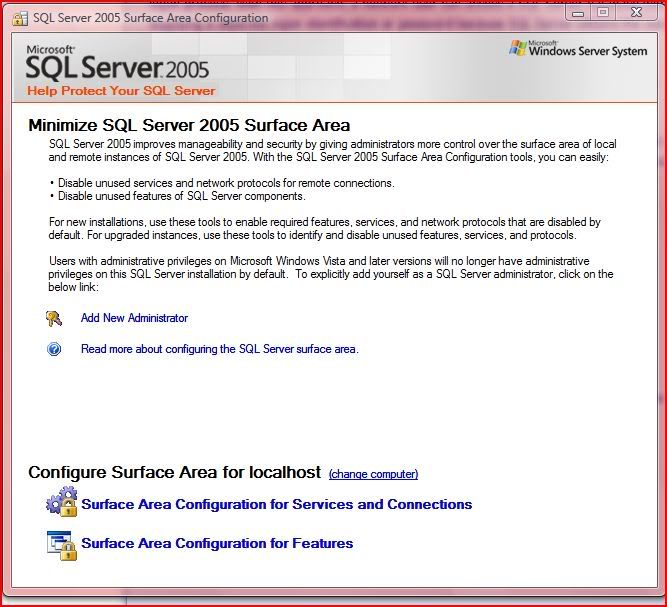
Went to SQL Server 2005 in my All Programs list
then opened the Surface Area Configuration here in screen shot below and added myself as a new administrator.
Encore Pro Analyzer now opens for me and I have data.
So we can now concentrate on Mr Capers problem.
_________________
| Machine: AirCurve™ 10 VAuto BiLevel Machine with HumidAir™ Heated Humidifier |
| Additional Comments: Mask Bleep Eclipse https://bleepsleep.com/the-eclipse/ |
I may have to RISE but I refuse to SHINE.
-
jskinner
- Posts: 1475
- Joined: Sat Aug 26, 2006 9:21 pm
- Location: Greenwich, Nova Scotia, Canada
- Contact:
Re: Encore Pro Analyzer problem
You need to set 'Run as administrator' on the actual application not the short cut. You can't set that option on a short cut as you have discovered.Pugsy wrote: Nope, click on icon, just get the log in error thing.
Right click to open and only get "open", etc as a choice, do not get "run as administrator"
same thing after I uninstalled EPA and reinstalled paying special attention to "install as administrator"
still same error message.
Only time I get run as administrator choice is when I click on the set up files to install.
Encore Pro Analyzer Author
Facebook Apnea Group
Facebook Apnea Group
-
jskinner
- Posts: 1475
- Joined: Sat Aug 26, 2006 9:21 pm
- Location: Greenwich, Nova Scotia, Canada
- Contact:
Re: Encore Pro Analyzer problem
Not sure I recommend this approach but yet it will work also. I guess one nice thing about doing it this way is that you won't get the security popup each time you run EPA.Pugsy wrote:Okay, got it figured out. I had to go into the SQL server surface and give my user account administrator rights.
Encore Pro Analyzer Author
Facebook Apnea Group
Facebook Apnea Group
Re: Encore Pro Analyzer problem
I have opened Analyzer several times now and not one security pop up. I can't see any harm so far with doing this and it was very easy. I stumbled on it and figured worth a try, Works just fine.jskinner wrote:Not sure I recommend this approach but yet it will work also. I guess one nice thing about doing it this way is that you won't get the security popup each time you run EPA.
_________________
| Machine: AirCurve™ 10 VAuto BiLevel Machine with HumidAir™ Heated Humidifier |
| Additional Comments: Mask Bleep Eclipse https://bleepsleep.com/the-eclipse/ |
I may have to RISE but I refuse to SHINE.
-
jskinner
- Posts: 1475
- Joined: Sat Aug 26, 2006 9:21 pm
- Location: Greenwich, Nova Scotia, Canada
- Contact:
Re: Encore Pro Analyzer problem
You are right, you won't get the Security Rights Elevation dialog by using this technique.Pugsy wrote:I have opened Analyzer several times now and not one security pop up. I can't see any harm so far with doing this and it was very easy. I stumbled on it and figured worth a try, Works just fine.jskinner wrote:Not sure I recommend this approach but yet it will work also. I guess one nice thing about doing it this way is that you won't get the security popup each time you run EPA.
Encore Pro Analyzer Author
Facebook Apnea Group
Facebook Apnea Group
Re: Encore Pro Analyzer problem
Hi James
Went out for a while but now I'm back. I'm running Vista 32 in VMware Fusion on a MacBook Pro. I just booted up Windows, setup is on desktop. I right-clicked, said to run as Administrator, and it shows downloading application files.
However, the green "progress bar" doesn't fill more than half-way. I've never been able to download the files. I also get messages saying a file didn't download properly. I clicked "Retry" and the progress bar sits on the half-way mark.
Is setup routine corrupted? Do I need to start over with downloading that?
Thanks,
Mr Capers
Went out for a while but now I'm back. I'm running Vista 32 in VMware Fusion on a MacBook Pro. I just booted up Windows, setup is on desktop. I right-clicked, said to run as Administrator, and it shows downloading application files.
However, the green "progress bar" doesn't fill more than half-way. I've never been able to download the files. I also get messages saying a file didn't download properly. I clicked "Retry" and the progress bar sits on the half-way mark.
Is setup routine corrupted? Do I need to start over with downloading that?
Thanks,
Mr Capers
_________________
| Mask | ||||
| ||||
| Additional Comments: IPAP: 14/6 cm H2O; EPAP: 6 cm H20; Back-up rate: Auto Oximeter: CMS 50E | ||||
Re: Encore Pro Analyzer problem
Mr Capers,
If the setup files won't install then the first thing I would do would be trash those setup files and start with a fresh download. Start completely clean. Sometimes setup files do get messed up...... If you have tried this already then..
Where did you get Analyzer from?
If the setup files won't install then the first thing I would do would be trash those setup files and start with a fresh download. Start completely clean. Sometimes setup files do get messed up...... If you have tried this already then..
Where did you get Analyzer from?
_________________
| Machine: AirCurve™ 10 VAuto BiLevel Machine with HumidAir™ Heated Humidifier |
| Additional Comments: Mask Bleep Eclipse https://bleepsleep.com/the-eclipse/ |
I may have to RISE but I refuse to SHINE.
Re: Encore Pro Analyzer problem
Hi Pugsy,
I got analyzer from a link provided by James. I've just downloaded setup to the Mac side of the computer. I've restarted Fusion and Windows (Windows locked up right after my first bootup)
Next I'll try dragging Setup from the Mac to Windows. Windows has had problems with downloads over the past several months. Yes, I've checked with my ISP, downloaded test files, my DSL pipe to the internet is just fine -
Looks to be same result as last time -
Got setup on the Vista desktop
Run as Administrator
Get Encore Pro Analyzer Setup screen
Says "Downloading Application Files"
Progress bar goes halfway (Last night I tried this while reading your exchanges with James. After 40 min. progress bar still showed 1/2, clearly, the download had stalled)
I've tried this many times. It just isn't working.
Mr Capers
I got analyzer from a link provided by James. I've just downloaded setup to the Mac side of the computer. I've restarted Fusion and Windows (Windows locked up right after my first bootup)
Next I'll try dragging Setup from the Mac to Windows. Windows has had problems with downloads over the past several months. Yes, I've checked with my ISP, downloaded test files, my DSL pipe to the internet is just fine -
Looks to be same result as last time -
Got setup on the Vista desktop
Run as Administrator
Get Encore Pro Analyzer Setup screen
Says "Downloading Application Files"
Progress bar goes halfway (Last night I tried this while reading your exchanges with James. After 40 min. progress bar still showed 1/2, clearly, the download had stalled)
I've tried this many times. It just isn't working.
Mr Capers
_________________
| Mask | ||||
| ||||
| Additional Comments: IPAP: 14/6 cm H2O; EPAP: 6 cm H20; Back-up rate: Auto Oximeter: CMS 50E | ||||
-
jskinner
- Posts: 1475
- Joined: Sat Aug 26, 2006 9:21 pm
- Location: Greenwich, Nova Scotia, Canada
- Contact:
Re: Encore Pro Analyzer problem
Yes you seem to be having troubles downloading the setup file. You obviously need to get that downloaded correctly before it will install.Mr Capers wrote:Is setup routine corrupted? Do I need to start over with downloading that?
Encore Pro Analyzer Author
Facebook Apnea Group
Facebook Apnea Group
Re: Encore Pro Analyzer problem
Hi James
Just tried the setup download yet again. Progress bar stalls at 1/2 way point. I can bring up IE, go to internet, get various sites, get video feeds, no problem. When download is supposedly happening, I can open the diagnostic center and see no bytes being transmitted.
Mr Capers
Just tried the setup download yet again. Progress bar stalls at 1/2 way point. I can bring up IE, go to internet, get various sites, get video feeds, no problem. When download is supposedly happening, I can open the diagnostic center and see no bytes being transmitted.
Mr Capers
_________________
| Mask | ||||
| ||||
| Additional Comments: IPAP: 14/6 cm H2O; EPAP: 6 cm H20; Back-up rate: Auto Oximeter: CMS 50E | ||||