




I'm not computer illiterate, but sure could use some help getting around in *this* forum.
For example, when I look at the list of topics and click on one and read the posts, when I click on the back-arrow and come back to the list, I have to search the screen to find where I branched out to the topic. There does not appear to be a place-mark. Am I missing it? At the very bottom of the forum it shows some sparse information, including Red Icon = Unread. Even when I'm logged on, I don't see that helping me to get back where I left off on the topic list.
Another feature of some forums I don't see here (of course I may be overlooking it), when I'm looking at the list of topics I don't see an indication of which topics I've read on previous sessions. And if I have previously read a topic, an indication of new posts to it.
Because of the above, I often waste time I don't have to waste.
Is there a "user's manual" for this forum?
Thanks for any help . . .
Need help navigating this forum
-
wardmiller
- Posts: 294
- Joined: Mon Sep 17, 2012 6:29 pm
- Location: Upstate New York
Need help navigating this forum
_________________
| Mask: Quattro™ FX Full Face CPAP Mask with Headgear |
| Humidifier: S9™ Series H5i™ Heated Humidifier with Climate Control |
| Additional Comments: ResMed VPAP Auto, Series 9 device, with H5i Heated Humidifier; RedMed Mirage Quattro full-face mask. |

Re: Need help navigating this forum
See the image below....the 3 little red tablets I have circled mean that either I haven't read that thread or there are new posts in that thread that I have not read.
If I click on that little red tablet it takes me to the first unread post in that thread. I don't have to scroll forwards or backwards.
If it is a totally new thread with no responses it just takes me to the first post.
If it is a 3 page thread and I have read everything but the last 2 posts it takes me to page 3 and the first unread post will be right in front of me. Once I have read a thread....no little red tablet shows up like in your thread here.
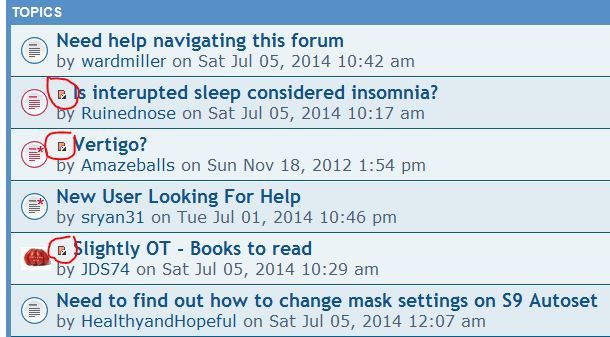
If I click on that little red tablet it takes me to the first unread post in that thread. I don't have to scroll forwards or backwards.
If it is a totally new thread with no responses it just takes me to the first post.
If it is a 3 page thread and I have read everything but the last 2 posts it takes me to page 3 and the first unread post will be right in front of me. Once I have read a thread....no little red tablet shows up like in your thread here.

_________________
| Machine: AirCurve™ 10 VAuto BiLevel Machine with HumidAir™ Heated Humidifier |
| Additional Comments: Mask Bleep Eclipse https://bleepsleep.com/the-eclipse/ |
I may have to RISE but I refuse to SHINE.
-
BleepingBeauty

- Posts: 2454
- Joined: Thu Apr 02, 2009 5:30 pm
- Location: Aridzona ;-)
Re: Need help navigating this forum
Clicking the back-arrow is causing your trouble. Instead, click on the "Go" link at the bottom right of the page to take you back to the main page of the forum. Then the thread(s) you've already read will be marked that way.wardmiller wrote:I'm not computer illiterate, but sure could use some help getting around in *this* forum.
For example, when I look at the list of topics and click on one and read the posts, when I click on the back-arrow and come back to the list, I have to search the screen to find where I branched out to the topic. There does not appear to be a place-mark. Am I missing it? At the very bottom of the forum it shows some sparse information, including Red Icon = Unread. Even when I'm logged on, I don't see that helping me to get back where I left off on the topic list.
Another feature of some forums I don't see here (of course I may be overlooking it), when I'm looking at the list of topics I don't see an indication of which topics I've read on previous sessions. And if I have previously read a topic, an indication of new posts to it.
Because of the above, I often waste time I don't have to waste.
Is there a "user's manual" for this forum?
Thanks for any help . . .
Veni, vidi, Velcro. I came, I saw, I stuck around.
Dx 11/07: AHI 107, central apnea, Cheyne Stokes respiration, moderate-severe O2 desats. (Simple OSA would be too easy. )
)
PR S1 ASV 950, DreamWear mask, F&P 150 humidifier, O2 @ 2L.
Dx 11/07: AHI 107, central apnea, Cheyne Stokes respiration, moderate-severe O2 desats. (Simple OSA would be too easy.
)PR S1 ASV 950, DreamWear mask, F&P 150 humidifier, O2 @ 2L.
-
Wulfman...
Re: Need help navigating this forum
I agree. I've always clicked on the "Home" icon at the top of the page.BleepingBeauty wrote:Clicking the back-arrow is causing your trouble. Instead, click on the "Go" link at the bottom right of the page to take you back to the main page of the forum. Then the thread(s) you've already read will be marked that way.wardmiller wrote:I'm not computer illiterate, but sure could use some help getting around in *this* forum.
For example, when I look at the list of topics and click on one and read the posts, when I click on the back-arrow and come back to the list, I have to search the screen to find where I branched out to the topic. There does not appear to be a place-mark. Am I missing it? At the very bottom of the forum it shows some sparse information, including Red Icon = Unread. Even when I'm logged on, I don't see that helping me to get back where I left off on the topic list.
Another feature of some forums I don't see here (of course I may be overlooking it), when I'm looking at the list of topics I don't see an indication of which topics I've read on previous sessions. And if I have previously read a topic, an indication of new posts to it.
Because of the above, I often waste time I don't have to waste.
Is there a "user's manual" for this forum?
Thanks for any help . . .
Den
.

Re: Need help navigating this forum
After 8 years even a old dog can still learn new tricks, I didn't know about clicking the new post thingy, or the Home button at the top, I'd scroll all the way to the bottom to get home. Thanks, I learned something and didn't even have any coffee. Jim
If I had know about this years ago, I could have saved a lot of money by not having to buy new shoes for my mouse...
If I had know about this years ago, I could have saved a lot of money by not having to buy new shoes for my mouse...
Last edited by Goofproof on Sat Jul 05, 2014 1:22 pm, edited 1 time in total.
Use data to optimize your xPAP treatment!
"The art of medicine consists in amusing the patient while nature cures the disease." Voltaire
"The art of medicine consists in amusing the patient while nature cures the disease." Voltaire

Re: Need help navigating this forum
Pugsy wrote:See the image below....the 3 little red tablets I have circled mean that either I haven't read that thread or there are new posts in that thread that I have not read.
If I click on that little red tablet it takes me to the first unread post in that thread. I don't have to scroll forwards or backwards.
If it is a totally new thread with no responses it just takes me to the first post.
If it is a 3 page thread and I have read everything but the last 2 posts it takes me to page 3 and the first unread post will be right in front of me. Once I have read a thread....no little red tablet shows up like in your thread here.
That's cool! Thanks Pugsy. It wasn't me who asked the original question, but I didn't know about this. I've been on here for a few months now, and often visit and view postings without logging in. This only works if you log in, of course, as otherwise the software doesn't know what you have read, so from now on, I will log in when I visit.
Paul H in Duncan, BC
_________________
| Machine: AirStart™ 10 Auto CPAP with HumidAir™ Heated Humidifier |
| Mask: AirFit™ P10 Nasal Pillow CPAP Mask with Headgear |
| Additional Comments: OSCAR, macOS Mojave |
Re: Need help navigating this forum
I set the site to login automatically, unless the cookies get cleared it works pretty good.
Use data to optimize your xPAP treatment!
"The art of medicine consists in amusing the patient while nature cures the disease." Voltaire
"The art of medicine consists in amusing the patient while nature cures the disease." Voltaire

Re: Need help navigating this forum
well, you taught me something else today, Pugsy... I'd just been looking for new stuff based on when I was last in, since there's no "new posts" link like on other boards.Pugsy wrote: If I click on that little red tablet it takes me to the first unread post in that thread. I don't have to scroll forwards or backwards.
thanks!
Get OSCAR
Accounts to put on the foe list: dataq1, clownbell, gearchange, lynninnj, mper!?, DreamDiver, Geer1, almostadoctor, sleepgeek, ajack, stom, mogy, D.H., They often post misleading, timewasting stuff.
Accounts to put on the foe list: dataq1, clownbell, gearchange, lynninnj, mper!?, DreamDiver, Geer1, almostadoctor, sleepgeek, ajack, stom, mogy, D.H., They often post misleading, timewasting stuff.
-
wardmiller
- Posts: 294
- Joined: Mon Sep 17, 2012 6:29 pm
- Location: Upstate New York
Re: Need help navigating this forum
Thanks to all who responded! Good information.
Puggsy, how did you learn that about the little red tablets?
I searched for phpBB user manual and got a LOT of hits. But it's all about how the host can use the application, not the end users like you and me. Dumb! I've been involved with programming computers since 1958 and have never seen a greater need for an end user's manual. I've been surviving in this forum, but obviously have missed using a lot of its power.
Another example, how do you easily quote just a sentence from one response so the author's ID appears with the quote? I've hit Quote, then laboriously deleted what I didn't want, being careful to not delete an operator. There must be an easier way.
Must you scroll up to the top to log off? Again, there should be an easier way.
Why must I seek out a thread on how to add an attachment (if you can) or Snip? That could be easily explain once, in a user's manual,for all to see whenever needed.
I've looked at this forum's FAQ, but they seem to be a hodgepodge of the Help Desk's marginal notes, not an organized presentation of typical end user's fumbles. And again, half the questions apply to the Administrator, not the end user.
I don't know who to blame, our host or phpBB. But someone could save a lot of user's wasted time and efforts by providing a well thought out end user's guide to the many not so obvious features. </rant>
Puggsy, how did you learn that about the little red tablets?
I searched for phpBB user manual and got a LOT of hits. But it's all about how the host can use the application, not the end users like you and me. Dumb! I've been involved with programming computers since 1958 and have never seen a greater need for an end user's manual. I've been surviving in this forum, but obviously have missed using a lot of its power.
Another example, how do you easily quote just a sentence from one response so the author's ID appears with the quote? I've hit Quote, then laboriously deleted what I didn't want, being careful to not delete an operator. There must be an easier way.
Must you scroll up to the top to log off? Again, there should be an easier way.
Why must I seek out a thread on how to add an attachment (if you can) or Snip? That could be easily explain once, in a user's manual,for all to see whenever needed.
I've looked at this forum's FAQ, but they seem to be a hodgepodge of the Help Desk's marginal notes, not an organized presentation of typical end user's fumbles. And again, half the questions apply to the Administrator, not the end user.
I don't know who to blame, our host or phpBB. But someone could save a lot of user's wasted time and efforts by providing a well thought out end user's guide to the many not so obvious features. </rant>
_________________
| Mask: Quattro™ FX Full Face CPAP Mask with Headgear |
| Humidifier: S9™ Series H5i™ Heated Humidifier with Climate Control |
| Additional Comments: ResMed VPAP Auto, Series 9 device, with H5i Heated Humidifier; RedMed Mirage Quattro full-face mask. |
-
Wulfman...
Re: Need help navigating this forum
With "quotes", you can either hit the (orange) "Quote" option and strip out what you don't want in the quote or you can copy the part you want to quote and then highlight it and hit the "Quote" button at the top of the dialog box.wardmiller wrote:Thanks to all who responded! Good information.
Puggsy, how did you learn that about the little red tablets?
I searched for phpBB user manual and got a LOT of hits. But it's all about how the host can use the application, not the end users like you and me. Dumb! I've been involved with programming computers since 1958 and have never seen a greater need for an end user's manual. I've been surviving in this forum, but obviously have missed using a lot of its power.
Another example, how do you easily quote just a sentence from one response so the author's ID appears with the quote? I've hit Quote, then laboriously deleted what I didn't want, being careful to not delete an operator. There must be an easier way.
Must you scroll up to the top to log off? Again, there should be an easier way.
Why must I seek out a thread on how to add an attachment (if you can) or Snip? That could be easily explain once, in a user's manual,for all to see whenever needed.
I've looked at this forum's FAQ, but they seem to be a hodgepodge of the Help Desk's marginal notes, not an organized presentation of typical end user's fumbles. And again, half the questions apply to the Administrator, not the end user.
I don't know who to blame, our host or phpBB. But someone could save a lot of user's wasted time and efforts by providing a well thought out end user's guide to the many not so obvious features. </rant>
If you look at some of the posts that people make (like this one), you can see the internal codes to use (like with quotes).wardmiller wrote:Another example, how do you easily quote just a sentence from one response so the author's ID appears with the quote? I've hit Quote, then laboriously deleted what I didn't want, being careful to not delete an operator. There must be an easier way.
In my opinion, if I have to read a friggin' "manual", it's too damned complicated. (I started working with computers in 1969)
If you want to get to the top of the page, all you have to do is click the little triangle in the gray circle in the lower right-hand corner in each post and it will shoot you up to the top. Then you can easily log out.......two clicks.
Den
.
-
Wulfman...
Re: Need help navigating this forum
By the way, I used to have to WRITE user manuals and documentation for all kinds of stuff. Maybe that's why I hate to have to read them now.
Den
.
Den
.
Re: Need help navigating this forum
maybe it's because most manuals are written by people with hate filled heartsWulfman... wrote:By the way, I used to have to WRITE user manuals and documentation for all kinds of stuff. Maybe that's why I hate to have to read them now.
Get OSCAR
Accounts to put on the foe list: dataq1, clownbell, gearchange, lynninnj, mper!?, DreamDiver, Geer1, almostadoctor, sleepgeek, ajack, stom, mogy, D.H., They often post misleading, timewasting stuff.
Accounts to put on the foe list: dataq1, clownbell, gearchange, lynninnj, mper!?, DreamDiver, Geer1, almostadoctor, sleepgeek, ajack, stom, mogy, D.H., They often post misleading, timewasting stuff.
-
Wulfman...
Re: Need help navigating this forum
I hope you're not implying that I have a "hate-filled heart".palerider wrote:maybe it's because most manuals are written by people with hate filled heartsWulfman... wrote:By the way, I used to have to WRITE user manuals and documentation for all kinds of stuff. Maybe that's why I hate to have to read them now.
But, when reading documentation/manuals, I try to put my mind in "simple" (dumbed-down) mode and try to interpret them as if I didn't know anything about the subject and see if what they wrote makes sense. Far too often, the terminology is over the heads of people who might benefit from it. In other words......heavy on over-their-heads "bullshit" and light on "basics".
Den
.
Re: Need help navigating this forum
only for writing user manuals (you said it!!! )Wulfman... wrote:I hope you're not implying that I have a "hate-filled heart".palerider wrote:maybe it's because most manuals are written by people with hate filled heartsWulfman... wrote:By the way, I used to have to WRITE user manuals and documentation for all kinds of stuff. Maybe that's why I hate to have to read them now.
But, when reading documentation/manuals, I try to put my mind in "simple" (dumbed-down) mode and try to interpret them as if I didn't know anything about the subject and see if what they wrote makes sense. Far too often, the terminology is over the heads of people who might benefit from it. In other words......heavy on over-their-heads "bullshit" and light on "basics".
Den
.
Get OSCAR
Accounts to put on the foe list: dataq1, clownbell, gearchange, lynninnj, mper!?, DreamDiver, Geer1, almostadoctor, sleepgeek, ajack, stom, mogy, D.H., They often post misleading, timewasting stuff.
Accounts to put on the foe list: dataq1, clownbell, gearchange, lynninnj, mper!?, DreamDiver, Geer1, almostadoctor, sleepgeek, ajack, stom, mogy, D.H., They often post misleading, timewasting stuff.
-
Wulfman...
Re: Need help navigating this forum
Well, I haven't had to WRITE any documentation like that for over 30 years......and it was more for specialized mainframe applications (banking software and networking). But, I wrote it so that the basic-level user could read and understand it.palerider wrote:only for writing user manuals (you said it!!! )Wulfman... wrote:I hope you're not implying that I have a "hate-filled heart".palerider wrote:maybe it's because most manuals are written by people with hate filled heartsWulfman... wrote:By the way, I used to have to WRITE user manuals and documentation for all kinds of stuff. Maybe that's why I hate to have to read them now.
But, when reading documentation/manuals, I try to put my mind in "simple" (dumbed-down) mode and try to interpret them as if I didn't know anything about the subject and see if what they wrote makes sense. Far too often, the terminology is over the heads of people who might benefit from it. In other words......heavy on over-their-heads "bullshit" and light on "basics".
Den
.
And that's the critique I always use when reading what others have written.
I originally said:
In my opinion, if I have to read a friggin' "manual", it's too damned complicated.
Den
.