FIX: ResScan Crunched Report Issue

General Discussion on any topic relating to CPAP and/or Sleep Apnea.
User avatar
Perrybucsdad
Posts: 834
Joined: Mon Sep 12, 2011 7:09 am
Location: Northeast Ohio

FIX: ResScan Crunched Report Issue

Post by Perrybucsdad » Fri Sep 23, 2011 8:04 pm

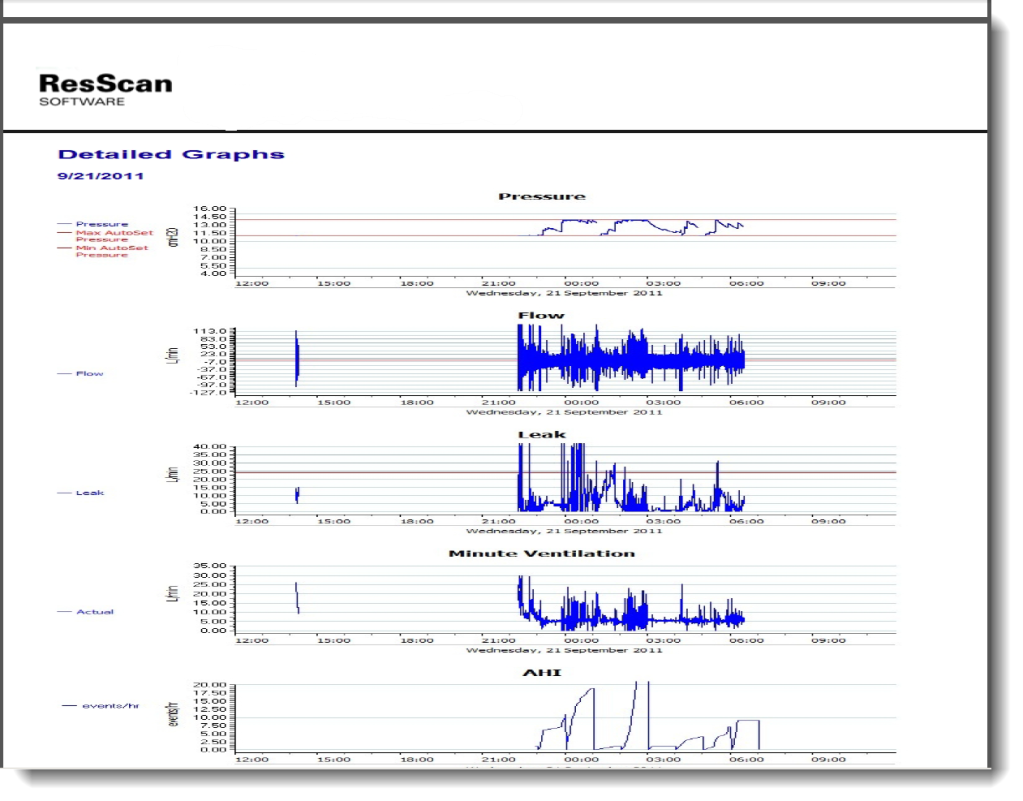
I started noticing an issue that was more of an eyesore. I have two computers, one running windows XP, and one running WIndows7. Both have ResScan on them, but when I would generate a report and save it on the Win 7 machine, the flow graphs would look all crunched (see bottom of post). On the XP Machine, I didn't have this problem.

Well, I contacted ResMed today (one of the nice things about working for a hospital is medical vendors don't think twice when you contact them) to find out what was the issue with this and I found the issue and the fix. The issue is if you have IE9 installed on Win 7 machines (I would assume this would also affect Vista. XP can't run IE9).

Anyhow, the easy fix is as follows. Rollback IE9 to the previous version of Internet Explorer.

1. Open 'Control Panel', go to 'Programs', then 'Programs and Features', 'Uninstall a program'. Alternatively, just type 'appwiz.cpl' into 'Start', 'Search' area and hit Enter.
2. Click on 'View installed updates' link in left sidebar.
3. Click to select and highlight 'Windows Internet Explorer 9', and then right-click on the update and select the 'Uninstall' option. Click OK
4. Restart PC when prompted. After restarting, IE9 will be removed from the system to the previously installed version.


Crunched Report Example
Image

_________________
Machine: ResMed AirSense™ 10 AutoSet™ CPAP Machine with HumidAir™ Heated Humidifier
Mask: AirFit™ P10 Nasal Pillow CPAP Mask with Headgear
Additional Comments: ResScan v5.9; Sleepyhead v1.0.0-beta

User avatar
Lizistired
Posts: 2835
Joined: Tue Dec 14, 2010 10:47 pm
Location: Indiana

Re: FIX: ResScan Crunched Report Issue

Post by Lizistired » Fri Sep 23, 2011 8:09 pm

Good to know how to rollback IE9, since I seldom like the new anything
I did the report once when I first started using ResScan. It was a huge waste of time and paper. I just print a screen shot and I can get it all on one page. YMMV

_________________
Humidifier: S9™ Series H5i™ Heated Humidifier with Climate Control
Additional Comments: Swift FX sometimes, CMS-50F, Cervical collar sometimes, White noise, Zeo... I'm not well, but I'm better.

User avatar
Breathe Jimbo
Posts: 954
Joined: Sun Sep 12, 2010 3:02 pm
Location: Pasadena, CA

Re: FIX: ResScan Crunched Report Issue

Post by Breathe Jimbo » Sat Sep 24, 2011 12:38 am

This worked for me on Vista.

Thank you for posting the fix!

_________________
Humidifier: S9™ Series H5i™ Heated Humidifier with Climate Control
Additional Comments: Since 9/9/10; 13 cm; ResScan 3.16; SleepyHead 0.9; PapCap

User avatar
thud
Posts: 105
Joined: Thu Sep 15, 2011 4:53 pm
Location: MI

Re: FIX: ResScan Crunched Report Issue

Post by thud » Sat Sep 24, 2011 7:05 am

Great Information Perrybucsdad. Like you I have 2 laptops, one with XP and the other with Win7. The Win7 machine is kind of my backup machine. I hardly use it. I like XP better. I have not installed Resscan on my Win7 machine but when I do I'll take heed to your fix! Thanks!

_________________
Humidifier: S9™ Series H5i™ Heated Humidifier with Climate Control
Additional Comments: ResScan v3.14 Software, also alternate with Resmed Quattro FX FFM
..........Thud