Hi Trout,
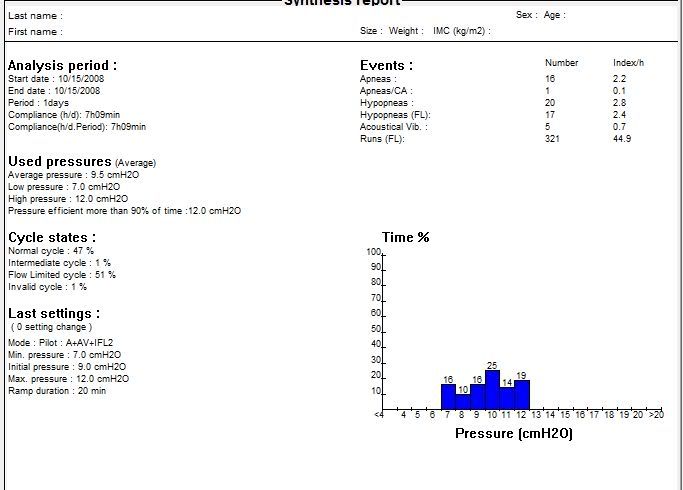
16 apnea are apneas that happened. The machine responds
after they occur, by raising the pressure, after the obsturction has been identified. It will drop the pressure back down after it figures an "all clear" has sounded. However, as on most automatic machines, that "raise the pressure after an apnea has occured" is limited to raising the pressure to 10.
Unless you tell the PB otherwise. I would set the "maximum pressure for command on apnea" at - or very close to - what you had your 420G on. Check what that does. With response to apnea high enough, you may have less apneas.
Since moving the initial up to 9 hasn't made much of a difference (if this night is representative of others) I'd also move the initial pressure to 11(very close to the 90% recommended), the minimum to 8 or 9, and the maximum to 14 or more. You're spending far too much time above the initial pressure - which means you're getting slow responses to events for much of the time, and fast drops (that's what happens above the initial). With a higher initial pressure the machine wont' drop you so quickly to where the events return.
By the way, snores (you don't have many) will drive the machine to the max - and it is often driven high because too low pressure lets snores happen. With a higher initial and a higher minimum you may find yourself feeling better, and getting better results.
Allergies and congestion may definitely contribute to the large number of runs and flow limited cycles -have you tried sinus irrigation?
http://www.neilmed.com .
O.
And now here is my secret, a very simple secret; it is only with the heart that one can see rightly, what is essential is invisible to the eye.
Antoine de Saint-Exupery
Good advice is compromised by missing data
Forum member Dog Slobber Nov. 2023