


Can someone give me Sleepyhead software link


-
SleepyToo2
- Posts: 1005
- Joined: Sun Sep 11, 2011 7:55 am
- Location: North of Philadelphia, PA
Re: Can someone give me Sleepyhead software link
Pugsy, are you sure you have the full executable package? The binary only (that's the small file) is only an update to part of the full package - double clicking on that probably won't do anything if the rest of the dll's are not there?
_________________
| Mask: AirFit™ P10 Nasal Pillow CPAP Mask with Headgear |
| Additional Comments: Use SleepyHead software. |
Not a medical professional - just a patient who has done a lot of reading
-
Perrybucsdad

- Posts: 834
- Joined: Mon Sep 12, 2011 7:09 am
- Location: Northeast Ohio
Re: Can someone give me Sleepyhead software link
Pugsy... create a shortcut for the .EXE file, and then pin that shortcut.
_________________
| Machine: ResMed AirSense™ 10 AutoSet™ CPAP Machine with HumidAir™ Heated Humidifier |
| Mask: AirFit™ P10 Nasal Pillow CPAP Mask with Headgear |
| Additional Comments: ResScan v5.9; Sleepyhead v1.0.0-beta |

Re: Can someone give me Sleepyhead software link
Can't create a short cut. That is the problem...create...isn't an option when he right clicks on the application file. None of the normal copy/create choices are available.Perrybucsdad wrote:Pugsy... create a shortcut for the .EXE file, and then pin that shortcut.
Yep for sure we have it. SleepyHead works just fine if we open it from the SleepyHead folder. He got the full download. Files in the folder match mine.SleepyToo2 wrote:Pugsy, are you sure you have the full executable package? The binary only (that's the small file) is only an update to part of the full package - double clicking on that probably won't do anything if the rest of the dll's are not there?
I will look at what you suggest. If it sounds scary to you or difficult then it probably is not something we want George to try. We need to keep it simple. This might be something I could sort out if I was in front of the computer with hands on but trying to do all this via phone is not ideal.archangle wrote:The file association for .lnk files is the problem there. Google ".lnk file association." Microshaft uses ".lnk" files for links, and the file extension is hidden really well.
More scary fixes to try. It sounds like the easiest fix is to download a utility, but I don't know for sure that the source is safe. It's probably safe, but there's a lot of professional criminals out there trying to hack your PC.
We need a solution for someone that does not have advanced computer skills. While George does very well with basic computer stuff, he doesn't have the background for elaborate fixes.
_________________
| Machine: AirCurve™ 10 VAuto BiLevel Machine with HumidAir™ Heated Humidifier |
| Additional Comments: Mask Bleep Eclipse https://bleepsleep.com/the-eclipse/ |
I may have to RISE but I refuse to SHINE.
Re: Can someone give me Sleepyhead software link
This box....George doesn't have all these options. The context menu is not complete for some reason.

From this link which talks about enabling this feature and I suspect there is a similar thing for pin to taskbar
http://www.sevenforums.com/tutorials/57 ... -menu.html
This is for Windows 7 but I bet a similar solution for Vista. Download is a reg edit file thing for Windows 7...should be one for Vista somewhere.
Manually involves Registry Editing but I don't know if George can handle that.
Or is there somewhere in his computer's choices where we can simply turn on the whole library of choices when we right click on a file? He does have administrator rights.
From this link which talks about enabling this feature and I suspect there is a similar thing for pin to taskbar
http://www.sevenforums.com/tutorials/57 ... -menu.html
This is for Windows 7 but I bet a similar solution for Vista. Download is a reg edit file thing for Windows 7...should be one for Vista somewhere.
Manually involves Registry Editing but I don't know if George can handle that.
Or is there somewhere in his computer's choices where we can simply turn on the whole library of choices when we right click on a file? He does have administrator rights.
_________________
| Machine: AirCurve™ 10 VAuto BiLevel Machine with HumidAir™ Heated Humidifier |
| Additional Comments: Mask Bleep Eclipse https://bleepsleep.com/the-eclipse/ |
Last edited by Pugsy on Tue Dec 20, 2011 10:49 am, edited 1 time in total.
I may have to RISE but I refuse to SHINE.
Re: Can someone give me Sleepyhead software link
Okay....The File Conext Menu that pops up is missing create a shortcut, pin to taskbar, pin to start menu..
Found this as a cause
This is one of the many side-effects caused by the removal of IsShortcut registry value.
http://www.winhelponline.com/blog/pin-t ... windows-7/
There is a Vista reg edit fix shown. Up to George how he wants to proceed.
Found this as a cause
This is one of the many side-effects caused by the removal of IsShortcut registry value.
http://www.winhelponline.com/blog/pin-t ... windows-7/
There is a Vista reg edit fix shown. Up to George how he wants to proceed.
_________________
| Machine: AirCurve™ 10 VAuto BiLevel Machine with HumidAir™ Heated Humidifier |
| Additional Comments: Mask Bleep Eclipse https://bleepsleep.com/the-eclipse/ |
I may have to RISE but I refuse to SHINE.

Re: Can someone give me Sleepyhead software link
I don't have that option on my Vista Home Prem. machine either. I have always just dragged n dropped it on the Start button. Is yours "Vista Home Prem."?Pugsy wrote:This box....George doesn't have all these options. The context menu is not complete for some reason.
From this link which talks about enabling this feature and I suspect there is a similar thing for pin to taskbar
http://www.sevenforums.com/tutorials/57 ... -menu.html
This is for Windows 7 but I bet a similar solution for Vista. Download is a reg edit file thing for Windows 7...should be one for Vista somewhere.
Manually involves Registry Editing but I don't know if George can handle that.
Or is there somewhere in his computer's choices where we can simply turn on the whole library of choices when we right click on a file? He does have administrator rights.
_________________
| Humidifier: HC150 Heated Humidifier With Hose, 2 Chambers and Stand |
| Additional Comments: New users can't remember they can't remember YET! |
BeganCPAP31Jan2007;AHI<0.5
I have no doubt, how I sleep affects every waking moment.
I am making progress-NOW I remember that I can't remember

If this isn’t rocket science why are there so many spaceshots?
Be your own healthcare advocate!
I have no doubt, how I sleep affects every waking moment.
I am making progress-NOW I remember that I can't remember
If this isn’t rocket science why are there so many spaceshots?
Be your own healthcare advocate!
Re: Can someone give me Sleepyhead software link
I have 2 computers.. New Win 7 Home Premium and 3 yr old Vista Home Premium.GumbyCT wrote: I don't have that option on my Vista Home Prem. machine either. I have always just dragged n dropped it on the Start button. Is yours "Vista Home Prem."?
Both have identical context menu choices when I right click on a file. I can also click and drag to start menu or taskbar if I want to. This is what I have. I don't have what that image at the help site has either.George didn't have these options that I have in full.. he was minus the pin to stuff, copy and the create shortcut stuff.
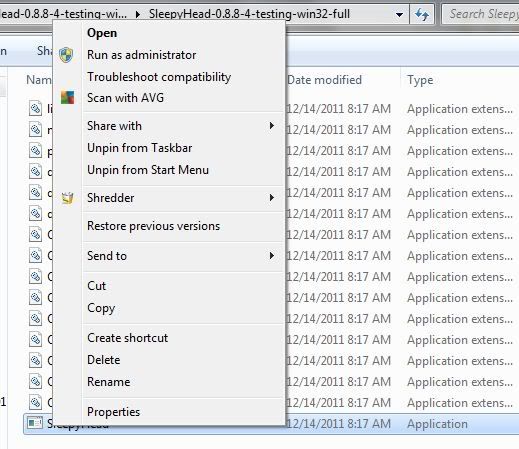
George was able to finally get a SH desktop short cut after running the registry fix from the link above.
Unfortunately it still tells him that a file is missing. The file is obviously in the SH folder so I don't know why it is not recognized. Remove and reinstall multiple times...no luck. Again SleepyHead will open and work find from within the folder..just not from a shortcut.
Because of WinRar the SleepyHead folder is in a subfolder for Main WinRar folder. WinRar won't leave the computer. Is it possible that the SH program being in a sub folder of a WinRar folder could explain why the application exe short cut won't work? Or is there another problem on the computer stopping shortcuts from working properly?
At this point all I know to offer is put the 16 SH files on a disc and snail mail it and have George copy them to a folder on his desktop. He could at least easily get to the application exe file.. if we still couldn't get a shortcut to work.
Again....SleepyHead works now..just takes a bit of navigation to the folder. So we do have a working SleepyHead.
_________________
| Machine: AirCurve™ 10 VAuto BiLevel Machine with HumidAir™ Heated Humidifier |
| Additional Comments: Mask Bleep Eclipse https://bleepsleep.com/the-eclipse/ |
I may have to RISE but I refuse to SHINE.
Re: Can someone give me Sleepyhead software link
Update. I just got a note from George. He has been able to get an active link on his desktop directly to the SH folder with the 16 files in it and the application exe file is easily seen at the bottom to click on to open SH and so he has eliminated 3 navigation steps. I think we can live with that.
_________________
| Machine: AirCurve™ 10 VAuto BiLevel Machine with HumidAir™ Heated Humidifier |
| Additional Comments: Mask Bleep Eclipse https://bleepsleep.com/the-eclipse/ |
I may have to RISE but I refuse to SHINE.

Re: Can someone give me Sleepyhead software link
Bill Gates deserves to be given a legacy REMStar Plus CPAP machine with no humidifier.
_________________
| Mask: Swift™ FX Nasal Pillow CPAP Mask with Headgear |
| Humidifier: S9™ Series H5i™ Heated Humidifier with Climate Control |
| Additional Comments: Also SleepyHead, PRS1 Auto, Respironics Auto M series, Legacy Auto, and Legacy Plus |
Please enter your equipment in your profile so we can help you.
Click here for information on the most common alternative to CPAP.
If it's midnight and a DME tells you it's dark outside, go and check for yourself.
Useful Links.
Click here for information on the most common alternative to CPAP.
If it's midnight and a DME tells you it's dark outside, go and check for yourself.
Useful Links.
-
SleepyToo2
- Posts: 1005
- Joined: Sun Sep 11, 2011 7:55 am
- Location: North of Philadelphia, PA
Re: Can someone give me Sleepyhead software link
Isn't there an older, less functional model that he could be given????!!!archangle wrote:Bill Gates deserves to be given a legacy REMStar Plus CPAP machine with no humidifier.
_________________
| Mask: AirFit™ P10 Nasal Pillow CPAP Mask with Headgear |
| Additional Comments: Use SleepyHead software. |
Not a medical professional - just a patient who has done a lot of reading

Re: Can someone give me Sleepyhead software link
I vote for having the blower run in reverse! Maybe that way he'll get an idea what it feels like to have your wallet sucked empty!archangle wrote:Bill Gates deserves to be given a legacy REMStar Plus CPAP machine with no humidifier.
_________________
| Mask: AirFit™ P10 Nasal Pillow CPAP Mask with Headgear |
| Humidifier: S9™ Series H5i™ Heated Humidifier with Climate Control |
| Additional Comments: Hose management - rubber band tied to casement window crank handle! Hey, it works! S/W is 3.13, not 3.7 |
Re: Can someone give me Sleepyhead software link
Windows 3.1?SleepyToo2 wrote:Isn't there an older, less functional model that he could be given????!!!archangle wrote:Bill Gates deserves to be given a legacy REMStar Plus CPAP machine with no humidifier.
Cheers,
Mick.
Mick.
Re: Can someone give me Sleepyhead software link
How about a modern high tech, custom designed CPAP machine with a fancy computer display, and custom software.
Of course, the operating system is Windows.
Of course, the operating system is Windows.
_________________
| Mask: Swift™ FX Nasal Pillow CPAP Mask with Headgear |
| Humidifier: S9™ Series H5i™ Heated Humidifier with Climate Control |
| Additional Comments: Also SleepyHead, PRS1 Auto, Respironics Auto M series, Legacy Auto, and Legacy Plus |
Please enter your equipment in your profile so we can help you.
Click here for information on the most common alternative to CPAP.
If it's midnight and a DME tells you it's dark outside, go and check for yourself.
Useful Links.
Click here for information on the most common alternative to CPAP.
If it's midnight and a DME tells you it's dark outside, go and check for yourself.
Useful Links.


Re: Can someone give me Sleepyhead software link
You'll all be glad to know the next version will have an installer
It also will offer to update itself automatically..
It also will offer to update itself automatically..
_________________
| Machine: ResMed AirSense™ 10 AutoSet™ CPAP Machine with HumidAir™ Heated Humidifier |
| Mask: Swift™ FX Nasal Pillow CPAP Mask with Headgear |
| Humidifier: S9™ Series H5i™ Heated Humidifier with Climate Control |
| Additional Comments: CMS50D+/F Oximeter, S9 VPAP Auto/Adapt, PRS1 Auto, Intellipap Auto, SleepyHead :) |
Author of the free, cross platform, open-source sleep tracking software SleepyHead.
Download http://sleepyhead.jedimark.net
Source Code http://gitlab.com/sleepyhead/sleepyhead-code
Download http://sleepyhead.jedimark.net
Source Code http://gitlab.com/sleepyhead/sleepyhead-code
-
SleepyToo2
- Posts: 1005
- Joined: Sun Sep 11, 2011 7:55 am
- Location: North of Philadelphia, PA
Re: Can someone give me Sleepyhead software link
Jedimark, I am looking forward to the next version of SleepyHead! Of course, Bill Gates should be stuck with version 1 of the Encore Viewer - if he gets a data-capable machine in the first place ...
_________________
| Mask: AirFit™ P10 Nasal Pillow CPAP Mask with Headgear |
| Additional Comments: Use SleepyHead software. |
Not a medical professional - just a patient who has done a lot of reading