


I've downloaded the setup.exe file. When I try to run it, I get "an error occurred attempting to install PCMDCA". The details show "An error occurred trying to download 'https://www.mysleepmapper.com/PCMDeskto ... pplication'.
See the setup log file located at 'C:\Users\Owner\AppData\Local\Temp\VSDDBB9.tmp\install.log' for more information.
The install log says this....
The following properties have been set:
Property: [AdminUser] = true {boolean}
Property: [InstallMode] = HomeSite {string}
Property: [ProcessorArchitecture] = AMD64 {string}
Property: [VersionNT] = 6.1.1 {version}
Running checks for package 'Windows Installer 3.1', phase BuildList
The following properties have been set for package 'Windows Installer 3.1':
Running checks for command 'WindowsInstaller3_1\WindowsInstaller-KB893803-v2-x86.exe'
Result of running operator 'VersionGreaterThanOrEqualTo' on property 'VersionMsi' and value '3.1': true
Result of checks for command 'WindowsInstaller3_1\WindowsInstaller-KB893803-v2-x86.exe' is 'Bypass'
'Windows Installer 3.1' RunCheck result: No Install Needed
Running checks for package 'Microsoft .NET Framework 4 Client Profile (x86 and x64)', phase BuildList
Reading value 'Version' of registry key 'HKLM\Software\Microsoft\NET Framework Setup\NDP\v4\Client'
Read string value '4.5.50938'
Setting value '4.5.50938 {string}' for property 'DotNet40Client_TargetVersion'
The following properties have been set for package 'Microsoft .NET Framework 4 Client Profile (x86 and x64)':
Property: [DotNet40Client_TargetVersion] = 4.5.50938 {string}
Running checks for command 'DotNetFX40Client\dotNetFx40_Client_x86_x64.exe'
Result of running operator 'ValueEqualTo' on property 'InstallMode' and value 'HomeSite': true
Result of checks for command 'DotNetFX40Client\dotNetFx40_Client_x86_x64.exe' is 'Bypass'
Running checks for command 'DotNetFX40Client\dotNetFx40_Client_setup.exe'
Result of running operator 'ValueNotEqualTo' on property 'InstallMode' and value 'HomeSite': false
Result of running operator 'VersionGreaterThanOrEqualTo' on property 'DotNet40Client_TargetVersion' and value '4.0.30129': true
Result of checks for command 'DotNetFX40Client\dotNetFx40_Client_setup.exe' is 'Bypass'
'Microsoft .NET Framework 4 Client Profile (x86 and x64)' RunCheck result: No Install Needed
Launching Application.
URLDownloadToCacheFile failed with HRESULT '-2146697208'
Error: An error occurred trying to download 'https://www.mysleepmapper.com/PCMDeskto ... pplication'.
I am running Windows 7 on a Toshiba Satellite A665 laptop and have no other issues with it. Everything but this download works great.
Can anyone help please? Thanks Ed
Unable to install Respironics Sleepmapper


2 posts
• Page 1 of 1

Re: Unable to install Respironics Sleepmapper
You aren't missing much. All that SleepMapper will show you is what is available on the LCD screen daily.
It shows AHI (no event category break down) and leak. If you don't ever reach large leak territory it shows a leak number of 100% meaning for 100% of the time your leaks were below large leak territory.
The leak number on the machine's LCD display is % of time that you do spend in large leak territory.
As to your install problem...I have no idea how to fix it. There's a conflict somewhere but in all honesty..SleepMapper isn't worth the hassle trying to figure it out.
This is what you get in terms of a report from SleepMapper.
You would be much better off to use SleepyHead software...I have links in my signature line for it.
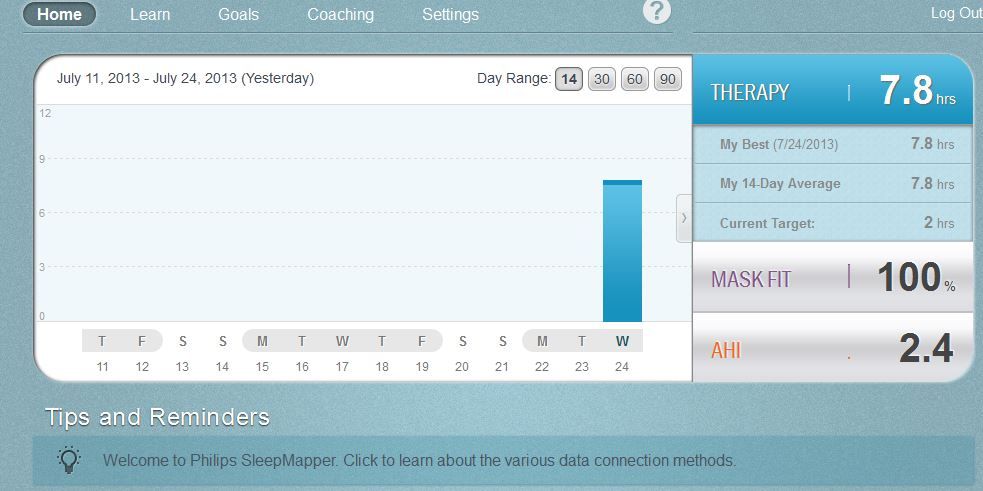
It shows AHI (no event category break down) and leak. If you don't ever reach large leak territory it shows a leak number of 100% meaning for 100% of the time your leaks were below large leak territory.
The leak number on the machine's LCD display is % of time that you do spend in large leak territory.
As to your install problem...I have no idea how to fix it. There's a conflict somewhere but in all honesty..SleepMapper isn't worth the hassle trying to figure it out.
This is what you get in terms of a report from SleepMapper.
You would be much better off to use SleepyHead software...I have links in my signature line for it.

_________________
| Machine: AirCurve™ 10 VAuto BiLevel Machine with HumidAir™ Heated Humidifier |
| Additional Comments: Mask Bleep Eclipse https://bleepsleep.com/the-eclipse/ |
I may have to RISE but I refuse to SHINE.
2 posts
• Page 1 of 1