


Hi,
My Resmed S9 Autoset is missing data for January 19 - February 3. I have used the machine every night since I got in (in October 2013), and it did not seem to be working differently during the time of the missing summary data. The data is missing from the machine itself, as when I check the info on the window for the last month it reports: Days Used 14/30. Last time I downloaded the SD card data (not supposed to do anything to the internal machine memory) was January 1st prior to downloading again on February 3rd. I have not noticed any power failures or anything else that may have affected the machine. Regardless, I am going to get a backup power supply just in case.
Anyway, does anyone have an answer to what may have happened, or has anyone else experienced this same thing for this Resmed machine? I am worried about my next insurance compliance report appointment coming up soon.
Thanks!
ResMed S9 Autoset internal machine memory missing data


14 posts
• Page 1 of 1

Re: ResMed S9 Autoset internal machine memory missing data
Which software are you using?
Does it also show no usage for that period?
If it is SleepyHead....if the SD card was not written to then it might show no usage at all...or the aliens may have done it.
I have had 3 random nights where SleepyHead says I didn't used the machine but I know I did and ResScan confirms that I did and I know for sure the SD card was inserted correctly...so I blame the aliens.
I don't ever check my LCD screen so I don't know if it is accurate or not.
Your DME would most likely be using the SD card and ResScan to verify compliance usage...so if you have ResScan and it shows no usage for that time period..then something is wrong with machine.
Does it also show no usage for that period?
If it is SleepyHead....if the SD card was not written to then it might show no usage at all...or the aliens may have done it.
I have had 3 random nights where SleepyHead says I didn't used the machine but I know I did and ResScan confirms that I did and I know for sure the SD card was inserted correctly...so I blame the aliens.
I don't ever check my LCD screen so I don't know if it is accurate or not.
Your DME would most likely be using the SD card and ResScan to verify compliance usage...so if you have ResScan and it shows no usage for that time period..then something is wrong with machine.
_________________
| Machine: AirCurve™ 10 VAuto BiLevel Machine with HumidAir™ Heated Humidifier |
| Additional Comments: Mask Bleep Eclipse https://bleepsleep.com/the-eclipse/ |
I may have to RISE but I refuse to SHINE.
Re: ResMed S9 Autoset internal machine memory missing data
I use both ResScan and SleepyHead, and they both are missing the data too. Funny thing is I just powered off the S9, unplugged it (cord connection at the machine) to put in on a surge protector. Then, when powered back up, the machine is now missing last night's data and says it was not used last night! Seems to be something wrong with the S9 machine itself...
Re: ResMed S9 Autoset internal machine memory missing data
Doesn't sound good. Probably should contact supplier Monday.
_________________
| Machine: AirCurve™ 10 VAuto BiLevel Machine with HumidAir™ Heated Humidifier |
| Additional Comments: Mask Bleep Eclipse https://bleepsleep.com/the-eclipse/ |
I may have to RISE but I refuse to SHINE.
-
Citation4444
- Posts: 56
- Joined: Thu Dec 05, 2013 4:16 pm
- Location: North GA Mountains, USA
Re: ResMed S9 Autoset internal machine memory missing data
My first S9 Autoset started missing chunks of data, and it was replaced. The replacement has worked fine. Get your DME to replace the unit.
_________________
| Mask: ResMed AirFit™ F20 Mask with Headgear + 2 Replacement Cushions |
| Humidifier: S9™ Series H5i™ Heated Humidifier with Climate Control |
| Additional Comments: Now using S9 VPAP Adapt ASV 36037 |
Re: ResMed S9 Autoset internal machine memory missing data
Sorry in advance for hijacking an old topic but its related to my issue and I need some insight. I am new here and been doing some searching around to find my answer but this is somewhat new to me.
So here is my situation, I have a ResMed S9 assigned to me in Oct 2014 with a memory card and wireless modem to send data back to my equipment provider. This is my 3rd machine, the other two got old and needed to be retired for use. Needless on the two previous machines I have not had to deal with downloads or reports back to the DME provider.
A couple months after receiving the machine the company calls and says they were receiving updates (via the wireless modem). After we talked about it they explained the machine transmits daily mid-day. Well there was the problem as I dont keep the machine plugged in during the day only at night when I use it... clearly no power no transmission. So for the next week I leave it plugged in. The company calls back saying hardly any use is showing up, a few days only and I had the machine for over 3 months at that point and I do use it every single night without fail.
So they suggest I bring in the memory card. I drop that off and they tell me that its blank. Hmm ok.
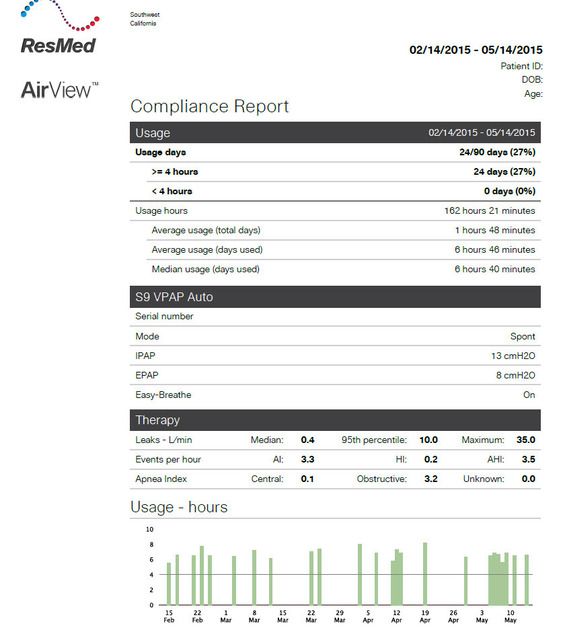
I don't hear from the company until again for a few months with a demand letter saying they need download stats or the insurance will not pay the claim. So they ask me to send in the memory card again. I did. They send back a report and say I am not in compliance. I have tried to paste a copy of the report into this post not sure if it will come out correctly but I am not sure how to read this. What I am most interested in is the green bars as I believe they are saying those are the only days I have used the machine?
The problem is I am using this damn thing every night (sorry my frustration crept in there) and I can see on the machine itself it is showing well over 1500 hours used since I have owned it. There is no way my wife lets me sleep more than a minute if I dont wear the thing since the snoring wakes her up... so clearly something is wrong with this download /report process.
Is there anyway to get all the history from the machine itself so I can prove to the DME provider that something is wrong is how they are collecting the data? Could there be some issue where the machine isnt downloading the results? Any thoughts or ideas? Like I said the display on the machine which can be adjusted to just hours of use up to 1 year back is clearly showing lots of hours that doesnt match up with these stat reports.
To make matters worse my DME provider doesn't seem to care there may be an issue. They are just saying the download shows not compliant and they are going to bill me directly for the machine. In my conversations it doesnt seem to matter to them they will get me to pay or the insurer so I am not sure who to file a complaint with if there is any regulatory agency that I can go to for help.
Thanks in advance for any advice or help.
So here is my situation, I have a ResMed S9 assigned to me in Oct 2014 with a memory card and wireless modem to send data back to my equipment provider. This is my 3rd machine, the other two got old and needed to be retired for use. Needless on the two previous machines I have not had to deal with downloads or reports back to the DME provider.
A couple months after receiving the machine the company calls and says they were receiving updates (via the wireless modem). After we talked about it they explained the machine transmits daily mid-day. Well there was the problem as I dont keep the machine plugged in during the day only at night when I use it... clearly no power no transmission. So for the next week I leave it plugged in. The company calls back saying hardly any use is showing up, a few days only and I had the machine for over 3 months at that point and I do use it every single night without fail.
So they suggest I bring in the memory card. I drop that off and they tell me that its blank. Hmm ok.
I don't hear from the company until again for a few months with a demand letter saying they need download stats or the insurance will not pay the claim. So they ask me to send in the memory card again. I did. They send back a report and say I am not in compliance. I have tried to paste a copy of the report into this post not sure if it will come out correctly but I am not sure how to read this. What I am most interested in is the green bars as I believe they are saying those are the only days I have used the machine?
The problem is I am using this damn thing every night (sorry my frustration crept in there) and I can see on the machine itself it is showing well over 1500 hours used since I have owned it. There is no way my wife lets me sleep more than a minute if I dont wear the thing since the snoring wakes her up... so clearly something is wrong with this download /report process.
Is there anyway to get all the history from the machine itself so I can prove to the DME provider that something is wrong is how they are collecting the data? Could there be some issue where the machine isnt downloading the results? Any thoughts or ideas? Like I said the display on the machine which can be adjusted to just hours of use up to 1 year back is clearly showing lots of hours that doesnt match up with these stat reports.
To make matters worse my DME provider doesn't seem to care there may be an issue. They are just saying the download shows not compliant and they are going to bill me directly for the machine. In my conversations it doesnt seem to matter to them they will get me to pay or the insurer so I am not sure who to file a complaint with if there is any regulatory agency that I can go to for help.
Thanks in advance for any advice or help.

Re: ResMed S9 Autoset internal machine memory missing data
stop unplugging the machine.
what I imagine is happening is that you're waking up and yanking the cord out, before the machine finishes up and writes the days report, it may also be corrupting the memory card.
you can verify by loading the data from the card into sleepyhead, and/or checking the data on the machine itself, hold both silver buttons down for a few seconds to get into the report page.
what I imagine is happening is that you're waking up and yanking the cord out, before the machine finishes up and writes the days report, it may also be corrupting the memory card.
you can verify by loading the data from the card into sleepyhead, and/or checking the data on the machine itself, hold both silver buttons down for a few seconds to get into the report page.
Get OSCAR
Accounts to put on the foe list: dataq1, clownbell, gearchange, lynninnj, mper!?, DreamDiver, Geer1, almostadoctor, sleepgeek, ajack, stom, mogy, D.H., They often post misleading, timewasting stuff.
Accounts to put on the foe list: dataq1, clownbell, gearchange, lynninnj, mper!?, DreamDiver, Geer1, almostadoctor, sleepgeek, ajack, stom, mogy, D.H., They often post misleading, timewasting stuff.
-
chunkyfrog

- Posts: 34544
- Joined: Mon Jul 12, 2010 5:10 pm
- Location: Nowhere special--this year in particular.
Re: ResMed S9 Autoset internal machine memory missing data
Also look at the SD card. The read/write switch may have gotten nudged to read-only.
. . . Crappens.
. . . Crappens.
_________________
| Mask: AirFit™ P10 For Her Nasal Pillow CPAP Mask with Headgear |
| Additional Comments: Airsense 10 Autoset for Her |
Re: ResMed S9 Autoset internal machine memory missing data
I don't know which s9 is being referenced, but my vpap auto won't start if the card is locked... once in a while I bump the slider as I'm putting the card back in, and then that night I put on the mask, and... nothing.. have to take the card out, slide it back to 'unlocked' and put it back in before the machine will fire up.chunkyfrog wrote:Also look at the SD card. The read/write switch may have gotten nudged to read-only.
. . . Crappens.
Get OSCAR
Accounts to put on the foe list: dataq1, clownbell, gearchange, lynninnj, mper!?, DreamDiver, Geer1, almostadoctor, sleepgeek, ajack, stom, mogy, D.H., They often post misleading, timewasting stuff.
Accounts to put on the foe list: dataq1, clownbell, gearchange, lynninnj, mper!?, DreamDiver, Geer1, almostadoctor, sleepgeek, ajack, stom, mogy, D.H., They often post misleading, timewasting stuff.
Re: ResMed S9 Autoset internal machine memory missing data
Bring the machine in to your DME with the proof of use using the blower hours. Medicare accepts that, I don't see why an insurance company would not. The DME has the serial number of your machine written down, so they KNOW that you are not showing them a fake machine. Print off a digital photo of the blower hours (get it printed at Walgreens).
I agree with another poster that continually plugging and unplugging the machine is probably screwing up the data. We picked up my brother's Bipap yesterday and the DME specifically TOLD him not to unplug it, although unplugging during thunderstorms was acceptable. It does not have a turn off switch for a reason.
I agree with another poster that continually plugging and unplugging the machine is probably screwing up the data. We picked up my brother's Bipap yesterday and the DME specifically TOLD him not to unplug it, although unplugging during thunderstorms was acceptable. It does not have a turn off switch for a reason.
_________________
| Mask: AirFit™ P10 Nasal Pillow CPAP Mask with Headgear |
| Additional Comments: Sleepyhead |
Last edited by SewTired on Wed Jun 03, 2015 1:59 pm, edited 1 time in total.
Diabetes 2, RLS & bradycardia
Airsense For Her; Settings: range 8-12, Airfit P10 (M)
Airsense For Her; Settings: range 8-12, Airfit P10 (M)
-
Jay Aitchsee

- Posts: 2936
- Joined: Sun May 22, 2011 12:47 pm
- Location: Southwest Florida
Re: ResMed S9 Autoset internal machine memory missing data
This might be because ResMed starts a new day at noon. If you review last night's data before noon, you see that night's data. If you check again after noon, you will not see any data until after the machine is used for that day. So, it's normal to see data before noon and none after noon (if the machine hasn't been used yet for that "day").erik4444 wrote:I use both ResScan and SleepyHead, and they both are missing the data too. Funny thing is I just powered off the S9, unplugged it (cord connection at the machine) to put in on a surge protector. Then, when powered back up, the machine is now missing last night's data and says it was not used last night! Seems to be something wrong with the S9 machine itself...
This doesn't explain your other missing data, though.
_________________
| Mask: AirFit™ P10 Nasal Pillow CPAP Mask with Headgear |
| Additional Comments: S9 Auto, P10 mask, P=7.0, EPR3, ResScan 5.3, SleepyHead V1.B2, Windows 10, ZEO, CMS50F, Infrared Video |
Re: ResMed S9 Autoset internal machine memory missing data
Yes palerider your guess is correct. As I am getting up in the morning I shut off the machine then unplug. I dont think its corrupting the card but makes sense that it might not have enough time to write the files to the card. Then again from what the DME provider tells me the when you put in a "blank" card the machine should download all available data.
As I mentioned they switched out the card twice now but files were loaded for prior dates to the card. That said I will not unplug the machine anymore at this point.
I did check the memory card lock / unlock switch and its properly set to unlock and "some" data is being written to the card just not everything from what I can tell.
I have checked the report on the machine and the hours are vastly different than what is showing up on the download report sent back to me from the DME provider.
I guess what I need to do is somehow recreate the use history. Is there anyway to force a full download of usage from the machine to the card starting with the first day of use?
As I mentioned they switched out the card twice now but files were loaded for prior dates to the card. That said I will not unplug the machine anymore at this point.
I did check the memory card lock / unlock switch and its properly set to unlock and "some" data is being written to the card just not everything from what I can tell.
I have checked the report on the machine and the hours are vastly different than what is showing up on the download report sent back to me from the DME provider.
I guess what I need to do is somehow recreate the use history. Is there anyway to force a full download of usage from the machine to the card starting with the first day of use?
Re: ResMed S9 Autoset internal machine memory missing data
if you yank the power while it's writing to the card, it can corrupt the card data.driftwood wrote:Yes palerider your guess is correct. As I am getting up in the morning I shut off the machine then unplug. I dont think its corrupting the card but makes sense that it might not have enough time to write the files to the card.
send 'em a photo of the usage screens.driftwood wrote:I have checked the report on the machine and the hours are vastly different than what is showing up on the download report sent back to me from the DME provider.
I guess what I need to do is somehow recreate the use history. Is there anyway to force a full download of usage from the machine to the card starting with the first day of use?
all the machine keeps internally is usage and summary info, but then, that's what they're wanting.
format a card in your computer, put it in the machine, let the machine reformat it when it asks.
then remove the card, and read it into sleepyhead, and see what the overview looks like.
and stop unplugging the machine.
Get OSCAR
Accounts to put on the foe list: dataq1, clownbell, gearchange, lynninnj, mper!?, DreamDiver, Geer1, almostadoctor, sleepgeek, ajack, stom, mogy, D.H., They often post misleading, timewasting stuff.
Accounts to put on the foe list: dataq1, clownbell, gearchange, lynninnj, mper!?, DreamDiver, Geer1, almostadoctor, sleepgeek, ajack, stom, mogy, D.H., They often post misleading, timewasting stuff.
Re: ResMed S9 Autoset internal machine memory missing data
Unfortunately I tried that and they are telling me the insurer requires the downloads in order to pay the claim. I have an appointment tomorrow to take the machine over to a tech with the DME provider and they will see if they can get more information off the machine but sounds like they wont, dont know now.palerider wrote:send 'em a photo of the usage screens.
14 posts
• Page 1 of 1