



Hi Everybodty
Sorry to trouble you over this but I am putting together an analysis, and am still finding that all numerals get left justified, making them nonsense.
How can I keep the space between different columns without filling up the space with dots, which is what I had to do last time.
There must be something I can do - please help me out.
cheers
Mars
Help Needed In Editing - Workable Solution Found


13 posts
• Page 1 of 1
Help Needed In Editing - Workable Solution Found
Last edited by mars on Fri Dec 04, 2009 7:25 pm, edited 1 time in total.
for an an easier, cheaper and travel-easy sleep apnea treatment 
http://www.cpaptalk.com/viewtopic/t7020 ... rapy-.html
http://www.cpaptalk.com/viewtopic/t7020 ... rapy-.html

Re: Help Needed In Editing
Make the document in a word-processing program or spreadsheet, take a screen shot and post the image.
Muffy
Muffy
________________________________
Machine: Dell Dimension 8100
Mask: 3M N-95 (during flu season)
Humidifier: Avoided, tends to make me moldy
Software: XP Pro
Additional Comments: You can't find a solution when you don't know the problem
Machine: Dell Dimension 8100
Mask: 3M N-95 (during flu season)
Humidifier: Avoided, tends to make me moldy
Software: XP Pro
Additional Comments: You can't find a solution when you don't know the problem
Re: Help Needed In Editing
Hi Muffy
It worked when I tested it on an old post, but when I inserted it into the blank new post, I still got the left justification when it appeared on the board..
So I am still doing something wrong
Mars
It worked when I tested it on an old post, but when I inserted it into the blank new post, I still got the left justification when it appeared on the board..
So I am still doing something wrong
Mars
for an an easier, cheaper and travel-easy sleep apnea treatment
http://www.cpaptalk.com/viewtopic/t7020 ... rapy-.html
http://www.cpaptalk.com/viewtopic/t7020 ... rapy-.html
Re: Help Needed In Editing
Have you tried turning off the justification for that project?
Re: Help Needed In Editing
OK, maybe I'm not understanding what you mean, cause I do it like this:mars wrote:Hi Muffy
It worked when I tested it on an old post, but when I inserted it into the blank new post, I still got the left justification when it appeared on the board..
So I am still doing something wrong
Mars
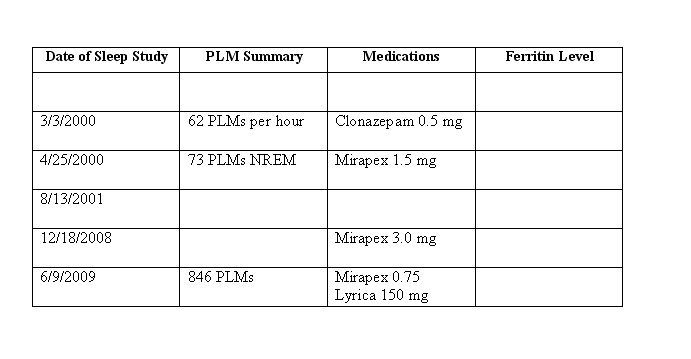
Now the image itself is left-justified, but I don't see how that's a problem. Maybe just post what you've got to try to see what the issue is.
Muffy
________________________________
Machine: Dell Dimension 8100
Mask: 3M N-95 (during flu season)
Humidifier: Avoided, tends to make me moldy
Software: XP Pro
Additional Comments: You can't find a solution when you don't know the problem
Machine: Dell Dimension 8100
Mask: 3M N-95 (during flu season)
Humidifier: Avoided, tends to make me moldy
Software: XP Pro
Additional Comments: You can't find a solution when you don't know the problem
Re: Help Needed In Editing
Will do.
Thanks
Mars
Thanks
Mars
for an an easier, cheaper and travel-easy sleep apnea treatment
http://www.cpaptalk.com/viewtopic/t7020 ... rapy-.html
http://www.cpaptalk.com/viewtopic/t7020 ... rapy-.html
Re: Help Needed In Editing
Hi
Sorry, Julie and Muffy, I realise that I did not explain the problem properly.
As you can see, the figures are all bunched together, but when I go into edit, they are all in columns.
cheers
Mars
This is the problem -
9999999..................kkkkkkkkkkkkkkkkk..................rrrrrrrrrrrrrrrrrrrrrrrr
3 columns, the dots are spaces, when I leave spaces I get -
999999 kkkkkkkkkkkkkkkkk rrrrrrrrrrrrrrrrrrrrrrrr
the spaces are ignored.
Sorry, Julie and Muffy, I realise that I did not explain the problem properly.
As you can see, the figures are all bunched together, but when I go into edit, they are all in columns.
cheers
Mars
This is the problem -
9999999..................kkkkkkkkkkkkkkkkk..................rrrrrrrrrrrrrrrrrrrrrrrr
3 columns, the dots are spaces, when I leave spaces I get -
999999 kkkkkkkkkkkkkkkkk rrrrrrrrrrrrrrrrrrrrrrrr
the spaces are ignored.
Last edited by mars on Fri Dec 04, 2009 8:27 am, edited 1 time in total.
for an an easier, cheaper and travel-easy sleep apnea treatment
http://www.cpaptalk.com/viewtopic/t7020 ... rapy-.html
http://www.cpaptalk.com/viewtopic/t7020 ... rapy-.html

Re: Help Needed In Editing
Mars,
Have you tried using tabs instead of spaces?
Have you tried using tabs instead of spaces?
_________________
| Mask: TAP PAP Nasal Pillow CPAP Mask with Improved Stability Mouthpiece |
| Additional Comments: Sleepyhead software, not listed. Currently using Dreamstation ASV, not listed |
-- Kiralynx
Beastie, 2008-10-28. NEW Beastie, PRS1 960, 2014-05-14. NEWER Beastie, Dream Station ASV, 2017-10-17. PadaCheek Hosecover. Homemade Brandy Keg Chin Support. TapPap Mask.
Min PS = 4, Max PS = 8
Epap Range = 6 - 7.5
Beastie, 2008-10-28. NEW Beastie, PRS1 960, 2014-05-14. NEWER Beastie, Dream Station ASV, 2017-10-17. PadaCheek Hosecover. Homemade Brandy Keg Chin Support. TapPap Mask.
Min PS = 4, Max PS = 8
Epap Range = 6 - 7.5
Re: Help Needed In Editing
Hi Kiralynx
Thanks.
I cannot see any tabs on the Post New Message page, so am not sure how I could make that work.
Am still baffled.
cheers
Mars
Thanks.
I cannot see any tabs on the Post New Message page, so am not sure how I could make that work.
Am still baffled.
cheers
Mars
for an an easier, cheaper and travel-easy sleep apnea treatment
http://www.cpaptalk.com/viewtopic/t7020 ... rapy-.html
http://www.cpaptalk.com/viewtopic/t7020 ... rapy-.html
Re: Help Needed In Editing
Mars,
Uhm. Maybe I am not awake this morning and have not posted clearly.
I did not mean "tabs" liked a tabbed browser. But tabs, like the tab key on your keyboard. Mumph. Well... they useta work, but now they don't. Try using "code" in the formatting while spacing.... it puts a weird formatting around it, but may allow you to space between your columns.
Uhm. Maybe I am not awake this morning and have not posted clearly.
I did not mean "tabs" liked a tabbed browser. But tabs, like the tab key on your keyboard. Mumph. Well... they useta work, but now they don't. Try using "code" in the formatting while spacing.... it puts a weird formatting around it, but may allow you to space between your columns.
Code: Select all
xxxx xxxx xxxx _________________
| Mask: TAP PAP Nasal Pillow CPAP Mask with Improved Stability Mouthpiece |
| Additional Comments: Sleepyhead software, not listed. Currently using Dreamstation ASV, not listed |
-- Kiralynx
Beastie, 2008-10-28. NEW Beastie, PRS1 960, 2014-05-14. NEWER Beastie, Dream Station ASV, 2017-10-17. PadaCheek Hosecover. Homemade Brandy Keg Chin Support. TapPap Mask.
Min PS = 4, Max PS = 8
Epap Range = 6 - 7.5
Beastie, 2008-10-28. NEW Beastie, PRS1 960, 2014-05-14. NEWER Beastie, Dream Station ASV, 2017-10-17. PadaCheek Hosecover. Homemade Brandy Keg Chin Support. TapPap Mask.
Min PS = 4, Max PS = 8
Epap Range = 6 - 7.5
Re: Help Needed In Editing
Hi Kiralynx
That was a great idea.
The spacing worked. Now I want to see if the post can be read without having to scroll down.
We're getting nearer, but I must get to bed soon.
cheers
Mars
That was a great idea.
The spacing worked. Now I want to see if the post can be read without having to scroll down.
We're getting nearer, but I must get to bed soon.
cheers
Mars
for an an easier, cheaper and travel-easy sleep apnea treatment
http://www.cpaptalk.com/viewtopic/t7020 ... rapy-.html
http://www.cpaptalk.com/viewtopic/t7020 ... rapy-.html
Re: Help Needed In Editing
Mars,
Don't remember whether you're east coast, west coat, or somewhere in between, but yeah... I'm getting ready for a late breakfast, and it's somewheres between 11p and 2a for you.
Glad the "code" worked.
Don't remember whether you're east coast, west coat, or somewhere in between, but yeah... I'm getting ready for a late breakfast, and it's somewheres between 11p and 2a for you.
Glad the "code" worked.
_________________
| Mask: TAP PAP Nasal Pillow CPAP Mask with Improved Stability Mouthpiece |
| Additional Comments: Sleepyhead software, not listed. Currently using Dreamstation ASV, not listed |
-- Kiralynx
Beastie, 2008-10-28. NEW Beastie, PRS1 960, 2014-05-14. NEWER Beastie, Dream Station ASV, 2017-10-17. PadaCheek Hosecover. Homemade Brandy Keg Chin Support. TapPap Mask.
Min PS = 4, Max PS = 8
Epap Range = 6 - 7.5
Beastie, 2008-10-28. NEW Beastie, PRS1 960, 2014-05-14. NEWER Beastie, Dream Station ASV, 2017-10-17. PadaCheek Hosecover. Homemade Brandy Keg Chin Support. TapPap Mask.
Min PS = 4, Max PS = 8
Epap Range = 6 - 7.5
Re: Help Needed In Editing
Hi Kiralynx
The code worked, but put it into a small box, and you have to scroll down to read it. That would be fine except the post is a long one, and includes columns of data for comparison. The scrolling makes comparison difficult. So I am looking at a different format that will fit.
Thank you Muffy, Julie and Kiralynx for helping out.
cheers
Mars
PS Now finished and posted, thank goodness, but those damned spaces should be as valid as any other character. At least, thats what I think
The code worked, but put it into a small box, and you have to scroll down to read it. That would be fine except the post is a long one, and includes columns of data for comparison. The scrolling makes comparison difficult. So I am looking at a different format that will fit.
Thank you Muffy, Julie and Kiralynx for helping out.
cheers
Mars
PS Now finished and posted, thank goodness, but those damned spaces should be as valid as any other character. At least, thats what I think
for an an easier, cheaper and travel-easy sleep apnea treatment
http://www.cpaptalk.com/viewtopic/t7020 ... rapy-.html
http://www.cpaptalk.com/viewtopic/t7020 ... rapy-.html
13 posts
• Page 1 of 1