


Anyone care to help a newbie out with interpreting data? I have no clue what I'm looking at. I did peek at Pugsy's tutorial, but honestly with all the different machines and softwares mentioned my head is spinning.
What graphs are the most helpful for me to learn, as a beginner? Just the basics. I can copy/paste them here if anyone would be willing to help.
Thanks!
Help reading SH data, please


11 posts
• Page 1 of 1
Help reading SH data, please
_________________
| Mask: AirFit™ P10 Nasal Pillow CPAP Mask with Headgear |
| Humidifier: S9™ Series H5i™ Heated Humidifier with Climate Control |
| Additional Comments: ResMed S9 Autoset |

Re: Help reading SH data, please
Can't copy/paste the screen shots of reports. You have to upload them to some place like Photobucket and then link to them for the images to show up.
We talked about how to do that in this thread.
viewtopic.php?f=1&t=81072&p=737779#p737779
I also have some examples of what we like to see at a glance.
Mainly it's the basics..
The AHI bar graphs on the left so we can see AHI and the event category breakdown.
And on the right side the
Events graph
Flow rate graph
Pressure graph (not mask pressure as it just mimics regular pressure)
Leak graph
Maybe Flow limitation graph if it is very active.
Mask pressure and AHI graphs aren't need and are just taking up space. You can turn them off in Preferences/graphs tab...just remove the check mark. You can click and drag the graphs just a little and resize them if you wish.
Here's an example of my report. I don't bother with flow limitation graph because it is boring.
My pressure graph isn't going to look like yours because I am using a different model machine so my pressure line is going to be a lot more active and fluctuate a lot compared to yours..don't worry about that.
Your leak number you want to avoid as much as possible is 24 L/min..stay below that area for the bulk of the night and unless leaks wake you up...don't worry about them.
We talked about how to do that in this thread.
viewtopic.php?f=1&t=81072&p=737779#p737779
I also have some examples of what we like to see at a glance.
Mainly it's the basics..
The AHI bar graphs on the left so we can see AHI and the event category breakdown.
And on the right side the
Events graph
Flow rate graph
Pressure graph (not mask pressure as it just mimics regular pressure)
Leak graph
Maybe Flow limitation graph if it is very active.
Mask pressure and AHI graphs aren't need and are just taking up space. You can turn them off in Preferences/graphs tab...just remove the check mark. You can click and drag the graphs just a little and resize them if you wish.
Here's an example of my report. I don't bother with flow limitation graph because it is boring.
My pressure graph isn't going to look like yours because I am using a different model machine so my pressure line is going to be a lot more active and fluctuate a lot compared to yours..don't worry about that.
Your leak number you want to avoid as much as possible is 24 L/min..stay below that area for the bulk of the night and unless leaks wake you up...don't worry about them.

_________________
| Machine: AirCurve™ 10 VAuto BiLevel Machine with HumidAir™ Heated Humidifier |
| Additional Comments: Mask Bleep Eclipse https://bleepsleep.com/the-eclipse/ |
I may have to RISE but I refuse to SHINE.
Re: Help reading SH data, please
Pugsy I'm not sure if you should use those particular graphs for your sleepyhead examples. We might all come down with a serious case of graph envy.
_________________
| Mask: Quattro™ FX Full Face CPAP Mask with Headgear |
| Humidifier: S9™ Series H5i™ Heated Humidifier with Climate Control |
| Additional Comments: ResScan 4.3 software, 50D+ Oximeter |
Re: Help reading SH data, please
That graph is super clean...most of mine aren't that clean but I had it handy.
Here's one from when I was using the PR S1 BiPap that shows more activity. This is a rare ugly cluster for me...probably REM stage sleep as my OSA is 5 times worse in REM.
This one is also where I show which url addy to copy and paste in forum text page to get image to show up.

_________________
| Machine: AirCurve™ 10 VAuto BiLevel Machine with HumidAir™ Heated Humidifier |
| Additional Comments: Mask Bleep Eclipse https://bleepsleep.com/the-eclipse/ |
I may have to RISE but I refuse to SHINE.
Re: Help reading SH data, please
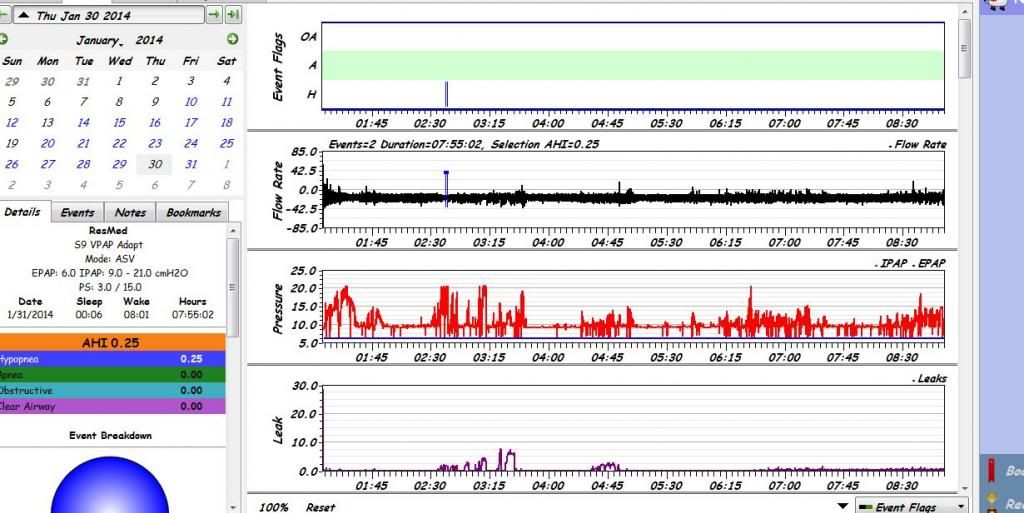
Okay, here we go...

_________________
| Mask: AirFit™ P10 Nasal Pillow CPAP Mask with Headgear |
| Humidifier: S9™ Series H5i™ Heated Humidifier with Climate Control |
| Additional Comments: ResMed S9 Autoset |
Re: Help reading SH data, please
Your report is pretty boring for the most part and that's good.
The little bit of CAs and leaks at the beginning of the night is most likely awake breathing and fiddling with the mask.
Leak line is well below 24 L/min (beginning of large leak territory for the ResMed S9 machine) for the bulk of the night. In fact you had only one brief short lived spike to 20 L/min which was probably a quick adjustment with the mask.
I don't see anything that is just shouting out "fix me". How are you sleeping? How are you feeling during the day?
Was there something on the reports that you didn't understand?
The Flow limitation graph isn't horribly exciting...I have seen much worse.
The little bit of CAs and leaks at the beginning of the night is most likely awake breathing and fiddling with the mask.
Leak line is well below 24 L/min (beginning of large leak territory for the ResMed S9 machine) for the bulk of the night. In fact you had only one brief short lived spike to 20 L/min which was probably a quick adjustment with the mask.
I don't see anything that is just shouting out "fix me". How are you sleeping? How are you feeling during the day?
Was there something on the reports that you didn't understand?
The Flow limitation graph isn't horribly exciting...I have seen much worse.
_________________
| Machine: AirCurve™ 10 VAuto BiLevel Machine with HumidAir™ Heated Humidifier |
| Additional Comments: Mask Bleep Eclipse https://bleepsleep.com/the-eclipse/ |
I may have to RISE but I refuse to SHINE.
Re: Help reading SH data, please
I am definitely starting to notice a difference in my day-to-day fatigue (having been using my CPAP for about two weeks, now). Some days I feel better than others. I guess time will tell if those nights were worse. Going from AHI of 28.8 to <2 (and really, <1 because you're right about those CAs) is a big change, and I definitely wake up feeling better rested most days. Of course, my 2-year-old finally just figured out how to sleep through the night, so that helps too lol! I have to say that I love my P10 mask. It is so comfortable that I barely notice that it's there. I started out with a Mirage FX, and had to switch after three days as it rubbed my face so badly.
I guess my questions are: how do I determine the length of OA event, and is there a length that would be concerning? And can you tell me what the Flow Limitation graph is? The others I think I understand.
I guess my questions are: how do I determine the length of OA event, and is there a length that would be concerning? And can you tell me what the Flow Limitation graph is? The others I think I understand.
_________________
| Mask: AirFit™ P10 Nasal Pillow CPAP Mask with Headgear |
| Humidifier: S9™ Series H5i™ Heated Humidifier with Climate Control |
| Additional Comments: ResMed S9 Autoset |
Re: Help reading SH data, please
Also, my DME is renting my machine to me, is that normal/common? I would rather just pay for it than rent it monthly, it seems like I would come out way ahead in the long run. Would I need to check with my insurance to see what they would cover? Maybe a phone call to the DME is in order.
_________________
| Mask: AirFit™ P10 Nasal Pillow CPAP Mask with Headgear |
| Humidifier: S9™ Series H5i™ Heated Humidifier with Climate Control |
| Additional Comments: ResMed S9 Autoset |
Re: Help reading SH data, please
Call your insurance company to see if they are the ones requesting the rent to own thing.
Normally if they do the rent to own it's a capped rental and after a certain period of time you own it and no more rentals.
Don't rely on what the DME tells you that your insurance does...you need to find out from insurance company directly.
DMEs sometimes tell people that rent is the only way but it isn't.
Flow limitations are hard to evaluate because we aren't really ever given a good comparison to go by.
Generally the more "active" the flow limitation graph...the more flow limitations there are and sometimes it is significant in relation to how a person feels and sometimes it isn't. So height of the FLs and concentration is what we look at. Yours isn't bad looking. Like I said I have seen much worse and to really put it under the microscope takes a lot of studying up on actual breath by breath stuff and to be honest...unless the graphs are horrible looking I don't see the need to do that.
A stuffy nose can affect the FL graph too.
There have been a few discussions in the last few months regarding some flow limitation graphs...you can search the forum for them or maybe someone will chime in.
When they are ugly usually just a tiny bit more pressure is all that is needed to make the FLs look less ugly but I don't think yours qualify and even if they did I don't know that I would do anything about them so soon starting therapy unless someone was reporting significant problems.
How to determine event duration...using SleepyHead look on the left side of the report ...see the detail tab? That's the default main tab but right next to it look for the "Events" tab and click on it. You will see the categories of events that happened with a number in parentheses..that's how many you had of that category of event.
Click on one of the categories...it will expand to show the events in that category along with the time it happened and another number in parentheses..that number is duration of the event in seconds. If you want to go further just click on one of the single events and the graph on the right will zoom in on that particular even up close.
Flow limitations are minor flow reductions that don't make criteria for one of the special categories of events. Usually it's because the reduction in air flow isn't enough of a reduction but might also be duration since to get a flag the "event" has to last at least 10 seconds.
Maybe the reduction is only 30 % reduction..just short of earning a flag for hyponea maybe.
Supine sleeping or REM stage sleep might also increase Flow limitations as either can make OSA worse.
Normally if they do the rent to own it's a capped rental and after a certain period of time you own it and no more rentals.
Don't rely on what the DME tells you that your insurance does...you need to find out from insurance company directly.
DMEs sometimes tell people that rent is the only way but it isn't.
Flow limitations are hard to evaluate because we aren't really ever given a good comparison to go by.
Generally the more "active" the flow limitation graph...the more flow limitations there are and sometimes it is significant in relation to how a person feels and sometimes it isn't. So height of the FLs and concentration is what we look at. Yours isn't bad looking. Like I said I have seen much worse and to really put it under the microscope takes a lot of studying up on actual breath by breath stuff and to be honest...unless the graphs are horrible looking I don't see the need to do that.
A stuffy nose can affect the FL graph too.
There have been a few discussions in the last few months regarding some flow limitation graphs...you can search the forum for them or maybe someone will chime in.
When they are ugly usually just a tiny bit more pressure is all that is needed to make the FLs look less ugly but I don't think yours qualify and even if they did I don't know that I would do anything about them so soon starting therapy unless someone was reporting significant problems.
How to determine event duration...using SleepyHead look on the left side of the report ...see the detail tab? That's the default main tab but right next to it look for the "Events" tab and click on it. You will see the categories of events that happened with a number in parentheses..that's how many you had of that category of event.
Click on one of the categories...it will expand to show the events in that category along with the time it happened and another number in parentheses..that number is duration of the event in seconds. If you want to go further just click on one of the single events and the graph on the right will zoom in on that particular even up close.
Flow limitations are minor flow reductions that don't make criteria for one of the special categories of events. Usually it's because the reduction in air flow isn't enough of a reduction but might also be duration since to get a flag the "event" has to last at least 10 seconds.
Maybe the reduction is only 30 % reduction..just short of earning a flag for hyponea maybe.
Supine sleeping or REM stage sleep might also increase Flow limitations as either can make OSA worse.
_________________
| Machine: AirCurve™ 10 VAuto BiLevel Machine with HumidAir™ Heated Humidifier |
| Additional Comments: Mask Bleep Eclipse https://bleepsleep.com/the-eclipse/ |
I may have to RISE but I refuse to SHINE.
Re: Help reading SH data, please
Thank you so much for your help! I am sure there will be more questions, but let's hope my graphs stay boring, right?
_________________
| Mask: AirFit™ P10 Nasal Pillow CPAP Mask with Headgear |
| Humidifier: S9™ Series H5i™ Heated Humidifier with Climate Control |
| Additional Comments: ResMed S9 Autoset |
Re: Help reading SH data, please
Yep, boring is good.
Of course when we feel like crap we don't like to hear our reports are boring...we would rather hear something needs major work done so that we can blame feeling like crap on something that has a face.
There's more to feeling the good numbers than just getting them.
Of course when we feel like crap we don't like to hear our reports are boring...we would rather hear something needs major work done so that we can blame feeling like crap on something that has a face.
There's more to feeling the good numbers than just getting them.
_________________
| Machine: AirCurve™ 10 VAuto BiLevel Machine with HumidAir™ Heated Humidifier |
| Additional Comments: Mask Bleep Eclipse https://bleepsleep.com/the-eclipse/ |
I may have to RISE but I refuse to SHINE.
11 posts
• Page 1 of 1