


sleep seeker by resmed


9 posts
• Page 1 of 1
-
grammie11
sleep seeker by resmed
Has anyone downloaded this? Does it give you all information about your pressure, etc?

Re: sleep seeker by resmed
Here is a link to it https://www.wakeuptosleep.com/treatment ... eeker.html I haven't checked it out yet.
_________________
| Machine: ResMed AirCurve 10 ASV Machine with Heated Humidifier |
| Mask: Evora Full Face Mask - Fitpack |
| Additional Comments: AirCurve 10 ASV, Oscar V1.0.1-r-1 |
US Navy Retired 1973,AirCurve 10 ASV, Mode: ASV Auto, Min EPAP: 7.2, Max EPAP: 15.0, Min PS:4.0, Max PS: 15.0, Mask ResMed Airtouch F20, Backup: (2) AirCurve 10 ASV
Re: sleep seeker by resmed
I tried, but I can never get the upload to work.
I'm on Windows 8 and when I put the SD card in the reader, the utility starts in its own small window, but then it goes to "page error" page and I can't do anything with it. I've even tried being signed in to their website in a main browser at the time.
I'm on Windows 8 and when I put the SD card in the reader, the utility starts in its own small window, but then it goes to "page error" page and I can't do anything with it. I've even tried being signed in to their website in a main browser at the time.
_________________
| Mask: Pilairo Q Nasal Pillow CPAP Mask with Headgear |
| Humidifier: S9™ Series H5i™ Heated Humidifier with Climate Control |
| Additional Comments: (Testing AirFit P10 and looking for a full face backup for allergy season) Sleepyhead software. |
-
chunkyfrog

- Posts: 34544
- Joined: Mon Jul 12, 2010 5:10 pm
- Location: Nowhere special--this year in particular.
Re: sleep seeker by resmed
Just one more thing that won't work on Windows 8.
We just bought a Windows 7 computer at Costco-brand new!
We just bought a Windows 7 computer at Costco-brand new!
_________________
| Mask: AirFit™ P10 For Her Nasal Pillow CPAP Mask with Headgear |
| Additional Comments: Airsense 10 Autoset for Her |
Re: sleep seeker by resmed
So, chunkyfrog, does that mean you have it working on Windows 7 (or know of it working on that OS)?
_________________
| Mask: Pilairo Q Nasal Pillow CPAP Mask with Headgear |
| Humidifier: S9™ Series H5i™ Heated Humidifier with Climate Control |
| Additional Comments: (Testing AirFit P10 and looking for a full face backup for allergy season) Sleepyhead software. |

Re: sleep seeker by resmed
It works on my Windows 7 64 bit computer...such as it is...not worth the effort IMHO
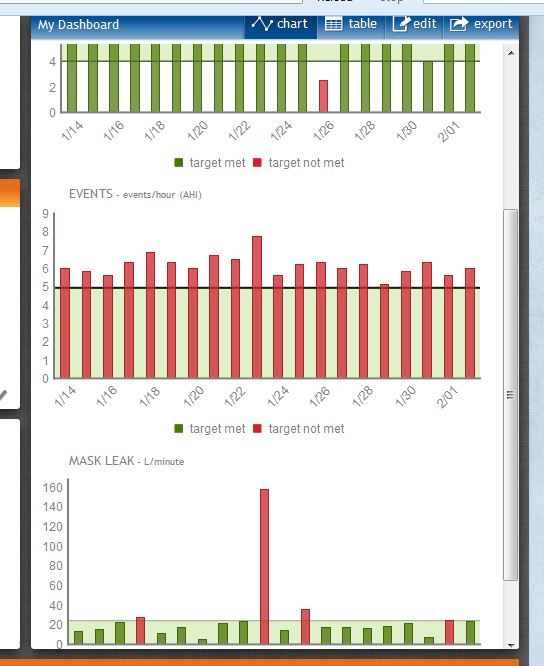
All it gives you are red or green bar graphs for
AHI....generic...no breakdown into event categories but looks like the line for being happy is at 5 per hour
It isn't accurate for my S9 Adapt....it is showing red ever since Jan 14 where I started the Adapt and showing every night and thus well above 5 for every night and I haven't had one night above 3.0 AHI and have had several with 0.0 AHI.
Perhaps it is just a bug with my Adapt.
Hours of use to meet compliance...with a line for 4 hours for some reason. Any night with less than that gets a red bar graph as opposed to green graph....you can customize this and set for something other than 4 hours if you wish.
Time in large leak bar graph....as long as the leak never goes above 24 L/min you get a green bar...if you went above it then you get a red graph but there is zero way to actually evaluate the leak because a person can't tell how long someone spent in large leak.
So if green...not a big deal but if red there's no way to really know if the night was bad or not.
I had one night where max leak was over 160...the short hose became disconnected from the long hose so the machine blew like crazy until it shut itself off.
All in all pretty much like the Respironics counterpart...nothing near the level of data that the software we have will give and even though there is an app for the iPhone...it still has to be uploaded to the web first via computer.
Those of you who can't get it to work..you aren't missing much and as soon as I close this I will be removing that little piece of software from my computer.
This is the sum total that you get.
All it gives you are red or green bar graphs for
AHI....generic...no breakdown into event categories but looks like the line for being happy is at 5 per hour
It isn't accurate for my S9 Adapt....it is showing red ever since Jan 14 where I started the Adapt and showing every night and thus well above 5 for every night and I haven't had one night above 3.0 AHI and have had several with 0.0 AHI.
Perhaps it is just a bug with my Adapt.
Hours of use to meet compliance...with a line for 4 hours for some reason. Any night with less than that gets a red bar graph as opposed to green graph....you can customize this and set for something other than 4 hours if you wish.
Time in large leak bar graph....as long as the leak never goes above 24 L/min you get a green bar...if you went above it then you get a red graph but there is zero way to actually evaluate the leak because a person can't tell how long someone spent in large leak.
So if green...not a big deal but if red there's no way to really know if the night was bad or not.
I had one night where max leak was over 160...the short hose became disconnected from the long hose so the machine blew like crazy until it shut itself off.
All in all pretty much like the Respironics counterpart...nothing near the level of data that the software we have will give and even though there is an app for the iPhone...it still has to be uploaded to the web first via computer.
Those of you who can't get it to work..you aren't missing much and as soon as I close this I will be removing that little piece of software from my computer.
This is the sum total that you get.

_________________
| Machine: AirCurve™ 10 VAuto BiLevel Machine with HumidAir™ Heated Humidifier |
| Additional Comments: Mask Bleep Eclipse https://bleepsleep.com/the-eclipse/ |
I may have to RISE but I refuse to SHINE.
Re: sleep seeker by resmed
Thanks Pugsy. I was hoping that the iPhone/iPad app would be useful. But from your description of what you get, I think I will just remove the upload utility from my laptop and not give this software another thought. I'll stick with SleepyHead and ResScan.
_________________
| Mask: Pilairo Q Nasal Pillow CPAP Mask with Headgear |
| Humidifier: S9™ Series H5i™ Heated Humidifier with Climate Control |
| Additional Comments: (Testing AirFit P10 and looking for a full face backup for allergy season) Sleepyhead software. |
Re: sleep seeker by resmed
"Bar ar 4 Hours"
When I got my new machine in Dec they installed a transmitter to deterimine use for the insurance company. A day of use was the machine was used for over 4 hours and to be complient one had to use the machine 20 of 30 days.
So I guess the red days do not count as a day used.
When I got my new machine in Dec they installed a transmitter to deterimine use for the insurance company. A day of use was the machine was used for over 4 hours and to be complient one had to use the machine 20 of 30 days.
So I guess the red days do not count as a day used.
_________________
| Machine: ResMed AirSense™ 10 AutoSet™ CPAP Machine with HumidAir™ Heated Humidifier |
| Mask: AirTouch™ F20 Full Face CPAP Mask with Headgear |
Re: sleep seeker by resmed
"Bar ar 4 Hours"
When I got my new machine in Dec they installed a transmitter to deterimine use for the insurance company. A day of use was the machine was used for over 4 hours and to be complient one had to use the machine 20 of 30 days.
So I guess the red days do not count as a day used.
When I got my new machine in Dec they installed a transmitter to deterimine use for the insurance company. A day of use was the machine was used for over 4 hours and to be complient one had to use the machine 20 of 30 days.
So I guess the red days do not count as a day used.
_________________
| Machine: ResMed AirSense™ 10 AutoSet™ CPAP Machine with HumidAir™ Heated Humidifier |
| Mask: AirTouch™ F20 Full Face CPAP Mask with Headgear |
9 posts
• Page 1 of 1