



Hi Peeps,
Ever since I have been a member here, I have noticed that all the data images that people post are cut off on the right side so I can't see perhaps 20% of the image on the right side...
Does everyone experience this?
And is there any way to fix it?
Jamis
Data image difficulty


13 posts
• Page 1 of 1

Re: Data image difficulty
What is your computer desktop resolution?
I have seen comments where someone apologizes for image being large and cut off but I can see the entire image with space around it to spare?
Do you experience this with the reports I send you?
I have seen comments where someone apologizes for image being large and cut off but I can see the entire image with space around it to spare?
Do you experience this with the reports I send you?
_________________
| Machine: AirCurve™ 10 VAuto BiLevel Machine with HumidAir™ Heated Humidifier |
| Additional Comments: Mask Bleep Eclipse https://bleepsleep.com/the-eclipse/ |
I may have to RISE but I refuse to SHINE.
-
Guest
Re: Data image difficulty
The image is cut off by the method of display. View the image in a separate browser tab. The decent browsers (meaning those other than I. E.) will allow you to right click an image, then select something from the menu along the lines of "show image in new tab".jamiswolf wrote:Hi Peeps,
Ever since I have been a member here, I have noticed that all the data images that people post are cut off on the right side so I can't see perhaps 20% of the image on the right side...
Does everyone experience this?
And is there any way to fix it?
Jamis
Re: Data image difficulty
This only happens to me on my netbook - and seem independent of the resolution.
Never happens on my desktop.
Never happens on my desktop.
_________________
| Mask: AirFit™ P10 Nasal Pillow CPAP Mask with Headgear |
| Additional Comments: Machine: Resmed AirSense10 for Her with Climateline heated hose ; alternating masks. |
And now here is my secret, a very simple secret; it is only with the heart that one can see rightly, what is essential is invisible to the eye.
Antoine de Saint-Exupery
Good advice is compromised by missing data
Forum member Dog Slobber Nov. 2023
Antoine de Saint-Exupery
Good advice is compromised by missing data
Forum member Dog Slobber Nov. 2023
Re: Data image difficulty
Hey, thanks for the responses.
Pugsy...screen resolution is 1400 x 1050 and yours didn't seem to be that way. Rather then re-posting an example I'll find some and link to it.
J
Pugsy...screen resolution is 1400 x 1050 and yours didn't seem to be that way. Rather then re-posting an example I'll find some and link to it.
J
Re: Data image difficulty
OK on this thread, the Sleepyhead images is cut off at the right and almost every data image I look at seems to be this way. Is it just that people are posting only to show the text portion on the left?
viewtopic/t71701/Help-Interpreting-Data ... yHead.html
J
viewtopic/t71701/Help-Interpreting-Data ... yHead.html
J
Re: Data image difficulty
I see a blue margin at right side on that SH image in that thread. So not cut off on right side.
What is the last time that you see noted? I see 0500 or 0515. It is a very large cropped image but it appears to me that it is cropping that has removed the rest of any hours on the right side. It does fill my screen but there is definitely a small blue margin on the right side.
Do you see all of this report?
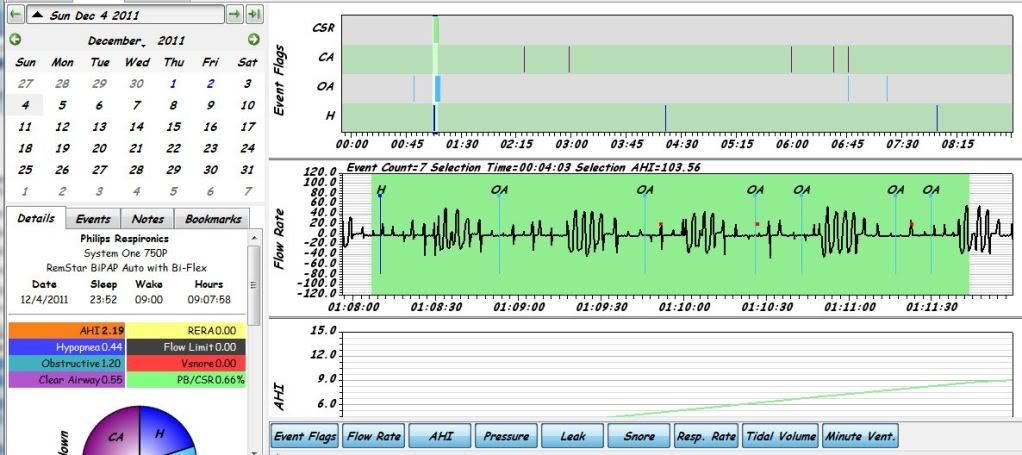
What is the last time that you see noted? I see 0500 or 0515. It is a very large cropped image but it appears to me that it is cropping that has removed the rest of any hours on the right side. It does fill my screen but there is definitely a small blue margin on the right side.
Do you see all of this report?
_________________
| Machine: AirCurve™ 10 VAuto BiLevel Machine with HumidAir™ Heated Humidifier |
| Additional Comments: Mask Bleep Eclipse https://bleepsleep.com/the-eclipse/ |
I may have to RISE but I refuse to SHINE.
Re: Data image difficulty
Good morning,
I solved the problem. It is a computer issue secondary to a bad eyes issue. The settings I have to have in order to read text crop the images.
I can see the full image but I can't read any of the text on it now...but that's always been an issue with me. And yes Pugsy, the images you sent were like that but now I can temporarily modify the screen settings to get full images. I'm a little slow with tech stuff.
Thanks for the help...
J
I solved the problem. It is a computer issue secondary to a bad eyes issue. The settings I have to have in order to read text crop the images.
I can see the full image but I can't read any of the text on it now...but that's always been an issue with me. And yes Pugsy, the images you sent were like that but now I can temporarily modify the screen settings to get full images. I'm a little slow with tech stuff.
Thanks for the help...
J

Re: Data image difficulty
Try zooming the browser window in & out, or is that what you are doing? You'll find the options under View/Zoom in most browsers, I think. I use Firefox and that's where it is there.jamiswolf wrote:Good morning,
I solved the problem. It is a computer issue secondary to a bad eyes issue. The settings I have to have in order to read text crop the images.
I can see the full image but I can't read any of the text on it now...but that's always been an issue with me. And yes Pugsy, the images you sent were like that but now I can temporarily modify the screen settings to get full images. I'm a little slow with tech stuff.
Thanks for the help...
J
_________________
| Mask: AirFit™ P10 Nasal Pillow CPAP Mask with Headgear |
| Humidifier: S9™ Series H5i™ Heated Humidifier with Climate Control |
| Additional Comments: Hose management - rubber band tied to casement window crank handle! Hey, it works! S/W is 3.13, not 3.7 |
Re: Data image difficulty
idamtnboy,
Thanks, that's what I did to resolve the issue. Feeling a little silly since it's so obvious now that I know what the problem is. Using Firefox and the control button and the +- keys do the job.
J
Thanks, that's what I did to resolve the issue. Feeling a little silly since it's so obvious now that I know what the problem is. Using Firefox and the control button and the +- keys do the job.
J
-
steveinmaine

- Posts: 24
- Joined: Mon Dec 05, 2011 4:17 pm
Re: Data image difficulty
I had the same issue. I found in Firefox, cntrl + spinning the middle wheel button zoomed it out for me.
Re: Data image difficulty
Thanks Steve...even easier. Probably all sort of cool Firefox tricks I don't know.steveinmaine wrote:I had the same issue. I found in Firefox, cntrl + spinning the middle wheel button zoomed it out for me.
J
-
Lizistired
- Posts: 2835
- Joined: Tue Dec 14, 2010 10:47 pm
- Location: Indiana
Re: Data image difficulty
It's still a pain to zoom in and out.. I have the problem on some posts and not on others. The first time I uploaded to photobucket, I think they ask me about adjusting the size of the image. I assumed that the images were to large.
_________________
| Humidifier: S9™ Series H5i™ Heated Humidifier with Climate Control |
| Additional Comments: Swift FX sometimes, CMS-50F, Cervical collar sometimes, White noise, Zeo... I'm not well, but I'm better. |
ResScan: http://www.resmed.com/int/assets/html/s ... c=patients
ResScan Tutorial- http://montfordhouse.com/cpap/resscan_tutorial/
Machines Video: http://www.cpaplibrary.com/machine-education
ResScan Tutorial- http://montfordhouse.com/cpap/resscan_tutorial/
Machines Video: http://www.cpaplibrary.com/machine-education
13 posts
• Page 1 of 1