


ResScan Data help


12 posts
• Page 1 of 1
ResScan Data help
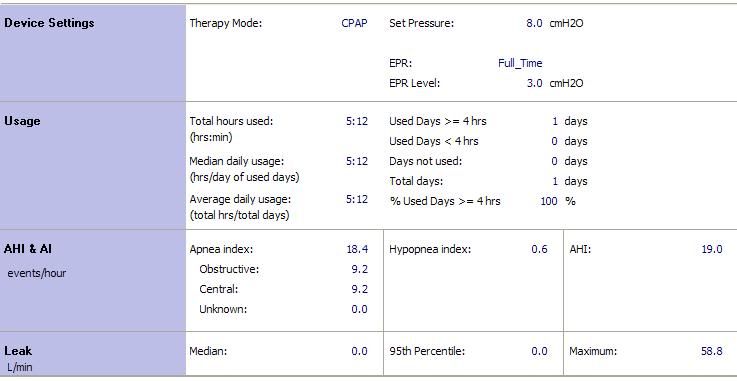
I have been using a Resmed S9 Elite for a week now. I haven't slept very well yet. I looked at the data on the SD card and I'm not sure what any of it really means. Here an example of what I feel my best night sleep with the CPAP has been. I have done some research and I know what AHI and AI are but what do the numbers mean and what is with the 95 percentile?

Re: Rescan Data help
I have the same machine and have been on it for 2 weeks now. I have not mastered interpretation of the leak, but my leak has been 0 most nights or negligible. My AHI has been 0.3-1.6. Looks like your AHI is high. Not sure if this is correct, if it is due in part to leak, or if you may need to talk to doctor about higher pressure? I know when they did my titration study, I needed a higher pressure to suppress my AHI below 5 consistently so I ended up on pressure of 14.
There are lots of experienced users who can help interpret your situation, but if that AHI is accurate it is too high and no wonder you don't feel good. Are you still waking up? Are you increasing your time on cpap? I try to use mine for 7.5 to 8 hrs per night.
There are lots of experienced users who can help interpret your situation, but if that AHI is accurate it is too high and no wonder you don't feel good. Are you still waking up? Are you increasing your time on cpap? I try to use mine for 7.5 to 8 hrs per night.
_________________
| Mask: Swift™ FX For Her Nasal Pillow CPAP Mask with Headgear |
| Humidifier: S9™ Series H5i™ Heated Humidifier with Climate Control |
| Additional Comments: ResMed Climate line tubing, Hose cozy, PurSleep Clear aroma therapy, Using latest version Sleepyhead sofware-thanks Jedimark! |

Re: ResScan Data help
I wonder if the 95th percentile leak figure is 0.0 You might want to download the session again(overwrite). I've had several instances where the figures initially shown didn't appear correct. They changed to something more reasonable after I downloaded/overwrote the session in question. I've encountered issues both with the machine recording of data and the software used to interpret the results. I'm wondering if you have a issue with leaks.
_________________
| Mask: Swift™ FX Nasal Pillow CPAP Mask with Headgear |
| Humidifier: S9™ Series H5i™ Heated Humidifier with Climate Control |
| Additional Comments: ResScan 4.30 |
When do I get the t-shirt?

Re: ResScan Data help
95% simply means for 95% of the time you were AT or Below whatever it is reporting. In this case leak. Essentially no leaks for 95% of the time. The other 5 % of the time it was above that number.
Maximum shows 58 L/min. Perhaps mask removal for short period of time.
While 0.0 leak is possible it does not seem probable given the maximum leak shown.
Are all your other nights showing 0.0 in median and 95%? If so, try unplugging the machine and then plug it back into the electric. This forces the firmware in the machine to reboot. Others have reported some odd data mainly zeros all the time in various categories. It is unusual to have 0.0 all the time. Hurts nothing to try the forced reboot and then see what tomorrow's data shows.
Did your sleep study show any incidence of centrals? On your reports have the centrals always been showing at roughly 50% of your AHI?
Maximum shows 58 L/min. Perhaps mask removal for short period of time.
While 0.0 leak is possible it does not seem probable given the maximum leak shown.
Are all your other nights showing 0.0 in median and 95%? If so, try unplugging the machine and then plug it back into the electric. This forces the firmware in the machine to reboot. Others have reported some odd data mainly zeros all the time in various categories. It is unusual to have 0.0 all the time. Hurts nothing to try the forced reboot and then see what tomorrow's data shows.
Did your sleep study show any incidence of centrals? On your reports have the centrals always been showing at roughly 50% of your AHI?
_________________
| Machine: AirCurve™ 10 VAuto BiLevel Machine with HumidAir™ Heated Humidifier |
| Additional Comments: Mask Bleep Eclipse https://bleepsleep.com/the-eclipse/ |
I may have to RISE but I refuse to SHINE.
Re: ResScan Data help
Can you please post all your graphs then we can see how everything interrelates.
It would be nice try and reduce the AHI numbers.
I often get a 95% leak value of 0.0
It would be nice try and reduce the AHI numbers.
I often get a 95% leak value of 0.0
_________________
| Mask: Swift™ FX Nasal Pillow CPAP Mask with Headgear |
| Humidifier: S9™ Series H5i™ Heated Humidifier with Climate Control |
| Additional Comments: CMS-50F, Night Vision camera, Hose hanger, ResScan 3.16, Modified Swift FX with head band and air diffuser. |

Re: ResScan Data help
Shaggy, in my opinion your results look OK. If you continue the treatment the AHI might go down. But I don't think that it is as important as you feel. I would pay attention to the central apnea index. For a plain OSA condition it should not be as hi as you show at 9.2. What was the prescribed pressure in your sleep study?
Another issue is that both your Obstructive and Central Apneas Indices are equal to 9.2. This seems to me to be a suspect. During the last 800 hours of CPAPing in my case it occurred to me only once that both were equal to 6.1 (which are above 5). In your case, since you just started it could be a chance or a machine malfunction. Here too, an attention is called for.
If you fill out a two weeks CPAP Log like this and post it here, it would help:

Another issue is that both your Obstructive and Central Apneas Indices are equal to 9.2. This seems to me to be a suspect. During the last 800 hours of CPAPing in my case it occurred to me only once that both were equal to 6.1 (which are above 5). In your case, since you just started it could be a chance or a machine malfunction. Here too, an attention is called for.
If you fill out a two weeks CPAP Log like this and post it here, it would help:
_________________
| Humidifier: S9™ Series H5i™ Heated Humidifier with Climate Control |
| Additional Comments: S9 Autoset machine; Ruby chinstrap under the mask straps; ResScan 5.6 |
Last edited by avi123 on Sat Aug 06, 2011 8:32 pm, edited 2 times in total.
see my recent set-up and Statistics:
http://i.imgur.com/TewT8G9.png
see my recent ResScan treatment results:
http://i.imgur.com/3oia0EY.png
http://i.imgur.com/QEjvlVY.png
http://i.imgur.com/TewT8G9.png
see my recent ResScan treatment results:
http://i.imgur.com/3oia0EY.png
http://i.imgur.com/QEjvlVY.png

Re: ResScan Data help
What about reducing the EPR? At a setting of 3 that means a good share of the night you are only receiving 5 cms of pressure.
_________________
| Mask: Quattro™ FX Full Face CPAP Mask with Headgear |
| Additional Comments: PR SystemOne BPAP Auto w/Bi-Flex & Humidifier - EncorePro 2.2 Software - Contec CMS-50D+ Oximeter - Respironics EverFlo Q Concentrator |
Women are Angels. And when someone breaks our wings, we simply continue to fly.....on a broomstick. We are flexible like that.
My computer says I need to upgrade my brain to be compatible with its new software.
My computer says I need to upgrade my brain to be compatible with its new software.



Re: ResScan Data help
Here's a generic example that should help make the meaning of "median" leak rate and "95th percentile" leak rate make more sense to those of you who are still struggling with the meaning of these numbers.
Let's suppose that you slept with the S9 running for 7.5 hours and we're looking at the overnight data in ResScan or off the LCD for the numbers it shows. Now lets suppose that ResScan says that your Leak Rate data looks like this:
Median = 1.0 L/min
95% = 2.5 L/min [This is the Leak number shown on the S9's LCD]
Max = 15 L/min
Now let's look at what those those numbers actually mean.
First it's important to realize that the Resmed machines and the ResScan software report Unintentional leak rates---in other words, an approximation of the mask's intentional leak rate is subtracted off the Total leak rate BEFORE the data is reported to the user. The intentional leak rate is designed to prevent users from rebreathing CO2. And note that otherbrands of CPAP machines often report Total Leak instead of Unintentional leak rate.
The median leak rate = 1.0 L/min means that for 50% of the time the S9 was on, your unintentional leak rate was LESS THAN or EQUAL TO 1.0 L/min. And so for 50% of the night, your unintentional leak rate was also GREATER THAN or EQUAL TO 1.0 L/min. So in the 7.5 hours you slept with the machine, for 3.25 hours (3 hours and 15 minutes) you had a leak rate of LESS THAN or EQUAL TO 1.0 L/min.
The 95% leak rate = 2.5 L/min means that for 95% of the time the S9 was on, your unintentional leak rate was LESS THAN or EQUAL TO 2.5 L/min. And so for 5% of the night, your unintentional leak rate was GREATER THAN or EQUAL TO 2.5 L/min. Now it's important to realize that 5% of one hour is equal to three minutes. Since you slept for 7.5 hours, that means your leak rate was GREATER THAN or EQUAL TO 2.5 L/min for a grand total of (3 minutes)*(7.5 hours)=22.5 minutes. That 22.5 minutes of "high leak rates" might be in one giant half hour leak or it could be in several smaller leaks---the only way to know is that to look at the detailed graphs in ResScan. [You find the detailed graphs under the "Detailed Graphs" tab. If you only download "summary data" the detailed graphs won't be there.]
The max leak rate=15L/min indicates that at some point when the S9 was sampling leak data, it detected an unintentional leak that was as large as 15L/min. It may have been a very short lived thing---when you broke the seal to scratch your nose for example. Or it could be that on one or two of the big leaks that you had, the leak pretty quickly went from in the neighborhood of 2.5 L/min to 15 L/min and stayed there. But you know for sure that you could not have leaked at a rate of 15L/min for more than about 22 minutes because of the 95% leak rate number and the time the machine was on.
Interpreting the leak rate data is also important:
First, on the Short Sleep Quality menu, if you see Mr. Red Frowny Face, that indicates your 75% leak rate is AT or ABOVE 24 L/min and Resmed's litertature indicates that your unintentional leak rate is AT or ABOVE a rate of 24 L/min for 25% of the night. And at that point, the ResMed engineers believe that your therapy can and probably is being compromised.
Many people take the 95% Leak Rate to be the key stat leak data. But it is worth looking at the median leak rate as well, in my opinion. The reason I look at both is that the median leak rate tells me whether I was leaking off and one all night long or not, where the 95% leak rate tells me if my worst leaks were bad ones or not. To illustrate what I mean, let's look at two examples:
Person A sleeps for 7.5 hours and is leaking off and on all night at a rate of 5.5 L/M and for about 25 minutes during the night, the leak rate actually is between 7 and 10 L/min. So A's leak numbers look like this:
median=5.5, 95%=7.0, and max=10.0
Now suppose Person B sleeps for 7.5 hours and has NO leaks at all for most of the night, but has ONE 25 minute leak where the leak rates are from 8 to 10 L/min during this leak. B's leak numbers look like this:
median=0.0, 95%=8.0, and max=10.0
Neither person's leak rates are great enough to cause Mr. Red Frowny Face to show up in the short Sleep Quality menu on the LCD. But Person A is likely to be having more significant problems with comfort due to leaking all night long.
Obviously, the closer to 0 your leak rate data is, the better obviously. But the information from Resmed seems to indicate that leaks above 24 L/min (the RED LINE in ResScan's detailed graphs) are enough to cause problems with the algorithms the S9 uses in order to detect and respond to apneas, hypopneas, flow limitations, and snores. So in any case you really want your 95% leak rate under 24 L/min to insure that you're getting some kind of meaningful therapy. But comfort is as a much of an issue as therapy is in my opinion: Nasty leaks cause most people real discomfort and they frequently cause people to wake up multiple times during the night to fiddle with the mask even when the leak is well below 24 L/min. For me, I don't worry at all if my 95% leak rate is below 10 L/min unless I had to fiddle with my mask more than once in the night. And if I wake up multiple times needing to fiddle with my mask because of leaks, then the leak rate IS a problem regardless of how low the 95% leak rate is.
Now as to the OP's posted leak numbers: It's possible that both the median and 95% leak rates could be equal to 0.0, with one very large, but very short lived leak triggering a max leak rate of 58.8 L/min. How long could it have lasted and still have the 95% = 0.0? Well:
(3 minutes) * (5.2 hours of usage) = max of 15.6 minutes of leaking ABOVE 0.0 L/min
So one really nasty 5--15 minute leak in an otherwise great night is enough to cause these kinds of numbers. Looking at the leak line would go a long way into figuring out what really happened and whether that 95% number can be "trusted"
Let's suppose that you slept with the S9 running for 7.5 hours and we're looking at the overnight data in ResScan or off the LCD for the numbers it shows. Now lets suppose that ResScan says that your Leak Rate data looks like this:
Median = 1.0 L/min
95% = 2.5 L/min [This is the Leak number shown on the S9's LCD]
Max = 15 L/min
Now let's look at what those those numbers actually mean.
First it's important to realize that the Resmed machines and the ResScan software report Unintentional leak rates---in other words, an approximation of the mask's intentional leak rate is subtracted off the Total leak rate BEFORE the data is reported to the user. The intentional leak rate is designed to prevent users from rebreathing CO2. And note that otherbrands of CPAP machines often report Total Leak instead of Unintentional leak rate.
The median leak rate = 1.0 L/min means that for 50% of the time the S9 was on, your unintentional leak rate was LESS THAN or EQUAL TO 1.0 L/min. And so for 50% of the night, your unintentional leak rate was also GREATER THAN or EQUAL TO 1.0 L/min. So in the 7.5 hours you slept with the machine, for 3.25 hours (3 hours and 15 minutes) you had a leak rate of LESS THAN or EQUAL TO 1.0 L/min.
The 95% leak rate = 2.5 L/min means that for 95% of the time the S9 was on, your unintentional leak rate was LESS THAN or EQUAL TO 2.5 L/min. And so for 5% of the night, your unintentional leak rate was GREATER THAN or EQUAL TO 2.5 L/min. Now it's important to realize that 5% of one hour is equal to three minutes. Since you slept for 7.5 hours, that means your leak rate was GREATER THAN or EQUAL TO 2.5 L/min for a grand total of (3 minutes)*(7.5 hours)=22.5 minutes. That 22.5 minutes of "high leak rates" might be in one giant half hour leak or it could be in several smaller leaks---the only way to know is that to look at the detailed graphs in ResScan. [You find the detailed graphs under the "Detailed Graphs" tab. If you only download "summary data" the detailed graphs won't be there.]
The max leak rate=15L/min indicates that at some point when the S9 was sampling leak data, it detected an unintentional leak that was as large as 15L/min. It may have been a very short lived thing---when you broke the seal to scratch your nose for example. Or it could be that on one or two of the big leaks that you had, the leak pretty quickly went from in the neighborhood of 2.5 L/min to 15 L/min and stayed there. But you know for sure that you could not have leaked at a rate of 15L/min for more than about 22 minutes because of the 95% leak rate number and the time the machine was on.
Interpreting the leak rate data is also important:
First, on the Short Sleep Quality menu, if you see Mr. Red Frowny Face, that indicates your 75% leak rate is AT or ABOVE 24 L/min and Resmed's litertature indicates that your unintentional leak rate is AT or ABOVE a rate of 24 L/min for 25% of the night. And at that point, the ResMed engineers believe that your therapy can and probably is being compromised.
Many people take the 95% Leak Rate to be the key stat leak data. But it is worth looking at the median leak rate as well, in my opinion. The reason I look at both is that the median leak rate tells me whether I was leaking off and one all night long or not, where the 95% leak rate tells me if my worst leaks were bad ones or not. To illustrate what I mean, let's look at two examples:
Person A sleeps for 7.5 hours and is leaking off and on all night at a rate of 5.5 L/M and for about 25 minutes during the night, the leak rate actually is between 7 and 10 L/min. So A's leak numbers look like this:
median=5.5, 95%=7.0, and max=10.0
Now suppose Person B sleeps for 7.5 hours and has NO leaks at all for most of the night, but has ONE 25 minute leak where the leak rates are from 8 to 10 L/min during this leak. B's leak numbers look like this:
median=0.0, 95%=8.0, and max=10.0
Neither person's leak rates are great enough to cause Mr. Red Frowny Face to show up in the short Sleep Quality menu on the LCD. But Person A is likely to be having more significant problems with comfort due to leaking all night long.
Obviously, the closer to 0 your leak rate data is, the better obviously. But the information from Resmed seems to indicate that leaks above 24 L/min (the RED LINE in ResScan's detailed graphs) are enough to cause problems with the algorithms the S9 uses in order to detect and respond to apneas, hypopneas, flow limitations, and snores. So in any case you really want your 95% leak rate under 24 L/min to insure that you're getting some kind of meaningful therapy. But comfort is as a much of an issue as therapy is in my opinion: Nasty leaks cause most people real discomfort and they frequently cause people to wake up multiple times during the night to fiddle with the mask even when the leak is well below 24 L/min. For me, I don't worry at all if my 95% leak rate is below 10 L/min unless I had to fiddle with my mask more than once in the night. And if I wake up multiple times needing to fiddle with my mask because of leaks, then the leak rate IS a problem regardless of how low the 95% leak rate is.
Now as to the OP's posted leak numbers: It's possible that both the median and 95% leak rates could be equal to 0.0, with one very large, but very short lived leak triggering a max leak rate of 58.8 L/min. How long could it have lasted and still have the 95% = 0.0? Well:
(3 minutes) * (5.2 hours of usage) = max of 15.6 minutes of leaking ABOVE 0.0 L/min
So one really nasty 5--15 minute leak in an otherwise great night is enough to cause these kinds of numbers. Looking at the leak line would go a long way into figuring out what really happened and whether that 95% number can be "trusted"
_________________
| Machine: DreamStation BiPAP® Auto Machine |
| Mask: Swift™ FX Nasal Pillow CPAP Mask with Headgear |
| Additional Comments: PR System DreamStation and Humidifier. Max IPAP = 9, Min EPAP=4, Rise time setting = 3, minPS = 3, maxPS=5 |
Re: ResScan Data help
Comments on the OP's posted AHI numbers this time.
A treated AHI of 19+ certainly indicates real problems with efficacy of treatment in my opinion. But we need some context here:
What were the numbers on the diagnostic sleep study? AHI = what? What was the breakdown between OA's, CA's, and H's? Because it is interesting that in the report posted, half the events are being labeled as CA's AND the number of CA's is high enough to cause a CAI = 9.2. Given that the machine ran for 5:12 = 5.2 hours, we can estimate the number of CA's:
#CA's = (9.2 CA's per hour) * (5.2 hours) = 47.84 = 48 clear airway apneas detected overnight (due to round off error)
And the presumption is that a clear airway apnea is likely to be a central apnea. So pugsy's questions about centrals on the sleep studies are pertinent and bear repeating:
1) Did your diagnostic sleep study show a large number of central apneas? If so, how many?
2) Did your titration study show a large number of central apneas? Did they start to "emerge" once the pressure got to a certain level? Did they become worse as pressure was increased?
And add to those questions:
3) Was your pressure setting of 8cm established by a titration sleep study? If so: Have you got a copy of the summary graphs? Did the tech ever increase the pressure above 8cm? If so, why was the pressure backed off to 8cm? Emergence of centrals?
4) On the titration study, what was the AHI, CAI, OAI achieved at each pressure setting that the tech tried on you? At what pressure was the AHI LOWEST? How long were you at that pressure? Did time at that pressure include any REM sleep or supine sleep?
5) You say the posted is the summary data for the "what I feel my best night sleep with the CPAP has been." Best in what sense? In terms of AHI numbers alone? Or in terms of how you felt the next morning?
Because depending on the answers, it could be that you're looking at CSA or CompSA instead of just plain old OSA.
Sp IMHO, since you aren't sleeping well yet AND you've got some really bad AHI numbers, I think a call to the sleep doctor's office is a prudent thing to do. Ask to speak to a doctor, nurse, or PA about what's going on---particularly with that CAI/OAI breakdown of AHI. They may or may not suggest that you come in for an office visit. They may very well authorize either a pressure adjustment or a week's trial of autotitration to check that titrated pressure.
A treated AHI of 19+ certainly indicates real problems with efficacy of treatment in my opinion. But we need some context here:
What were the numbers on the diagnostic sleep study? AHI = what? What was the breakdown between OA's, CA's, and H's? Because it is interesting that in the report posted, half the events are being labeled as CA's AND the number of CA's is high enough to cause a CAI = 9.2. Given that the machine ran for 5:12 = 5.2 hours, we can estimate the number of CA's:
#CA's = (9.2 CA's per hour) * (5.2 hours) = 47.84 = 48 clear airway apneas detected overnight (due to round off error)
And the presumption is that a clear airway apnea is likely to be a central apnea. So pugsy's questions about centrals on the sleep studies are pertinent and bear repeating:
1) Did your diagnostic sleep study show a large number of central apneas? If so, how many?
2) Did your titration study show a large number of central apneas? Did they start to "emerge" once the pressure got to a certain level? Did they become worse as pressure was increased?
And add to those questions:
3) Was your pressure setting of 8cm established by a titration sleep study? If so: Have you got a copy of the summary graphs? Did the tech ever increase the pressure above 8cm? If so, why was the pressure backed off to 8cm? Emergence of centrals?
4) On the titration study, what was the AHI, CAI, OAI achieved at each pressure setting that the tech tried on you? At what pressure was the AHI LOWEST? How long were you at that pressure? Did time at that pressure include any REM sleep or supine sleep?
5) You say the posted is the summary data for the "what I feel my best night sleep with the CPAP has been." Best in what sense? In terms of AHI numbers alone? Or in terms of how you felt the next morning?
Because depending on the answers, it could be that you're looking at CSA or CompSA instead of just plain old OSA.
Sp IMHO, since you aren't sleeping well yet AND you've got some really bad AHI numbers, I think a call to the sleep doctor's office is a prudent thing to do. Ask to speak to a doctor, nurse, or PA about what's going on---particularly with that CAI/OAI breakdown of AHI. They may or may not suggest that you come in for an office visit. They may very well authorize either a pressure adjustment or a week's trial of autotitration to check that titrated pressure.
_________________
| Machine: DreamStation BiPAP® Auto Machine |
| Mask: Swift™ FX Nasal Pillow CPAP Mask with Headgear |
| Additional Comments: PR System DreamStation and Humidifier. Max IPAP = 9, Min EPAP=4, Rise time setting = 3, minPS = 3, maxPS=5 |
Re: ResScan Data help
And one more thing:
Can you post a picture of the detailed data for this night----the graphs where we can see when the apneas occurred and how long they each lasted?
Because the distribution pattern of the events may also be enlightening in trying to answer the "Why do I still feel bad?"
Can you post a picture of the detailed data for this night----the graphs where we can see when the apneas occurred and how long they each lasted?
Because the distribution pattern of the events may also be enlightening in trying to answer the "Why do I still feel bad?"
_________________
| Machine: DreamStation BiPAP® Auto Machine |
| Mask: Swift™ FX Nasal Pillow CPAP Mask with Headgear |
| Additional Comments: PR System DreamStation and Humidifier. Max IPAP = 9, Min EPAP=4, Rise time setting = 3, minPS = 3, maxPS=5 |
-
Fitness Seeker

- Posts: 39
- Joined: Wed Aug 03, 2011 5:37 pm
Re: ResScan Data help
I"ve also been on my ResMed9 machine for a week. For 3 nites I had a nasal mask, which ireplaced 2 nights ago with a nasal pillows. But i'm still getting very unrefreshed sleep. The last 2 nites i've had my machine for at least 6 hours but b/c i've felt so exhausted. I then turned off the machine and removed the mask and ended up sleeping a little bit more, without the unit. Has anyone done this before when they first started w/ cpap? If so, how long did this go on?
Re: ResScan Data help
The waking up exhausted or the taking the mask off?Fitness Seeker wrote: Has anyone done this before when they first started w/ cpap? If so, how long did this go on?
Both things are common. Some people only have one of these problems; some have both.
How long does the "I need to take the mask off so I can sleep" pattern of behavior last? It depends on the choices you make: Because only you can control how long the "taking the mask off" problem lasts if you are consciously removing the mask and choosing to go back to sleep maskless. But the longer you let yourself do that, the longer it will take for you to become fully adjusted to the mask. And many people see little or no improvement in how they feel as long as they continue to sleep part time without the mask on their nose. And for some of those folks, this behavior is the start of a slippery slope that ends with the CPAP in the closest and the person sleeping sans mask 100% of the time.
How long does the feeling of waking up exhausted last? It depends: For most new CPAPers, it takes several WEEKS to several MONTHS before they notice much difference in how they feel; and a few unlucky CPAPers (like me) go through several months of feeling substantially worse on CPAP before we start to get back to our "normal" Pre-CPAP self; and then it can be several more weeks or months before we start to feel better than we did Pre-CPAP.
But getting to where you feel bright-eyed and bushy-tailed every morning when you first get up? Almost no-one sees that in the first week. Some CPAPers see that kind of energy start to return a few weeks to a few months after they initially start to feel a bit better. But some CPAPers never get to bright-eyed and bushy-tailed---perhaps because their bodies never fully recover from the damage the OSA has done. But continuing to CPAP prevents them from becoming even more worn out and more exhausted and more unhealthy in the long run.
Becoming a successful CPAPer requires reasonable expectations, hard work, and patience:
- Reasonable expectations---so you don't get discouraged if you're not one of the lucky ducks;
- Hard work---to use all your problem solving skills to troubleshoot all the inevitable difficulties of making the therapy work for you; and
- Patience---to keep on putting that mask on every night and working through the difficulties no matter how long it takes and how tired and frustrated you feel in the meantime.
_________________
| Machine: DreamStation BiPAP® Auto Machine |
| Mask: Swift™ FX Nasal Pillow CPAP Mask with Headgear |
| Additional Comments: PR System DreamStation and Humidifier. Max IPAP = 9, Min EPAP=4, Rise time setting = 3, minPS = 3, maxPS=5 |
12 posts
• Page 1 of 1