General Discussion on any topic relating to CPAP and/or Sleep Apnea.
-
Rogue Uvula
- Posts: 158
- Joined: Sun Aug 15, 2010 9:01 am
- Location: Georgia
Post
by Rogue Uvula » Mon Aug 30, 2010 8:12 pm
I loaded a copy of ResScan 3.11 on my desktop (Windows XP) and on my Laptop (Vista).
For some reason I cannot access the "flow" graph on my desktop while it is available on the laptop.
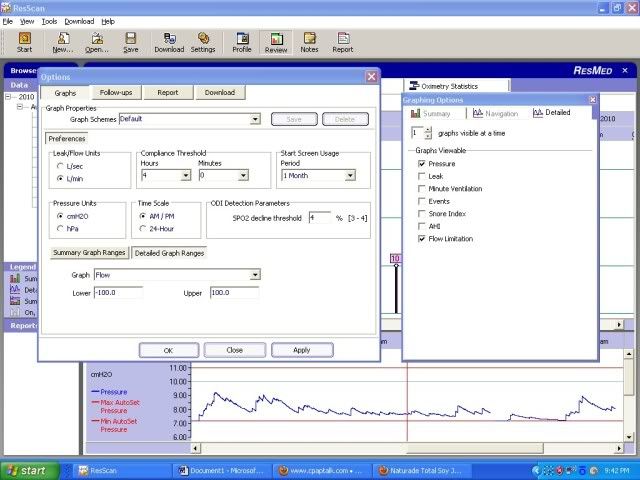
Here is a desktop image. You can see that it is listed in the Tools > Options "Detailed Graphs" Window; however it is not listed in the "Graphing Options", "Graphs Viewable" checklist.
On the laptop it works fine!
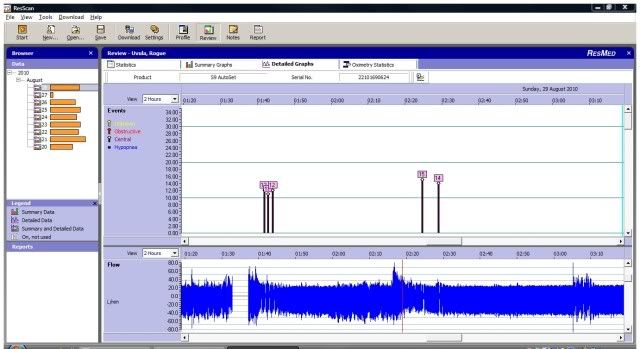
Any ideas?
TIA
Sleep well and prosper!
-
Guest
Post
by Guest » Mon Aug 30, 2010 8:16 pm
Change the graphs visable at a time to "2" andit should show up
-
Rogue Uvula
- Posts: 158
- Joined: Sun Aug 15, 2010 9:01 am
- Location: Georgia
Post
by Rogue Uvula » Mon Aug 30, 2010 8:24 pm
Thanks, but if you look at the options, "Flow Limitations" shows, but not "Flow"
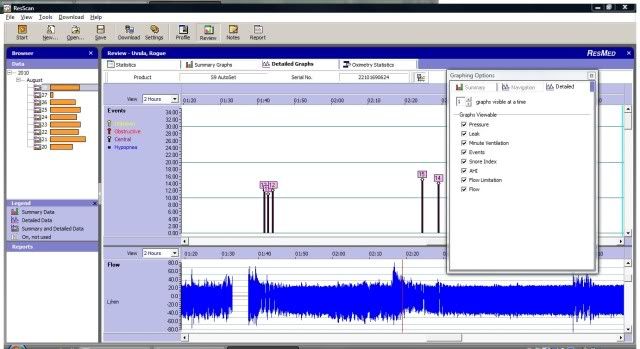
I accidentally "lost" the "Graphing Options" window from my image above. If you look at this window below, you will see "Flow" on the checklist (at the very bottom), but it is not an option on the first image above.
I hope that made better sense!
Sleep well and prosper!
-
mcdad
- Posts: 51
- Joined: Sun Aug 15, 2010 2:28 pm
Post
by mcdad » Mon Aug 30, 2010 8:30 pm
ok, use the slider on the right side and you should be able to slide to the data you want.
-
Rogue Uvula
- Posts: 158
- Joined: Sun Aug 15, 2010 9:01 am
- Location: Georgia
Post
by Rogue Uvula » Mon Aug 30, 2010 8:57 pm
Thanks gvz,
But it is still the same.
Happily, I have a "flow" graph on the laptop, so I'll wait awhile and try any more suggestions before I totally remove and reload ResScan.
Sleep well and prosper!
-
KatieW
- Posts: 1671
- Joined: Sun Sep 27, 2009 11:07 am
- Location: southern AZ
Post
by KatieW » Mon Aug 30, 2010 9:05 pm
On the page "Select Data Type to Download", make sure you say yes to all these:
--All Summary data and all detailed data sessions
--Include equivalent number of high rate data sessions
--Set these as my default options
KatieW
-
jdm2857
- Posts: 2982
- Joined: Wed Aug 20, 2008 8:29 pm
- Location: South Jersey
Post
by jdm2857 » Mon Aug 30, 2010 9:12 pm
I think Katie is on the right track. The high-rate data is the flow data. If you didn't download it to the Vista machine, you can't display it (obviously).
jeff
-
Uncle_Bob
- Posts: 2777
- Joined: Tue Feb 24, 2009 12:10 pm
- Location: Arizona
Post
by Uncle_Bob » Mon Aug 30, 2010 10:42 pm
and the high rate flow data is only stored for 7 days on the SD card
-
Rogue Uvula
- Posts: 158
- Joined: Sun Aug 15, 2010 9:01 am
- Location: Georgia
Post
by Rogue Uvula » Tue Aug 31, 2010 1:41 pm
Thanks for the help!
The high rate data was not checked in the download preferences window for the machine which did not provide flow data, so I believe it is reasonable to assume that was the issue.
I'll know for sure tomorrow. I had already downloaded today's data, and for some reason ResScan, my SD card reader, and my computer don't like to shake hands after I have downloaded the data once for that day!
Sleep well and prosper!