



I'm pulling data off of my S9 but while parts of it, like leak rate etc make sense to me, the section on "Events" does not.
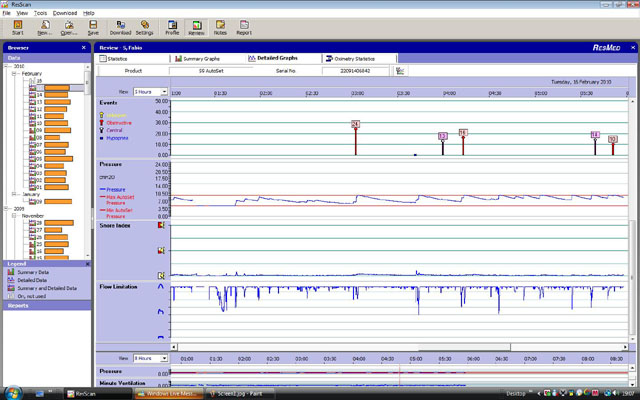
Each of the "events" has a number associated with it - I understand that event = bad and a bigger event means more bad, but what does the number assocaiated with the event actually mean? I have quite a few and they seem to come in clusters around the same time as the snoring chart goes off the graph.
I was going to insert a copy of one of my reports here but can't persuade the picture to upload to Twitter so I can link it.
How do I read these reports


4 posts
• Page 1 of 1
How do I read these reports
_________________
| Mask: Swift™ FX Nasal Pillow CPAP Mask with Headgear |
| Humidifier: S9™ Series H5i™ Heated Humidifier with Climate Control |
Re: How do I read these reports
If you mean the numbers like the ones on top of the red lines below, it is the length of time, in seconds, that an event lasts. Is that what you mean?AndrewB wrote:I'm pulling data off of my S9 but while parts of it, like leak rate etc make sense to me, the section on "Events" does not.
Each of the "events" has a number associated with it - I understand that event = bad and a bigger event means more bad, but what does the number assocaiated with the event actually mean? I have quite a few and they seem to come in clusters around the same time as the snoring chart goes off the graph.
I was going to insert a copy of one of my reports here but can't persuade the picture to upload to Twitter so I can link it.

Re: How do I read these reports
When look at my data using the ResScan software I don't get that graph. I do have all data checked. I just get summary graphs and Statistics. Am I doing something wrong?
_________________
| Mask: Wisp Nasal CPAP Mask with Headgear - Fit Pack |
| Humidifier: S9™ Series H5i™ Heated Humidifier with Climate Control |
| Additional Comments: SleepyHead software, mouth guard, Respironics chinstrap, 3M Medical tape |
Good Better Best, Never Let It Rest
Until The Good Is Better And The Better Is Best
Until The Good Is Better And The Better Is Best
Re: How do I read these reports
Yep those are the ones - dandy. I had thought that it was some sort of severity number related to pressure. Time makes complete sense.jnk wrote: If you mean the numbers like the ones on top of the red lines below, it is the length of time, in seconds, that an event lasts. Is that what you mean?
Now if only I could have mine look as nice as yours .... Mine has whole forests of those red lines.
_________________
| Mask: Swift™ FX Nasal Pillow CPAP Mask with Headgear |
| Humidifier: S9™ Series H5i™ Heated Humidifier with Climate Control |
4 posts
• Page 1 of 1