




Hello,
I am hoping my question can be answered, it is a little bit technical.
I was diagnosed with Apnea in February and have the Res Med machine.
Traditionally on the apnea scale, I have a very low score with only 3 or 4 apnea's an hour. However my non breathing times reach up to 86 seconds, whereby my Oxygen saturation drops to a very low dangerous level.
My starting pressure is 8 and currently I am on 11.2 on variable pressure
For a few months I was on 8-11 and this worked and then the apneas returned. Because they are so long I awaken in a panic, struggling to get air in, adrenaline kicks in and obviously the next day I feel average.
My time of support with the sleep clinic is now over but this is not resolved. Currently my apneas are 57 seconds which is better but I would prefer them for less time.
I was advised that I should step up the pressure every week or two until I find a level where it is good. However I seem to have a problem with the gas/air intake so I have to step this up slowly
A fair few times I have asked this question - what is my ceiling and how will I know when i reach it but they cannot answer me. Ever since I have started this journey the pressure is being turned up and I just want to know where is the level it will need to stop so that I will no longer have these long apneas.
I am hoping there is a person with a similar problem who can advise me.
I am aware if I get above my ideal pressure that my central apneas will return and that is something I want to avoid.
I am not overweight. I am female. I am 40.
Any other information happy to supply
Ceiling of air for CPAP

Re: Ceiling of air for CPAP
Hello and welcome to the forum. If you have a data capable machine there is a lot we can help you with here. The best first step is to register as a forum member and enter your equipment: mask and exact machine make/model like you see at the bottom of our messages (there are several different ResMed machines, even within the S9 series so be sure to indicate the exact one: Autoset, Elite, Escape, Escape Auto...). This will make it easier for people to give you better targeted help.
Depending on what machine you have we can also help you get software that will allow you and us to examine more closely what's going on with your pressures, leaks, and apnea events (including what type of apnea event, and its duration). You can enter your equipment info by clicking on the User Control Panel once you've registered on the forum. If you need more help doing this let us know. If your machine is fully data capable you will be able to find your "ideal" pressure over time using the free available software, and you'll get lots of help and support from this community.
Depending on what machine you have we can also help you get software that will allow you and us to examine more closely what's going on with your pressures, leaks, and apnea events (including what type of apnea event, and its duration). You can enter your equipment info by clicking on the User Control Panel once you've registered on the forum. If you need more help doing this let us know. If your machine is fully data capable you will be able to find your "ideal" pressure over time using the free available software, and you'll get lots of help and support from this community.
_________________
| Machine: AirSense 10 AutoSet with Heated Humidifer + Aifit N30i Nasal Mask Bundle |
| Additional Comments: SleepyHead-now-OSCAR software on Mac OSX Ventura |
-
FreeFlight
- Posts: 11
- Joined: Fri Jul 19, 2013 2:09 am
Re: Ceiling of air for CPAP
Thank you for your reply and welcome
Sorry about not registering first.
I believe I have done this correctly. Please let me know if I have missed anything
Sorry about not registering first.
I believe I have done this correctly. Please let me know if I have missed anything
_________________
| Mask: Quattro™ FX For Her Full Face Mask with Headgear |
| Humidifier: S9™ Series H5i™ Heated Humidifier with Climate Control |
| Additional Comments: Current tore |
Re: Ceiling of air for CPAP
Beautiful! You have a data capable machine. This is great news. Next, do you want to download software so that you can start looking more closely at what's going on during the night? If so, you might start with SleepyHead, free open source software (and there's a Mac version if you use a Mac). Here's the link to SleepyHead:FreeFlight wrote:I believe I have done this correctly. Please let me know if I have missed anything
http://sourceforge.net/projects/sleepyhead/files/
Let us know if you need help with it.
Also, do you have the clinical manual for your machine? It may come in handy as you start working on adjustments.
Good video tutorial here: http://www.cpaplibrary.com/machines.html
And the S9 Autoset Manual: http://www.apneuvereniging.nl/forum/pdf ... manual.pdf
_________________
| Machine: AirSense 10 AutoSet with Heated Humidifer + Aifit N30i Nasal Mask Bundle |
| Additional Comments: SleepyHead-now-OSCAR software on Mac OSX Ventura |
-
FreeFlight
- Posts: 11
- Joined: Fri Jul 19, 2013 2:09 am
Re: Ceiling of air for CPAP
Hello
thanks I have downloaded this. I am OK with the machine and manual - know how to adjust pressures and so on.
thanks
thanks I have downloaded this. I am OK with the machine and manual - know how to adjust pressures and so on.
thanks
_________________
| Mask: Quattro™ FX For Her Full Face Mask with Headgear |
| Humidifier: S9™ Series H5i™ Heated Humidifier with Climate Control |
| Additional Comments: Current tore |
-
FreeFlight
- Posts: 11
- Joined: Fri Jul 19, 2013 2:09 am
Re: Ceiling of air for CPAP
Thank you so much for this SW. I can now manage my own treatment, this helps so much. Very appreciated
As I have low AHI, and my problem is controlling the length of Apneas...is there a way on the SW to read the length. I cant see one?
As I have low AHI, and my problem is controlling the length of Apneas...is there a way on the SW to read the length. I cant see one?
_________________
| Mask: Quattro™ FX For Her Full Face Mask with Headgear |
| Humidifier: S9™ Series H5i™ Heated Humidifier with Climate Control |
| Additional Comments: Current tore |

Re: Ceiling of air for CPAP
FreeFlight wrote:As I have low AHI, and my problem is controlling the length of Apneas...is there a way on the SW to read the length. I cant see one?
If you look on the left hand side of SH, you'll see the calendar, just under that are 4 tabs (Details, Events, Notes, Bookmarks). Click on the Events tab and that will show you what you're looking for.
David
_________________
| Mask: ComfortGel Blue Nasal CPAP Mask with Headgear |
| Humidifier: S9™ Series H5i™ Heated Humidifier with Climate Control |
| Additional Comments: Wisp Mask, Pressure is set between 8.5 and 12.5. With a M Series Auto as a backup. Also a CMS-50D+ PulseOX |
Look twice, save a life. You never know when you might see a motorcyclist.

Re: Ceiling of air for CPAP
Welcome to the forum.
Could you look at the upper left of open SleepyHead and tell us what version you are using? I want to make sure you have the latest version 0.9.3 so you have all the data available. The website is pointing to files for 9.1 as being the latest and it isn't.
Someone didn't change that properly.
If you don't have 9.3 you will find it in the list...look for files dated May 19, 2013.
Are you using EPR exhale relief feature? If so at what setting?
You might want to read this...not only some help with what you see but how to post images of your reports so we can see what you are seeing.
understanding your data viewtopic/t88983/Pugsys-PointersSleepyH ... nding.html
Could you look at the upper left of open SleepyHead and tell us what version you are using? I want to make sure you have the latest version 0.9.3 so you have all the data available. The website is pointing to files for 9.1 as being the latest and it isn't.
Someone didn't change that properly.
If you don't have 9.3 you will find it in the list...look for files dated May 19, 2013.
Are you using EPR exhale relief feature? If so at what setting?
You might want to read this...not only some help with what you see but how to post images of your reports so we can see what you are seeing.
understanding your data viewtopic/t88983/Pugsys-PointersSleepyH ... nding.html
_________________
| Machine: AirCurve™ 10 VAuto BiLevel Machine with HumidAir™ Heated Humidifier |
| Additional Comments: Mask Bleep Eclipse https://bleepsleep.com/the-eclipse/ |
I may have to RISE but I refuse to SHINE.
-
FreeFlight
- Posts: 11
- Joined: Fri Jul 19, 2013 2:09 am
Re: Ceiling of air for CPAP
drj130 wrote:FreeFlight wrote:As I have low AHI, and my problem is controlling the length of Apneas...is there a way on the SW to read the length. I cant see one?
If you look on the left hand side of SH, you'll see the calendar, just under that are 4 tabs (Details, Events, Notes, Bookmarks). Click on the Events tab and that will show you what you're looking for.
David
Thanks David, I have found this now. Very kind of you
_________________
| Mask: Quattro™ FX For Her Full Face Mask with Headgear |
| Humidifier: S9™ Series H5i™ Heated Humidifier with Climate Control |
| Additional Comments: Current tore |
-
FreeFlight
- Posts: 11
- Joined: Fri Jul 19, 2013 2:09 am
Re: Ceiling of air for CPAP
Thank you for your welcome and assistance, it is very appreciated.Pugsy wrote:Welcome to the forum.
Could you look at the upper left of open SleepyHead and tell us what version you are using? I want to make sure you have the latest version 0.9.3 so you have all the data available. The website is pointing to files for 9.1 as being the latest and it isn't.
Someone didn't change that properly.
If you don't have 9.3 you will find it in the list...look for files dated May 19, 2013.
Are you using EPR exhale relief feature? If so at what setting?
You might want to read this...not only some help with what you see but how to post images of your reports so we can see what you are seeing.
understanding your data viewtopic/t88983/Pugsys-PointersSleepyH ... nding.html
Yes it was Verson 9.1, I have now downloaded 9.3
I am not using but will have a look with it tomorrow and see what I can change there. I believe this helps with the insuffulation
I have more confidence in this site and your combined knowledge in a few hours than I have had in my clinic which has dealt with me over the last 6 months. They told me I am doing fine as my AHI is so low yet I can see from this software I am still having obstructive events up to 80 seconds and even though I sit at air pressure 11 the entire night they had nothing to suggest apart from turning it up until 'it 'felt OK' and that 'I'd know' when I was not having apneas anymore.
There is a massive amount of information provided so I will read through it and come back to you when I figure out how to post data. This is absolutely legendary software and such a great resource for me. Thank you!
_________________
| Mask: Quattro™ FX For Her Full Face Mask with Headgear |
| Humidifier: S9™ Series H5i™ Heated Humidifier with Climate Control |
| Additional Comments: Current tore |
Re: Ceiling of air for CPAP
I'm glad that I could help. I'm still learning and tweaking here. Have/had some bad leaks that I'm still trying to get under control.
I don't know much, but if I can help, I will.
David
I don't know much, but if I can help, I will.
David
_________________
| Mask: ComfortGel Blue Nasal CPAP Mask with Headgear |
| Humidifier: S9™ Series H5i™ Heated Humidifier with Climate Control |
| Additional Comments: Wisp Mask, Pressure is set between 8.5 and 12.5. With a M Series Auto as a backup. Also a CMS-50D+ PulseOX |
Look twice, save a life. You never know when you might see a motorcyclist.

Re: Ceiling of air for CPAP
It is all too common to be dismissed based on your AHI being low. If someone has an AHI of less than 1, maybe experiences only one apnea event a night, but that event stretches in time as yours does, that's CLEARLY unacceptable!
Do you know if your apneas are obstructive or central in nature? I would have guessed (and that's all I can do) that with such an infrequent appearance and yet so long lasting it would be central in nature, and if that is the case raising your pressure maybe be the exact WRONG approach. In fact if that is the case you may need a more sophisticated machine.
You can get an idea from the data if it is obstructive or not. The machine will mark apneas that it detects with a flag indicating whether it detects your breathing to be block (Obstructed) or open (Clear Airway). The machine can not tell if it is central in nature ... that requires a simultaneous EEG. But we can make assumptions.
Have you been able to look at any of your data yet?
Do you know if your apneas are obstructive or central in nature? I would have guessed (and that's all I can do) that with such an infrequent appearance and yet so long lasting it would be central in nature, and if that is the case raising your pressure maybe be the exact WRONG approach. In fact if that is the case you may need a more sophisticated machine.
You can get an idea from the data if it is obstructive or not. The machine will mark apneas that it detects with a flag indicating whether it detects your breathing to be block (Obstructed) or open (Clear Airway). The machine can not tell if it is central in nature ... that requires a simultaneous EEG. But we can make assumptions.
Have you been able to look at any of your data yet?
_________________
| Machine | Mask | |
 |  |
Sleep loss is a terrible thing. People get grumpy, short-tempered, etc. That happens here even among the generally friendly. Try not to take it personally.
-
FreeFlight
- Posts: 11
- Joined: Fri Jul 19, 2013 2:09 am
Re: Ceiling of air for CPAP
Hi Kevin,
No mine are obstructives.
I do have some centrals but the long ones are obstructives.
Thanks
Ainsley
No mine are obstructives.
I do have some centrals but the long ones are obstructives.
Thanks
Ainsley
_________________
| Mask: Quattro™ FX For Her Full Face Mask with Headgear |
| Humidifier: S9™ Series H5i™ Heated Humidifier with Climate Control |
| Additional Comments: Current tore |
-
FreeFlight
- Posts: 11
- Joined: Fri Jul 19, 2013 2:09 am
Re: Ceiling of air for CPAP
Hello,
I think I have this figured out. Have attached link below.
My question is this: If I am sitting on my 11.2 ceiling and have to turn up the pressure each week by .2, how do I know when to stop? I was told not to go past 12 as this would affect my centrals...
Obviously this software - sleepy head - is a massive improvement to how I manage this as I can watch after the pressure is turned up and see how many obstructives are sneaking through and their length. I guess the main issue with me here is confidence to manage my own treatment and you have provided me with this via this software
thank you
ainsley
http://s1290.photobucket.com/user/freef ... sort=3&o=0
I think I have this figured out. Have attached link below.
My question is this: If I am sitting on my 11.2 ceiling and have to turn up the pressure each week by .2, how do I know when to stop? I was told not to go past 12 as this would affect my centrals...
Obviously this software - sleepy head - is a massive improvement to how I manage this as I can watch after the pressure is turned up and see how many obstructives are sneaking through and their length. I guess the main issue with me here is confidence to manage my own treatment and you have provided me with this via this software
thank you
ainsley
http://s1290.photobucket.com/user/freef ... sort=3&o=0

_________________
| Mask: Quattro™ FX For Her Full Face Mask with Headgear |
| Humidifier: S9™ Series H5i™ Heated Humidifier with Climate Control |
| Additional Comments: Current tore |
Re: Ceiling of air for CPAP
Hi Ainsley,
You can have your image(s) appear right in your post by copying the Image code -- you won't see the actual image until you click on Preview. If you can see it in Preview, then we'll see it too. So for your image this is what you'd paste into your post, with IMG in brackets like this [ ] at the beginning, and /IMG in brackets [ ] at the end:
http://i1290.photobucket.com/albums/b53 ... 94276f.png
and you'll see this in preview
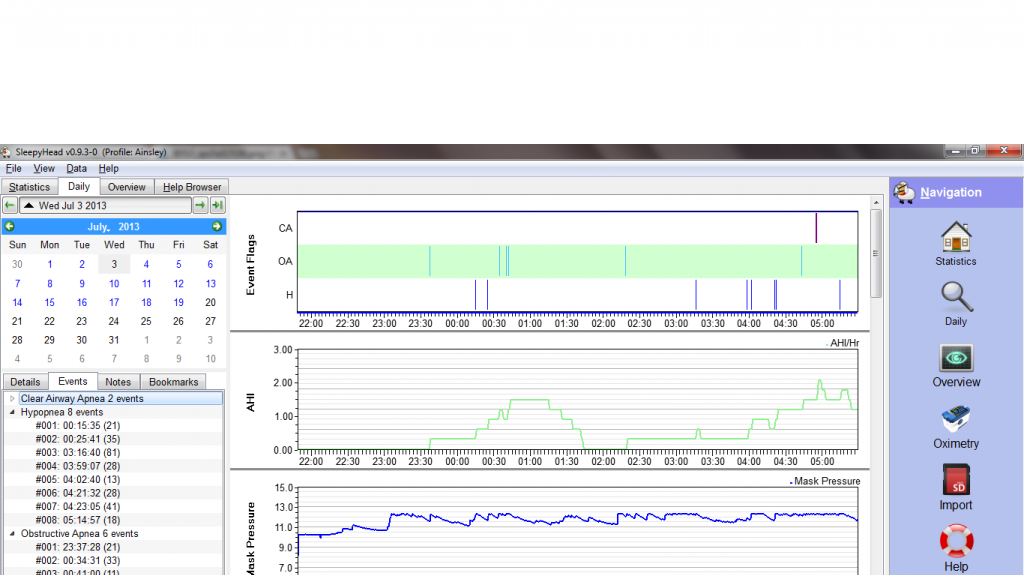
I think it's most helpful for us to see these graphs: AHI Event Flags (at the top of your image. Turn off the AHI graph because it's redundant), Pressure (turn off Mask Pressure), Flow Rate, Flow Limitation, Leaks, and Snore. Turn off all the others for now, and you can get all the mentioned graphs into one image. Somebody tell me if I'm forgetting something.
What are your minimum and maximum pressure settings now? I'm wondering if the solution that's being recommended to you, only raising the max pressure, is not the whole story, and if the minimum pressure should be paid attention to also. If the max keeps getting raised and the min stays the same, then it's going to take longer and longer for the machine to raise the pressure to max in response to an event. Sometimes raising the min pressure gives the machine a head start in the event of an event (pun intended), and I wonder if some of those events might be shortened and/or eliminated with a higher min pressure. But first we need to see the whole picture to address this question.
I should say that I just passed the one year mark with my machine so I'm not a senior here, but Pugsy and other folks with more expertise will surely weigh in and advise. But I'd go ahead and post another image with the graphs I mentioned because it will give them a better picture.
You can have your image(s) appear right in your post by copying the Image code -- you won't see the actual image until you click on Preview. If you can see it in Preview, then we'll see it too. So for your image this is what you'd paste into your post, with IMG in brackets like this [ ] at the beginning, and /IMG in brackets [ ] at the end:
http://i1290.photobucket.com/albums/b53 ... 94276f.png
and you'll see this in preview
I think it's most helpful for us to see these graphs: AHI Event Flags (at the top of your image. Turn off the AHI graph because it's redundant), Pressure (turn off Mask Pressure), Flow Rate, Flow Limitation, Leaks, and Snore. Turn off all the others for now, and you can get all the mentioned graphs into one image. Somebody tell me if I'm forgetting something.
What are your minimum and maximum pressure settings now? I'm wondering if the solution that's being recommended to you, only raising the max pressure, is not the whole story, and if the minimum pressure should be paid attention to also. If the max keeps getting raised and the min stays the same, then it's going to take longer and longer for the machine to raise the pressure to max in response to an event. Sometimes raising the min pressure gives the machine a head start in the event of an event (pun intended), and I wonder if some of those events might be shortened and/or eliminated with a higher min pressure. But first we need to see the whole picture to address this question.
I should say that I just passed the one year mark with my machine so I'm not a senior here, but Pugsy and other folks with more expertise will surely weigh in and advise. But I'd go ahead and post another image with the graphs I mentioned because it will give them a better picture.
_________________
| Machine: AirSense 10 AutoSet with Heated Humidifer + Aifit N30i Nasal Mask Bundle |
| Additional Comments: SleepyHead-now-OSCAR software on Mac OSX Ventura |