


After 10 years I finally...Data now included!


10 posts
• Page 1 of 1

After 10 years I finally...Data now included!
I've been using a brick for 10 years. I got my new machine yesterday so I have data. Can someone explain how to post the data here? I am not sure if the data is good or not. Thanks in advance.
_________________
| Machine: PR System One REMStar 60 Series Auto + Heated Tube Humidifier Core |
| Mask: FlexiFit HC431 Full Face CPAP Mask with Headgear |
| Additional Comments: Software: EncoreBasic 2.1 |
Last edited by stipton on Wed Sep 05, 2012 3:24 pm, edited 1 time in total.
Some good people in here!

Re: After 10 years I finally have my 1st night sleep data
Here are my standard "how to post images" instructions.
Open the image to full size so it is easily read.
I use Vista snipping tool to create a screen shot and crop the image at the same time.
Prt/scr key will also take a screen shot if using XP. If laptop is used sometimes the Fn key has to be pushed at the same time as the prt/scr key
I think windows 7 Home Premium has the snipping tool, Basic may not.
Once the screen shot is created save it in jpg format.
Upload the image to a host site. I use Photobucket it is free, there are others.
Once the image is uploaded then copy the ENTIRE IMG address. Be sure to include the opening and closing IMG in brackets. Paste that copied address into a post here.
If you want to use Photobucket they provide a box with the various url addresses and you just choose the last one in the box.
Copy/paste that last line url address into the body of your post.
Use the preview button. If you can't see the image try again because if you can't see it we can't.
You can use any photo hosting website of your choice but if you want to use Photobucket then here are additional instructions.
Once you have it in Photobucket look for the box of addresses.
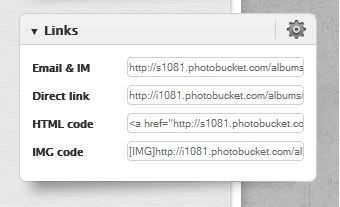
See the last line in that box...that is the image code url address...put your mouse cursor over it and copy it...it is held on the invisible clipboard...the come to your blank post here in the forum and put your mouse cursor on the blank page...right click your mouse....choose paste...the copied IMG address should show up.
You will only see the IMG box and the address in code.....use the preview button to see the image.
If you do it this way you don't have to use the IMG or URL buttons on the forum editor above your post.
You don't see the image when you are composing a post...it only shows the code for the link to where it is until you either preview it or click on submit.
Open the image to full size so it is easily read.
I use Vista snipping tool to create a screen shot and crop the image at the same time.
Prt/scr key will also take a screen shot if using XP. If laptop is used sometimes the Fn key has to be pushed at the same time as the prt/scr key
I think windows 7 Home Premium has the snipping tool, Basic may not.
Once the screen shot is created save it in jpg format.
Upload the image to a host site. I use Photobucket it is free, there are others.
Once the image is uploaded then copy the ENTIRE IMG address. Be sure to include the opening and closing IMG in brackets. Paste that copied address into a post here.
If you want to use Photobucket they provide a box with the various url addresses and you just choose the last one in the box.
Copy/paste that last line url address into the body of your post.
Use the preview button. If you can't see the image try again because if you can't see it we can't.
You can use any photo hosting website of your choice but if you want to use Photobucket then here are additional instructions.
Once you have it in Photobucket look for the box of addresses.
See the last line in that box...that is the image code url address...put your mouse cursor over it and copy it...it is held on the invisible clipboard...the come to your blank post here in the forum and put your mouse cursor on the blank page...right click your mouse....choose paste...the copied IMG address should show up.
You will only see the IMG box and the address in code.....use the preview button to see the image.
If you do it this way you don't have to use the IMG or URL buttons on the forum editor above your post.
You don't see the image when you are composing a post...it only shows the code for the link to where it is until you either preview it or click on submit.
_________________
| Machine: AirCurve™ 10 VAuto BiLevel Machine with HumidAir™ Heated Humidifier |
| Additional Comments: Mask Bleep Eclipse https://bleepsleep.com/the-eclipse/ |
I may have to RISE but I refuse to SHINE.
Re: After 10 years I finally have my 1st night sleep data

Finally got it posted! So how does it look?
_________________
| Machine: PR System One REMStar 60 Series Auto + Heated Tube Humidifier Core |
| Mask: FlexiFit HC431 Full Face CPAP Mask with Headgear |
| Additional Comments: Software: EncoreBasic 2.1 |
Some good people in here!
Re: After 10 years I finally have my 1st night sleep data
Short on time at the moment. Looks like a little more minimum is needed to maybe cut the snores down just a little more if you want a "cleaner" looking report.stipton wrote: Finally got it posted! So how does it look?
Nothing critical though by any means.
How did you sleep last night?
I will be leaving the house shortly so can't respond until way late tonight.
I don't see anything glaringly needing immediate attention. I would want to see if I would reduce the snores a bit but again....nothing hugely critical. Just maybe a little tweaking.
The minimum pressure is the most critical. If you change it...go up in small increments...at the stage you are at small changes can make a bigger difference than you might think. Some people will likely suggest 10 cm minimum...I wouldn't do it unless I went up slowly and had proof it was needed but that is me. I tend to take my time and go slow. No sense in using more than is needed.
_________________
| Machine: AirCurve™ 10 VAuto BiLevel Machine with HumidAir™ Heated Humidifier |
| Additional Comments: Mask Bleep Eclipse https://bleepsleep.com/the-eclipse/ |
I may have to RISE but I refuse to SHINE.
Re: After 10 years I finally have my 1st night sleep data
At the 6:45 (or so) time there is a gap, then a large leak. Did you take the mask off at that point?stipton wrote:
Finally got it posted! So how does it look?
_________________
| Machine: PR System One REMStar 60 Series Auto CPAP Machine |
| Mask: AirFit™ P10 Nasal Pillow CPAP Mask with Headgear |
| Additional Comments: Zeo Bedside, CMS-50E Pulse Oximeter |
Re: After 10 years I finally...Data now included!
Yep...nature called.
_________________
| Machine: PR System One REMStar 60 Series Auto + Heated Tube Humidifier Core |
| Mask: FlexiFit HC431 Full Face CPAP Mask with Headgear |
| Additional Comments: Software: EncoreBasic 2.1 |
Some good people in here!
Re: After 10 years I finally have my 1st night sleep data
Felt good when I got up this morning. I also used a FFM for the first time last night. I think it (the mask) is going to be good but I did have quite a few awakenings from leaks. I am sure I will get better with the mask. I have always used a nasal, but lately sinus issues have forced me to try something else. I have a habit of mouth breathing even with the chin strap as tight as possible. I guess mouth breathing is not the accurate term, I should say snoring. My wife is the one that helped convince me I needed a new machine. I think she would like to get some sleep as well.Pugsy wrote:Short on time at the moment. Looks like a little more minimum is needed to maybe cut the snores down just a little more if you want a "cleaner" looking report.stipton wrote: Finally got it posted! So how does it look?
Nothing critical though by any means.
How did you sleep last night?
I will be leaving the house shortly so can't respond until way late tonight.
I don't see anything glaringly needing immediate attention. I would want to see if I would reduce the snores a bit but again....nothing hugely critical. Just maybe a little tweaking.
The minimum pressure is the most critical. If you change it...go up in small increments...at the stage you are at small changes can make a bigger difference than you might think. Some people will likely suggest 10 cm minimum...I wouldn't do it unless I went up slowly and had proof it was needed but that is me. I tend to take my time and go slow. No sense in using more than is needed.
I did notice a bit of uncomfort with exhales. Almost like the Aflex should be turned down? I think I had it set on 2. I may reduce it tonight.
_________________
| Machine: PR System One REMStar 60 Series Auto + Heated Tube Humidifier Core |
| Mask: FlexiFit HC431 Full Face CPAP Mask with Headgear |
| Additional Comments: Software: EncoreBasic 2.1 |
Some good people in here!

Re: After 10 years I finally...Data now included!
In Resmed AutoCPAP machines the Vibratory Snore and the RERA are usually taken care of at pressures of around 10 cm. Why doesn't that Respironics machine do the same?
You're using the same kind of mask as I do, but I don't see that you are using a chinstrap. How about trying one and see if it helps?
I see some synchronization between the leaks and pressure. The one at #8 is an example.
You're using the same kind of mask as I do, but I don't see that you are using a chinstrap. How about trying one and see if it helps?
I see some synchronization between the leaks and pressure. The one at #8 is an example.
_________________
| Humidifier: S9™ Series H5i™ Heated Humidifier with Climate Control |
| Additional Comments: S9 Autoset machine; Ruby chinstrap under the mask straps; ResScan 5.6 |
Re: After 10 years I finally...Data now included!
Respironics algorithm is different from ResMed algorithm and Respironics machines respond differently when event precursors are present. They take a more cautious approach and go up in stages and more slowly than ResMed machines respond. Can't really do an apples to apples comparison.avi123 wrote:In Resmed AutoCPAP machines the Vibratory Snore and the RERA are usually taken care of at pressures of around 10 cm. Why doesn't that Respironics machine do the same?
_________________
| Machine: AirCurve™ 10 VAuto BiLevel Machine with HumidAir™ Heated Humidifier |
| Additional Comments: Mask Bleep Eclipse https://bleepsleep.com/the-eclipse/ |
I may have to RISE but I refuse to SHINE.
Re: After 10 years I finally...Data now included!
Ahh, that likely explains the leaks and some of the leaks might explain some of the pressure increases. Hard to say for sure which one came first.stipton wrote:I also used a FFM for the first time last night. I think it (the mask) is going to be good but I did have quite a few awakenings from leaks. I am sure I will get better with the mask.
Play with the AFlex setting.. there is a demo so you can try the other settings to see which one feels better.
You can also use CFlex. I found AFlex more natural feeling but you might like CFlex.
You might like it turned off. Choice is yours.
Remember also...this machine is going to feel a bit different from what you have been used to for the past 10 years.
You tried a new mask and a new machine in one night.
Concentrate on the mask and leaks first...then see what is left on the reports once the leaks are a little better managed and you don't have so many awakenings with leaks. Some of what we see in the snore line could be leaks making noise and some might also be some awake event stuff getting flagged.
_________________
| Machine: AirCurve™ 10 VAuto BiLevel Machine with HumidAir™ Heated Humidifier |
| Additional Comments: Mask Bleep Eclipse https://bleepsleep.com/the-eclipse/ |
I may have to RISE but I refuse to SHINE.
10 posts
• Page 1 of 1