




I have used my Apap with data for about 3 weeks and have successfully downloaded my first sleepyhead report. I am trying to interpret it. I have seen people post their reports on this forum. Can someone tell this almost computer illiterate person how to do this? My AHI was 6.73 which I think is good. I had 18 Clear Airway Apnea Events, 29 Hypopnea events, 13 Obstructive Apnea events and 19 Resp Effort Related Arousal events. Is this all OK? I was told my pressures are set from 4 to 18. My sleep study titrated me to 14.
Thank you for all your help!
Help with Sleepyhead data
Help with Sleepyhead data
_________________
| Machine: PR System One REMStar 60 Series Auto CPAP Machine |
| Mask: Mirage™ FX Nasal CPAP Mask with Headgear |
| Additional Comments: EncoreBasic |
Philips Respironics
Re: Help with Sleepyhead data
Are you running windows 7? If so, the most simple way is to go to ---> Start / All Programs / Accesories / Snipping Tool
With your left mouse button, press and drag the screen view over the graphs in SleepyHead.
Save it to your desktop or where ever you can best locate the file.
I use tinypic.com for the uploading as I find it most simpliest. Just follow the directions to Upload a file - select the file you just saved to "Desktop" or wherever. Once uploaded, Just copy the [ Img ] your pic file name [ / IMG ] link and paste it into your post!
With your left mouse button, press and drag the screen view over the graphs in SleepyHead.
Save it to your desktop or where ever you can best locate the file.
I use tinypic.com for the uploading as I find it most simpliest. Just follow the directions to Upload a file - select the file you just saved to "Desktop" or wherever. Once uploaded, Just copy the [ Img ] your pic file name [ / IMG ] link and paste it into your post!
_________________
| Mask: Swift™ FX Nasal Pillow CPAP Mask with Headgear |
| Additional Comments: SleepyHead & Encore Basic Software & a Zeo |
 .....................................................
 Press ESC if the animations BUG you!.....................................................
Re: Help with Sleepyhead data
I use Windows Vista. Any suggestions?
_________________
| Machine: PR System One REMStar 60 Series Auto CPAP Machine |
| Mask: Mirage™ FX Nasal CPAP Mask with Headgear |
| Additional Comments: EncoreBasic |
Philips Respironics
Re: Help with Sleepyhead data
Same appliesmerhaba12 wrote:I use Windows Vista. Any suggestions?
http://m.lifehacker.com/228885/windows- ... pping-tool
_________________
| Mask: Swift™ FX Nasal Pillow CPAP Mask with Headgear |
| Additional Comments: SleepyHead & Encore Basic Software & a Zeo |
.....................................................Press ESC if the animations BUG you!.....................................................
Re: Help with Sleepyhead data
Vista has the snipping tool and using it makes it super easy.
Find it in accessories...right click mouse and choose "pin to start menu" then you will always have it close by and won't have to go hunting.
If you don't know how to use it just google "how to use snipping tool in vista" and you can find the instructions.
Here are my standard how to insert images into posts speech.
Open the image to full size so it is easily read.
I use Vista snipping tool to create a screen shot and crop the image at the same time.
Prt/scr key will also take a screen shot if using XP. If laptop is used sometimes the Fn key has to be pushed at the same time as the prt/scr key
I think windows 7 Home Premium has the snipping tool, Basic may not.
Once the screen shot is created save it in jpg format.
Upload the image to a host site. I use Photobucket it is free, there are others.
Once the image is uploaded then copy the ENTIRE IMG address. Be sure to include the opening and closing IMG in brackets. Paste that copied address into a post here.
If you want to use Photobucket they provide a box with the various url addresses and you just choose the last one in the box.
Copy/paste that l url address into the body of your post.
Use the preview button. If you can't see the image try again because if you can't see it we can't.
If you want to use Photobucket (its free) they provide a box of various links so you can send the image for others to see
The last line in the box is the one you use here....just point mouse over it and copy the link..come to the body of your forum post and right click mouse and choose "paste" the image link code with the opening and closing IMG brackets are already included so no need to do nothing else. Click on the preview button to see if the link is the right one...if it is you will see the image. Then you can go ahead and submit the post.
Find it in accessories...right click mouse and choose "pin to start menu" then you will always have it close by and won't have to go hunting.
If you don't know how to use it just google "how to use snipping tool in vista" and you can find the instructions.
Here are my standard how to insert images into posts speech.
Open the image to full size so it is easily read.
I use Vista snipping tool to create a screen shot and crop the image at the same time.
Prt/scr key will also take a screen shot if using XP. If laptop is used sometimes the Fn key has to be pushed at the same time as the prt/scr key
I think windows 7 Home Premium has the snipping tool, Basic may not.
Once the screen shot is created save it in jpg format.
Upload the image to a host site. I use Photobucket it is free, there are others.
Once the image is uploaded then copy the ENTIRE IMG address. Be sure to include the opening and closing IMG in brackets. Paste that copied address into a post here.
If you want to use Photobucket they provide a box with the various url addresses and you just choose the last one in the box.
Copy/paste that l url address into the body of your post.
Use the preview button. If you can't see the image try again because if you can't see it we can't.
If you want to use Photobucket (its free) they provide a box of various links so you can send the image for others to see
The last line in the box is the one you use here....just point mouse over it and copy the link..come to the body of your forum post and right click mouse and choose "paste" the image link code with the opening and closing IMG brackets are already included so no need to do nothing else. Click on the preview button to see if the link is the right one...if it is you will see the image. Then you can go ahead and submit the post.
_________________
| Machine: AirCurve™ 10 VAuto BiLevel Machine with HumidAir™ Heated Humidifier |
| Additional Comments: Mask Bleep Eclipse https://bleepsleep.com/the-eclipse/ |
I may have to RISE but I refuse to SHINE.
Re: Help with Sleepyhead data
I don't know what I am doing wrong. When I go to accessories there isn't an option for Snipping tool. I also tried searching for it.
_________________
| Machine: PR System One REMStar 60 Series Auto CPAP Machine |
| Mask: Mirage™ FX Nasal CPAP Mask with Headgear |
| Additional Comments: EncoreBasic |
Philips Respironics
Re: Help with Sleepyhead data
I forgot to mention that the data on my SD card goes back 1 year. I have only had the machine for 1 month. Should I ask the DME to erase everything up to 6/25/2012?
_________________
| Machine: PR System One REMStar 60 Series Auto CPAP Machine |
| Mask: Mirage™ FX Nasal CPAP Mask with Headgear |
| Additional Comments: EncoreBasic |
Philips Respironics
Re: Help with Sleepyhead data
merhaba12 wrote:I don't know what I am doing wrong. When I go to accessories there isn't an option for Snipping tool. I also tried searching for it.
Check the "comments" in the link I posted regarding the snipping tool and Vista: http://m.lifehacker.com/228885/windows- ... pping-tool
I didn't have windows vista long enough to personally comment with any knowledge, however, it seems there is a method that some need to follow enabling (Tablet Accessories) or something to get it in Vista.
_________________
| Mask: Swift™ FX Nasal Pillow CPAP Mask with Headgear |
| Additional Comments: SleepyHead & Encore Basic Software & a Zeo |
.....................................................Press ESC if the animations BUG you!.....................................................Re: Help with Sleepyhead data
Vista Basic may not have the Snipping Tool. So it may be your Vista version.
There is a free program call Screen Hunter that a lot of the forum members here use to get their screen shots. Pretty easy to manage from what I have heard.
If your SD card has data on it prior to when you started therapy then either your SD card and/or machine was previously used. Was it presented as "new".
You can check machine hours to see if those hours correspond with your hours on your reports.
Old data can be selectively erased from the SD card but if the machine was used then it will just put the old data right back on the SD card if you erase it. If the machine does have prior hours of use on it then there is a way to erase just the prior therapy data and reset it to zero. You would also need to erase the SD card and start fresh at the same time or the SD card will just put the old data back to the machine.
Therapy hours can be reset to zero along with any of the other associated data points.
Machine hours of use for the life of the machine cannot be reset.
There is a free program call Screen Hunter that a lot of the forum members here use to get their screen shots. Pretty easy to manage from what I have heard.
If your SD card has data on it prior to when you started therapy then either your SD card and/or machine was previously used. Was it presented as "new".
You can check machine hours to see if those hours correspond with your hours on your reports.
Old data can be selectively erased from the SD card but if the machine was used then it will just put the old data right back on the SD card if you erase it. If the machine does have prior hours of use on it then there is a way to erase just the prior therapy data and reset it to zero. You would also need to erase the SD card and start fresh at the same time or the SD card will just put the old data back to the machine.
Therapy hours can be reset to zero along with any of the other associated data points.
Machine hours of use for the life of the machine cannot be reset.
_________________
| Machine: AirCurve™ 10 VAuto BiLevel Machine with HumidAir™ Heated Humidifier |
| Additional Comments: Mask Bleep Eclipse https://bleepsleep.com/the-eclipse/ |
I may have to RISE but I refuse to SHINE.
Re: Help with Sleepyhead data
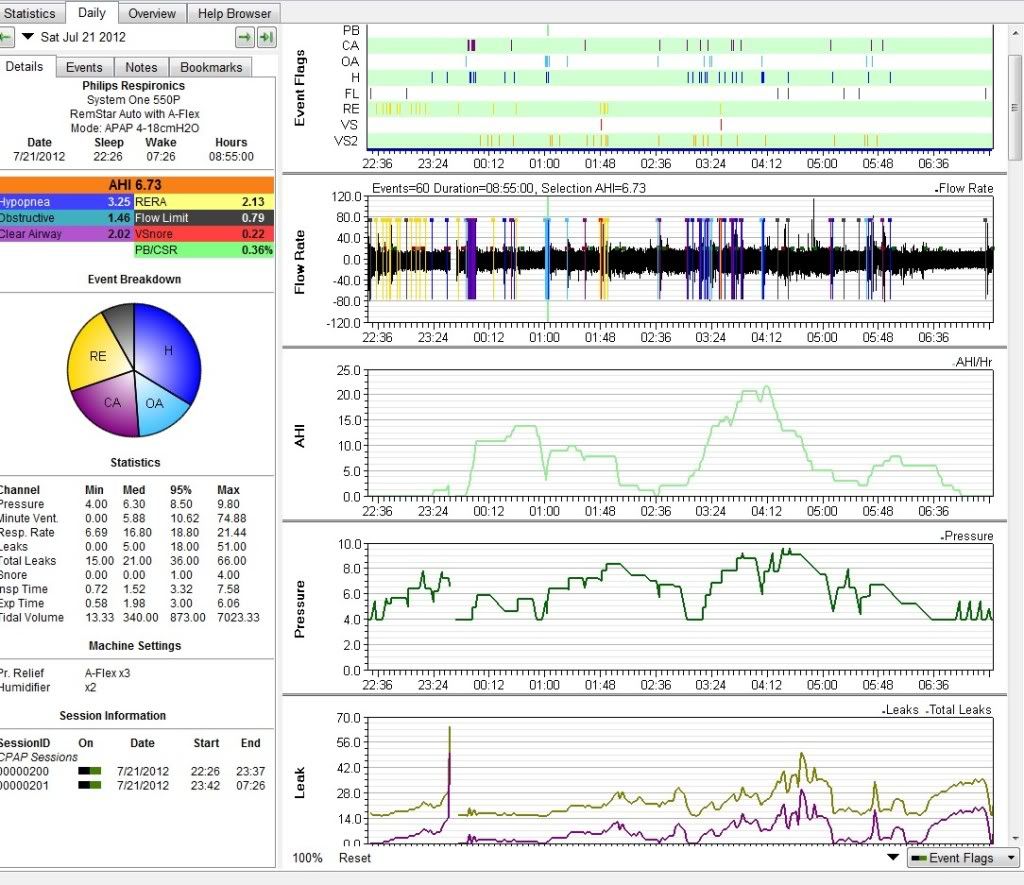
It worked! Thanks, Pugsy! The only problem I had was when I was taking the snapshot, I couldnt' include "snores, etc. because I had to scroll down to see it. Hopefully this much is enough for your input. Being new to CPAP, I am curious why if I am using the APAP, why do I still have apneas? I thought the machine was supposed to adjust the pressure so this would not happen.
_________________
| Machine: PR System One REMStar 60 Series Auto CPAP Machine |
| Mask: Mirage™ FX Nasal CPAP Mask with Headgear |
| Additional Comments: EncoreBasic |
Philips Respironics
Re: Help with Sleepyhead data
You can go to your preferences tab and graph section...you can turn off the AHI graph and then your snores should be on the same page. Though it isn't a critical issue.
How come you are using the 4 cm minimum? Is this what was prescribed?
How come you are using the 4 cm minimum? Is this what was prescribed?
_________________
| Machine: AirCurve™ 10 VAuto BiLevel Machine with HumidAir™ Heated Humidifier |
| Additional Comments: Mask Bleep Eclipse https://bleepsleep.com/the-eclipse/ |
I may have to RISE but I refuse to SHINE.
Re: Help with Sleepyhead data
My doc wrote the Rx for 4-18. My sleep study titrated to 14. In looking over the data from the past 3 weeks, I never need more than a pressure of 9. I think starting at 4 is too little air. Should I ask the DME to reset it to a 6? (I think the DME has the ability of setting the pressures of plus or minus 2.)
_________________
| Machine: PR System One REMStar 60 Series Auto CPAP Machine |
| Mask: Mirage™ FX Nasal CPAP Mask with Headgear |
| Additional Comments: EncoreBasic |
Philips Respironics
Re: Help with Sleepyhead data
I believe that is the correct path to take, personally. Pugsy will verify. 4 is a bit low and likely going to take the machine too long to respond to snores, ect.. and catch up to "events".merhaba12 wrote:My doc wrote the Rx for 4-18. My sleep study titrated to 14. In looking over the data from the past 3 weeks, I never need more than a pressure of 9. I think starting at 4 is too little air. Should I ask the DME to reset it to a 6? (I think the DME has the ability of setting the pressures of plus or minus 2.)
_________________
| Mask: Swift™ FX Nasal Pillow CPAP Mask with Headgear |
| Additional Comments: SleepyHead & Encore Basic Software & a Zeo |
.....................................................Press ESC if the animations BUG you!.....................................................Re: Help with Sleepyhead data
I think that would be a good idea.merhaba12 wrote:Should I ask the DME to reset it to a 6? (I think the DME has the ability of setting the pressures of plus or minus 2.)
Minimum of 4 probably does seem like not enough air movement for you and it isn't getting the job done.
Setting the minimum to 6 will be easier to breathe and also give the machine a better head start and I think you will also see some improvement in your reports.
_________________
| Machine: AirCurve™ 10 VAuto BiLevel Machine with HumidAir™ Heated Humidifier |
| Additional Comments: Mask Bleep Eclipse https://bleepsleep.com/the-eclipse/ |
I may have to RISE but I refuse to SHINE.
Re: Help with Sleepyhead data
Thank you, Lazer & Pugsy! I appreciate all your help!
_________________
| Machine: PR System One REMStar 60 Series Auto CPAP Machine |
| Mask: Mirage™ FX Nasal CPAP Mask with Headgear |
| Additional Comments: EncoreBasic |
Philips Respironics