




Last Friday I finally got my PR 450 cpap machine exchanged for a PR 550 so I would have an auto. I downloaded Sleepyhead this morning and was able to export the info. from my first machine's SD card, now my problem is that I can't seem to export anything from the SD card from the new machine's SD card. Do I have to do something with that first info. that I put on there or is it because it is from a different machine? It doesn't give me the choice of choosing the letter C that it did when I first exported info. Just ask me if I want to use the usual, or new location, but those won't work.
Thanks ahead of time if anyone has any answers for me, I doubt if I would still be using the cpap if it weren't for the information on this site. My numbers and hours have gotten better since last November. I think the new machine is better so far. I was unlucky enough to chose an awful DME, but that's another story
Marcella
Need some help with Sleepyhead
Need some help with Sleepyhead
_________________
| Mask: Mirage™ FX Nasal CPAP Mask with Headgear |
| Humidifier: S9™ Series H5i™ Heated Humidifier with Climate Control |

Re: Need some help with Sleepyhead
SleepyHead will let you have multiple machines' data stored under one user name. I have 3 PR S1 machines' data and 2 ReSmed machines' data all under one user name.
Some of the old data is stored on my computer and some of it is still on the SD cards.
If you put the SD card from the new machine in your computer and open SleepyHead and create a new location...pointing SleepyHead only to the drive letter where the SD card sits (not into the SD card itself) it should work. If it doesn't work can you tell us exactly what steps you are or were using to get the first set of data from the Pro machine?
I can use the same "location" no matter which SD card I use. A couple of times SleepyHead has "forgot" the location and told me no data available but it was fixed when I created a new location to import from and made sure it was correct and save that location for further use.
Some of the old data is stored on my computer and some of it is still on the SD cards.
If you put the SD card from the new machine in your computer and open SleepyHead and create a new location...pointing SleepyHead only to the drive letter where the SD card sits (not into the SD card itself) it should work. If it doesn't work can you tell us exactly what steps you are or were using to get the first set of data from the Pro machine?
I can use the same "location" no matter which SD card I use. A couple of times SleepyHead has "forgot" the location and told me no data available but it was fixed when I created a new location to import from and made sure it was correct and save that location for further use.
_________________
| Machine: AirCurve™ 10 VAuto BiLevel Machine with HumidAir™ Heated Humidifier |
| Additional Comments: Mask Bleep Eclipse https://bleepsleep.com/the-eclipse/ |
I may have to RISE but I refuse to SHINE.
Re: Need some help with Sleepyhead
For some reason it won't let me use the usual or new location, Just have to close out of it. I'm wondering if I should take it off of the computer and redo the whole thing. I felt lucky to get it downloaded and get the infor. on there from the first card. I removed that first info from sleepyhead because I already had that info. on paper & that didn't help. I've been at it for a few hours. It keeps telling me it might be in the preferences, but not sure what it could be in there. I have it on the laptop now, was thinking about trying it on the desktop, so I could start all over.
Thanks for your reply, I appreciate it. I'm feeling a little overwhelmed at the momet
Marcella
Thanks for your reply, I appreciate it. I'm feeling a little overwhelmed at the momet
Marcella
_________________
| Mask: Mirage™ FX Nasal CPAP Mask with Headgear |
| Humidifier: S9™ Series H5i™ Heated Humidifier with Climate Control |
Re: Need some help with Sleepyhead
It should let you create a new location and if for some reason that area is not active then about all you can do is remove SleepyHead and install again. There is a setting in preferences to "Skip log in screen"...I don't have this checked but it may be a reason why you can't get the usual choices for importing data.
If you are using SleepyHead Beta version you will need to uninstall SleepyHead AND also manually remove the SleepApp folder found in My Documents or SleepyHead won't install again.
All data is stored on the PR SD card so it hurts nothing to try a fresh install.
If you are using SleepyHead Beta version you will need to uninstall SleepyHead AND also manually remove the SleepApp folder found in My Documents or SleepyHead won't install again.
All data is stored on the PR SD card so it hurts nothing to try a fresh install.
_________________
| Machine: AirCurve™ 10 VAuto BiLevel Machine with HumidAir™ Heated Humidifier |
| Additional Comments: Mask Bleep Eclipse https://bleepsleep.com/the-eclipse/ |
I may have to RISE but I refuse to SHINE.
Re: Need some help with Sleepyhead
I have now been able to try the new locations that are in the drop-down file when I get there, but I get a little pop-up when I try them.... saying "Import Problem , Couldn't find any new machine data for the location given" So does that mean I should add some info. about the different machine somewhere.
I use windows XP.
I use windows XP.
_________________
| Mask: Mirage™ FX Nasal CPAP Mask with Headgear |
| Humidifier: S9™ Series H5i™ Heated Humidifier with Climate Control |
Re: Need some help with Sleepyhead
When you find the new location.....are you telling it the drive letter where the SD card is sitting or are you telling it the SD card folder? If you are telling it the SD card folder you have gone too far.
SleepyHead is designed to import from either backup folders on C drive or the entire contents of the drive letter where the SD card resides. Most common error is to go to the first folder and that is too far.
If you have anything other than the drive letter in the window to choose..you have gone too far.
This is all that needs to be in the box to choose...my SD card is in drive E.
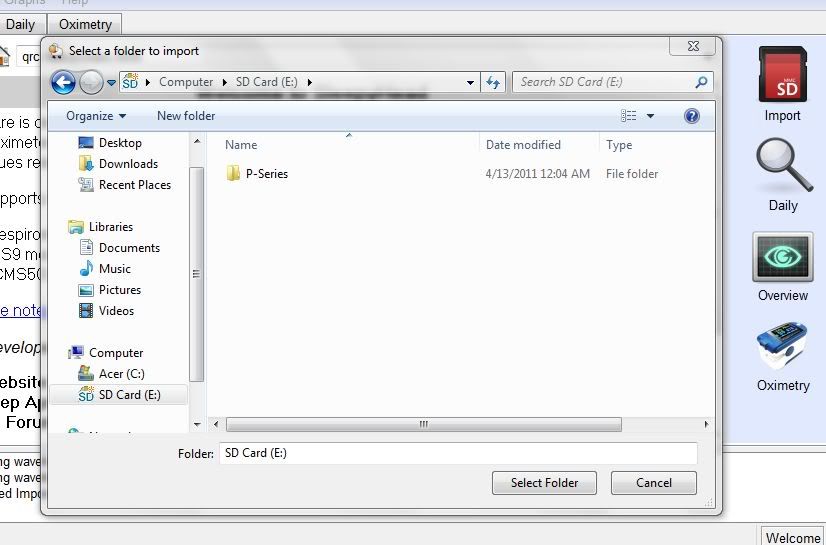
If you have anything else in that box...you aren't in the right spot and SH can't find the data.
We used to have to go to the P Series folder but SH works with multiple machines and only the PR S1 machine has P Series folders. So it wouldn't work with ResMed machines....they don't have P Series folders...hence the change to a "look in the whole drive" thing calling the "Folder" the drive letter and not the individual folder.
SleepyHead is designed to import from either backup folders on C drive or the entire contents of the drive letter where the SD card resides. Most common error is to go to the first folder and that is too far.
If you have anything other than the drive letter in the window to choose..you have gone too far.
This is all that needs to be in the box to choose...my SD card is in drive E.
If you have anything else in that box...you aren't in the right spot and SH can't find the data.
We used to have to go to the P Series folder but SH works with multiple machines and only the PR S1 machine has P Series folders. So it wouldn't work with ResMed machines....they don't have P Series folders...hence the change to a "look in the whole drive" thing calling the "Folder" the drive letter and not the individual folder.
_________________
| Machine: AirCurve™ 10 VAuto BiLevel Machine with HumidAir™ Heated Humidifier |
| Additional Comments: Mask Bleep Eclipse https://bleepsleep.com/the-eclipse/ |
I may have to RISE but I refuse to SHINE.
Re: Need some help with Sleepyhead
I am pretty sure it is C, I will go over all the info. you have sent and try to figure something out. I am ashamed to say I have been at this since 4:00am and my eyes are about to give out, so will take a break, then probably put it on the desktop and see what happens. I really need to be able to use this so I can have a better idea of what is going on. I was on a pressure of 6, but that just seemed to suffocate me, so I changed the pressure to 7, then 7.5 and my AHI finally went below 5 , I now have the new machine set at a range of 7.5 to 9 and I like the A-flex better than the C-flex, might not be much difference, but seems like there is.
I'll let you know if I have any success. Thanks so much, you help so many people.
Marcella
I'll let you know if I have any success. Thanks so much, you help so many people.
Marcella
_________________
| Mask: Mirage™ FX Nasal CPAP Mask with Headgear |
| Humidifier: S9™ Series H5i™ Heated Humidifier with Climate Control |
Re: Need some help with Sleepyhead
C drive is usually the main drive where the entire contents of the computer resides.
C drive could be used if you had copied the contents of the SD card to C drive folder on desktop and pointed SH to those copied files.
Otherwise..the SD card won't be sitting in C drive and if SleepHead is looking in C drive...it won't find the SD card.
If you will insert the SD card in the slot...open SleepyHead...create a new location...look in MyComputer for the drive that has the SD card in it...point to only the drive letter like my example...it will work.
C drive could be used if you had copied the contents of the SD card to C drive folder on desktop and pointed SH to those copied files.
Otherwise..the SD card won't be sitting in C drive and if SleepHead is looking in C drive...it won't find the SD card.
If you will insert the SD card in the slot...open SleepyHead...create a new location...look in MyComputer for the drive that has the SD card in it...point to only the drive letter like my example...it will work.
_________________
| Machine: AirCurve™ 10 VAuto BiLevel Machine with HumidAir™ Heated Humidifier |
| Additional Comments: Mask Bleep Eclipse https://bleepsleep.com/the-eclipse/ |
I may have to RISE but I refuse to SHINE.
Re: Need some help with Sleepyhead
OK, I'm going to print out some of your information and see if I can follow it. I'm getting ready to download it to the desktop now and see what happens.
I live in the country close to a little town of Crocker, near Ft. Leonard Wood and Lake of the Ozarks. We are farmers, well my husband is, I just like living in the country
I live in the country close to a little town of Crocker, near Ft. Leonard Wood and Lake of the Ozarks. We are farmers, well my husband is, I just like living in the country
_________________
| Mask: Mirage™ FX Nasal CPAP Mask with Headgear |
| Humidifier: S9™ Series H5i™ Heated Humidifier with Climate Control |
Re: Need some help with Sleepyhead
I am a country girl too. I know where Crocker is. I am outside Mount Vernon southwest of you. Pretty much in the middle of tornado alley when it comes up I44.
The 2 deer in my avatar...twins that I watched grow up from babies to adults. They were born in my pasture behind the barn and had to grow up in my pasture till big enough to jump the fence (horse fence so can't sneak under). They were quite used to my presence and I got those pictures from about 30 feet away.
Saw a fox this morning. First one that I have seen here.
The 2 deer in my avatar...twins that I watched grow up from babies to adults. They were born in my pasture behind the barn and had to grow up in my pasture till big enough to jump the fence (horse fence so can't sneak under). They were quite used to my presence and I got those pictures from about 30 feet away.
Saw a fox this morning. First one that I have seen here.
_________________
| Machine: AirCurve™ 10 VAuto BiLevel Machine with HumidAir™ Heated Humidifier |
| Additional Comments: Mask Bleep Eclipse https://bleepsleep.com/the-eclipse/ |
I may have to RISE but I refuse to SHINE.
Re: Need some help with Sleepyhead
That's a nice photo, I haven't saw a fox in a long time either, we sure have a lot of coyotes. A creek runs through the farm and we have lots of deer and turkey. The deer sure are pretty, my husband (the farmer) would be happy for the deer to move on so his cattle could have all the pasture I think they like it here too well. So far they don't bother to come in the yard, but they will eat in the fields right in front of the house.
I haven't had any luck yet with getting anything off the card, I'v tried so many different things. I think I will try the card from the older machine again, I got it to read this morning.
Time for lunch, I just saw the farmer head for the kitchen, he will have to settle for making himself a ham sandwich today
I haven't had any luck yet with getting anything off the card, I'v tried so many different things. I think I will try the card from the older machine again, I got it to read this morning.
Time for lunch, I just saw the farmer head for the kitchen, he will have to settle for making himself a ham sandwich today
_________________
| Mask: Mirage™ FX Nasal CPAP Mask with Headgear |
| Humidifier: S9™ Series H5i™ Heated Humidifier with Climate Control |
Re: Need some help with Sleepyhead
I just got the SD card from my first machine to read again and it was in in J It has all the info. on it from Nov. 18,2011 until last Friday. So will get back to it after my head feels a bit better. Will that old card work in the new machine and keep all the info. that's already on it? The new card has 3 nights on it.
_________________
| Mask: Mirage™ FX Nasal CPAP Mask with Headgear |
| Humidifier: S9™ Series H5i™ Heated Humidifier with Climate Control |
Re: Need some help with Sleepyhead
Yes, you can use the old card in the new machine. PR S1 machines don't care and SleepyHead doesn't care.
Different story with ResMed machines.
Sounds like your SD slot is J drive. Technically it should work with new card if you tell it to go to J drive. Sounds like SleepyHead has lost its directions. Normally all we do is give it new directions.
If you still have problems this evening send me a private message and perhaps we can do a phone call to sort out the issues.
I have cell phone with free minutes after 7 PM.
Different story with ResMed machines.
Sounds like your SD slot is J drive. Technically it should work with new card if you tell it to go to J drive. Sounds like SleepyHead has lost its directions. Normally all we do is give it new directions.
If you still have problems this evening send me a private message and perhaps we can do a phone call to sort out the issues.
I have cell phone with free minutes after 7 PM.
_________________
| Machine: AirCurve™ 10 VAuto BiLevel Machine with HumidAir™ Heated Humidifier |
| Additional Comments: Mask Bleep Eclipse https://bleepsleep.com/the-eclipse/ |
I may have to RISE but I refuse to SHINE.
Re: Need some help with Sleepyhead
OK, Thanks. I have been wondering if something is wrong with this card, it wants to lock things up on both computers and won't let it give me a choice when I go to My Computer. But it shows the info. on the screen of the Cpap machine. I'm going to try a few more times. I will get back with you, I have free calling on my home phone at any time.
_________________
| Mask: Mirage™ FX Nasal CPAP Mask with Headgear |
| Humidifier: S9™ Series H5i™ Heated Humidifier with Climate Control |
Re: Need some help with Sleepyhead
Wonder if the new SD card is in read only mode (the little slider thing on the SD card)...though that shouldn't prevent the computer from finding it in the drive the slot is in. Perhaps it is a damaged card.
You can take the old SD card from the other machine....slide it into the new machine and any data from the last 3 nights (or whatever) that is stored on the machine will be transferred to the old SD card.
Flow data isn't stored on the machine but all the other stuff is. It will write that data to the old SD card and you can then try SleepyHead with the old card. The machine will write the data in a folder with its model number...so there is no need to remove the old data.
With the PR S1 machines the only data that is written directly to the SD card while the card is in the slot is the wave form data..which is the flow graph...the zipper looking stuff. So the old card..in the new machine...will only be minus the few night that the new SD card was in the machine.
You won't lose much at all and the main important stuff (AHI, leak, etc) is still available.
You can take the old SD card from the other machine....slide it into the new machine and any data from the last 3 nights (or whatever) that is stored on the machine will be transferred to the old SD card.
Flow data isn't stored on the machine but all the other stuff is. It will write that data to the old SD card and you can then try SleepyHead with the old card. The machine will write the data in a folder with its model number...so there is no need to remove the old data.
With the PR S1 machines the only data that is written directly to the SD card while the card is in the slot is the wave form data..which is the flow graph...the zipper looking stuff. So the old card..in the new machine...will only be minus the few night that the new SD card was in the machine.
You won't lose much at all and the main important stuff (AHI, leak, etc) is still available.
_________________
| Machine: AirCurve™ 10 VAuto BiLevel Machine with HumidAir™ Heated Humidifier |
| Additional Comments: Mask Bleep Eclipse https://bleepsleep.com/the-eclipse/ |
I may have to RISE but I refuse to SHINE.