




While reviewing the Detailed Graphs in ResScan 3.13 software, I notice there is no Flow data only Flow Limitation data. I checked the Clinician Manual and it shows Flow data is available. I think Flow data was in ResScan 3.12.
Is it available? If it is how do I get it to show up.
Best Regards
ResScan Flow Data
ResScan Flow Data
_________________
| Machine: ResMed AirSense™ 10 AutoSet™ CPAP Machine with HumidAir™ Heated Humidifier |

Re: ResScan Flow Data
I see both on the detailed graphs. But I wished that I new their values..
Flow Limitation has to do with the shape of the inspiratory flow-time curve
Flow (L/min) shows an estimate of the airflow entering the lungs. Itis calculated by taking total flow and then removing mouth leak and mask vent flow components
Flow Limitation has to do with the shape of the inspiratory flow-time curve
Flow (L/min) shows an estimate of the airflow entering the lungs. Itis calculated by taking total flow and then removing mouth leak and mask vent flow components
_________________
| Humidifier: S9™ Series H5i™ Heated Humidifier with Climate Control |
| Additional Comments: S9 Autoset machine; Ruby chinstrap under the mask straps; ResScan 5.6 |
Last edited by avi123 on Sat Feb 26, 2011 1:45 pm, edited 1 time in total.
see my recent set-up and Statistics:
http://i.imgur.com/TewT8G9.png
see my recent ResScan treatment results:
http://i.imgur.com/3oia0EY.png
http://i.imgur.com/QEjvlVY.png
http://i.imgur.com/TewT8G9.png
see my recent ResScan treatment results:
http://i.imgur.com/3oia0EY.png
http://i.imgur.com/QEjvlVY.png
-
Lizistired
- Posts: 2835
- Joined: Tue Dec 14, 2010 10:47 pm
- Location: Indiana
Re: ResScan Flow Data
Hi Tim,
When you download your card, click select data, then select ALL and check the little box under that that says something about detailed session. Then click download.
When you download your card, click select data, then select ALL and check the little box under that that says something about detailed session. Then click download.
_________________
| Humidifier: S9™ Series H5i™ Heated Humidifier with Climate Control |
| Additional Comments: Swift FX sometimes, CMS-50F, Cervical collar sometimes, White noise, Zeo... I'm not well, but I'm better. |
ResScan: http://www.resmed.com/int/assets/html/s ... c=patients
ResScan Tutorial- http://montfordhouse.com/cpap/resscan_tutorial/
Machines Video: http://www.cpaplibrary.com/machine-education
ResScan Tutorial- http://montfordhouse.com/cpap/resscan_tutorial/
Machines Video: http://www.cpaplibrary.com/machine-education
Re: ResScan Flow Data
You may also need to check whether viewing for it is enabled. In the Detailed Graphs tab, click the "Show/Hide Graph Information Panel" button, which is next to the serial number. Verify that Flow is checked in the Navigation and/or Detailed tab, depending on where you want it displayed.
Ray
Diagnosed in 1997
Diagnosed in 1997
Re: ResScan Flow Data
In the "Show/Hide Graph Information Panel", Flow is not listed. It seems to have disappeared around the 12th of Feb. I have tried everything I can think of, delete ResScan and then reinstall but that didn't help.
Any suggestions would be appreciated.
Best Regards
Any suggestions would be appreciated.
Best Regards
_________________
| Machine: ResMed AirSense™ 10 AutoSet™ CPAP Machine with HumidAir™ Heated Humidifier |

Re: ResScan Flow Data
Is your harddrive getting close to being full?TimWK wrote:In the "Show/Hide Graph Information Panel", Flow is not listed. It seems to have disappeared around the 12th of Feb. I have tried everything I can think of, delete ResScan and then reinstall but that didn't help.
Any suggestions would be appreciated.
Best Regards
Re: ResScan Flow Data
No my hard drives are less than 1/3 full.
Best Regards
Best Regards
_________________
| Machine: ResMed AirSense™ 10 AutoSet™ CPAP Machine with HumidAir™ Heated Humidifier |
Re: ResScan Flow Data
It sounds like you no longer have all data selected in the download window.
Ray
Diagnosed in 1997
Diagnosed in 1997
Re: ResScan Flow Data
All data is selected in the download box.
Best Regards
Best Regards
_________________
| Machine: ResMed AirSense™ 10 AutoSet™ CPAP Machine with HumidAir™ Heated Humidifier |
Re: ResScan Flow Data
The resscan.xml file may be incorrect, but a re-install should have fixed that. It's located in (assuming WinXP) C:\Program Files\Resmed\Resscan3.
Do you remember making any changes on 2/11-2/12?
As a sanity check, does your SD card have BRP.EDF files for recent days in the DATALOG folder? For example, mine has one called 20110227_025705_BRP.EDF from last night. If those stopped around 2/11-2/12, then it would seem like something is wrong with either your S9 or the data card itself.
Do you remember making any changes on 2/11-2/12?
As a sanity check, does your SD card have BRP.EDF files for recent days in the DATALOG folder? For example, mine has one called 20110227_025705_BRP.EDF from last night. If those stopped around 2/11-2/12, then it would seem like something is wrong with either your S9 or the data card itself.
Ray
Diagnosed in 1997
Diagnosed in 1997
Re: ResScan Flow Data
Thanks for all the suggestions but here is what I’ve done and all to no avail.
Uninstalled ResScan 3.13.
Edited the registry to remove all traces of ResScan.
Rebooted between each step.
Installed ResScan 3.12, still no flow data.
Installed ResScan 3.13 still no flow data.
The data card has the following files for last night, BRP.crc, BRP.edf, EVE.crc, EVE.edf, PLD.crc, PLD.edf, SAD.crc, SAD.edf.
I have a spare SD card so I’ll try it tonight. If that still doesn’t work, I’ll call my DME tomorrow and see if he has any suggestions.
Best Regards
Uninstalled ResScan 3.13.
Edited the registry to remove all traces of ResScan.
Rebooted between each step.
Installed ResScan 3.12, still no flow data.
Installed ResScan 3.13 still no flow data.
The data card has the following files for last night, BRP.crc, BRP.edf, EVE.crc, EVE.edf, PLD.crc, PLD.edf, SAD.crc, SAD.edf.
I have a spare SD card so I’ll try it tonight. If that still doesn’t work, I’ll call my DME tomorrow and see if he has any suggestions.
Best Regards
_________________
| Machine: ResMed AirSense™ 10 AutoSet™ CPAP Machine with HumidAir™ Heated Humidifier |

Re: ResScan Flow Data
You did have the Navigation or the Detail tab open, right? In mine Flow is at the bottom of the list.TimWK wrote:In the "Show/Hide Graph Information Panel", Flow is not listed. It seems to have disappeared around the 12th of Feb.
Post a picture of the Information Panel. I have a hard time believing Flow is not on the list after you reinstalled.
_________________
| Mask: AirFit™ P10 Nasal Pillow CPAP Mask with Headgear |
| Humidifier: S9™ Series H5i™ Heated Humidifier with Climate Control |
| Additional Comments: Hose management - rubber band tied to casement window crank handle! Hey, it works! S/W is 3.13, not 3.7 |
Re: ResScan Flow Data
If i knew how to post pictures i would do it.
Best Regards
Best Regards
_________________
| Machine: ResMed AirSense™ 10 AutoSet™ CPAP Machine with HumidAir™ Heated Humidifier |



Re: ResScan Flow Data
Take a screen shot of the screen in question.TimWK wrote:If i knew how to post pictures i would do it.
Crop it so all the excess is gone and the image is clean and small.
Save the image as a jpg file
Upload the image to a photo hosting site like Photobucket.
Copy the entire IMG code address and paste it in the body of a post here. Be sure that the opening and closing IMG brackets are included.
Click preview to make sure the image shows up, if it doesn't try again.
If using Vista, there is the handy little Snipping Tool that allows cropping at the same time as taking the screen shot.
Unsure about Windows 7 since I don't have it.
_________________
| Machine: AirCurve™ 10 VAuto BiLevel Machine with HumidAir™ Heated Humidifier |
| Additional Comments: Mask Bleep Eclipse https://bleepsleep.com/the-eclipse/ |
I may have to RISE but I refuse to SHINE.
Re: ResScan Flow Data
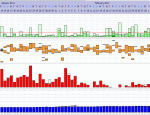
Here is the Data requested.
_________________
| Machine: ResMed AirSense™ 10 AutoSet™ CPAP Machine with HumidAir™ Heated Humidifier |