


Greetings,
Can anyone tell me if there is a preference between the Encore Viewer vs. Encore Pro 2? What is the most recent software? Do they do the same things...? We have a PC with Vista operating system.
Thanks!
My machine is:
Respironcis REMstar Auto a-Flex System 1
Encore Viewer vs. Encore Pro


8 posts
• Page 1 of 1

Re: Encore Viewer vs. Encore Pro
Either one can work, but my prerference is not to use Vista's O.S. in 32 or 64 bit at any cost. jim
Use data to optimize your xPAP treatment!
"The art of medicine consists in amusing the patient while nature cures the disease." Voltaire
"The art of medicine consists in amusing the patient while nature cures the disease." Voltaire
-
mikeandtina59
Re: Encore Viewer vs. Encore Pro
Either one can work, but my prerference is not to use Vista's operating system in 32 or 64 bit at any cost. jim
Thank you, Jim. But could you tell me what "32 or 64 bit" means....?
Vista is the only operating system we have on our computer.
-
digitaleagle

- Posts: 164
- Joined: Wed Nov 24, 2010 11:35 am
- Location: Des Moines IA
Re: Encore Viewer vs. Encore Pro
Windows XP, Vista, and now Windows 7 come in both 32 bit and 64 bit versions of the operating systems. Basically what this means, in very simple terms, is that the 64 bit version can address (and take advantage of )more computer memory or "RAM". The 32 bit versions are limited to 4 GB's total but the Operating system can typically only use about 3.5GB's at most. In other words, putting more than 4GB's of memory in a computer with a 32 bit Operating system is a waste of money because it can't utilize it.
A 64 bit operating system can address almost unlimited amounts of memory. Some applications can take advantage of the extra memory. Applications need to written to take advantage of the 64 bit OS's full potential.
A 64 bit Operating system can run almost all 32 bit written applications . If an application is written to take advantage of the increased addressing capabilities of a 64 bit OS it is referred to as "A 64 bit app". 64 bit applications will not run on 32 bit operating systems. Most typical users do not need the benefits of a 64 bit OS for the kinds of tasks that they typically do. Some applications need more memory for better performance like video rendering, Digital Audio workstation production, (for music) and the like. Those types of applications will have quite significant performance benefits from the 64 bit architecture. Most typical applications don't need this much memory but if you run lots of programs simultaneously, the extra memory will help your performance and stability.
If you are getting a new computer - many will come with the Windows 7 64 bit version. So, as more and more typical applications get written to take advantage of the 64 bit architecture, you can benefit from the increased memory with slight performance benefits.
One more note - your processor in your computer needs to be 64 bit capable to run a 64 bit OS version. Most modern CPU's on the market today are - but some of the older ones are not.
So - Encore Pro, I believe comes in 32 bit and 64 bit versions. If you have a 64 bit OS you could run either. If you have a 32 bit OS you can only run the 32 bit version. It's highly unlikely you would notice any difference between the two.
I'd also like to point out that Encore Pro installs Microsoft's SQL Server, (Relational Data base) which uses much more overhead than the Viewer software which doesn't need SQL server. The SQL server instance get's installed when you install the Encore Pro software. Some people have had problems getting this to work right on their computers. The Encore Pro software is really designed for medical clinics that will have multiple computers networked to a server - this is the main reason for utilizing the database.
I hope this helps.
A 64 bit operating system can address almost unlimited amounts of memory. Some applications can take advantage of the extra memory. Applications need to written to take advantage of the 64 bit OS's full potential.
A 64 bit Operating system can run almost all 32 bit written applications . If an application is written to take advantage of the increased addressing capabilities of a 64 bit OS it is referred to as "A 64 bit app". 64 bit applications will not run on 32 bit operating systems. Most typical users do not need the benefits of a 64 bit OS for the kinds of tasks that they typically do. Some applications need more memory for better performance like video rendering, Digital Audio workstation production, (for music) and the like. Those types of applications will have quite significant performance benefits from the 64 bit architecture. Most typical applications don't need this much memory but if you run lots of programs simultaneously, the extra memory will help your performance and stability.
If you are getting a new computer - many will come with the Windows 7 64 bit version. So, as more and more typical applications get written to take advantage of the 64 bit architecture, you can benefit from the increased memory with slight performance benefits.
One more note - your processor in your computer needs to be 64 bit capable to run a 64 bit OS version. Most modern CPU's on the market today are - but some of the older ones are not.
So - Encore Pro, I believe comes in 32 bit and 64 bit versions. If you have a 64 bit OS you could run either. If you have a 32 bit OS you can only run the 32 bit version. It's highly unlikely you would notice any difference between the two.
I'd also like to point out that Encore Pro installs Microsoft's SQL Server, (Relational Data base) which uses much more overhead than the Viewer software which doesn't need SQL server. The SQL server instance get's installed when you install the Encore Pro software. Some people have had problems getting this to work right on their computers. The Encore Pro software is really designed for medical clinics that will have multiple computers networked to a server - this is the main reason for utilizing the database.
I hope this helps.
_________________
| Mask: Swift™ FX Nasal Pillow CPAP Mask with Headgear |
| Additional Comments: The reason we have a concept called time is so all things don't happen at once |
Last edited by digitaleagle on Wed Jun 08, 2011 7:22 pm, edited 1 time in total.

Re: Encore Viewer vs. Encore Pro
Encore Pro offers wave form data. Can be PITA sometimes.
Encore Viewer does not offer wave form data. Is much more user friendly.
Otherwise the reports are visually identical.
Other choices are Onkor online analyzer and downloadable SleepyHead. Both designed by forum members and looking very promising.
SleepyHead and Onkor let's us zoom in on timeline to see deep into the graphs. Encore either one does not do this.
Examples here below.
Onkor report

Encore Pro report
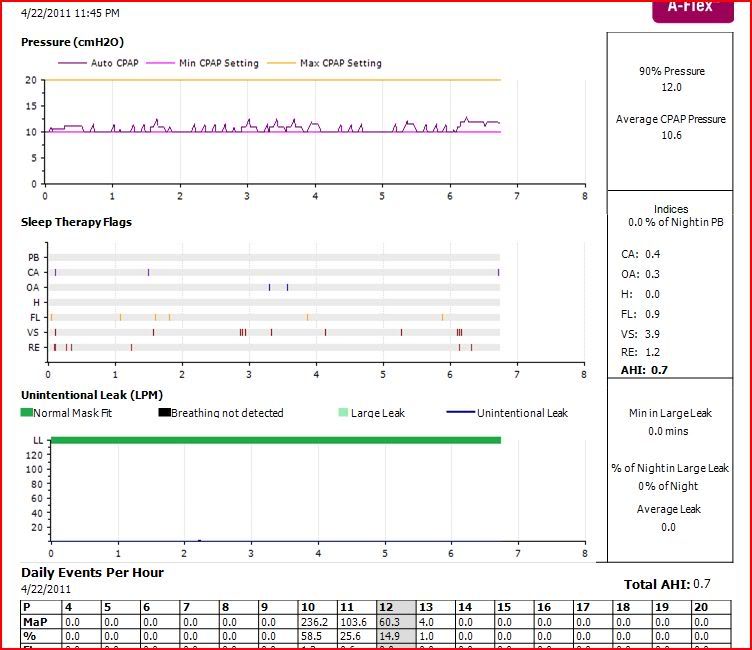
Encore Pro wave form report

SleepyHead report
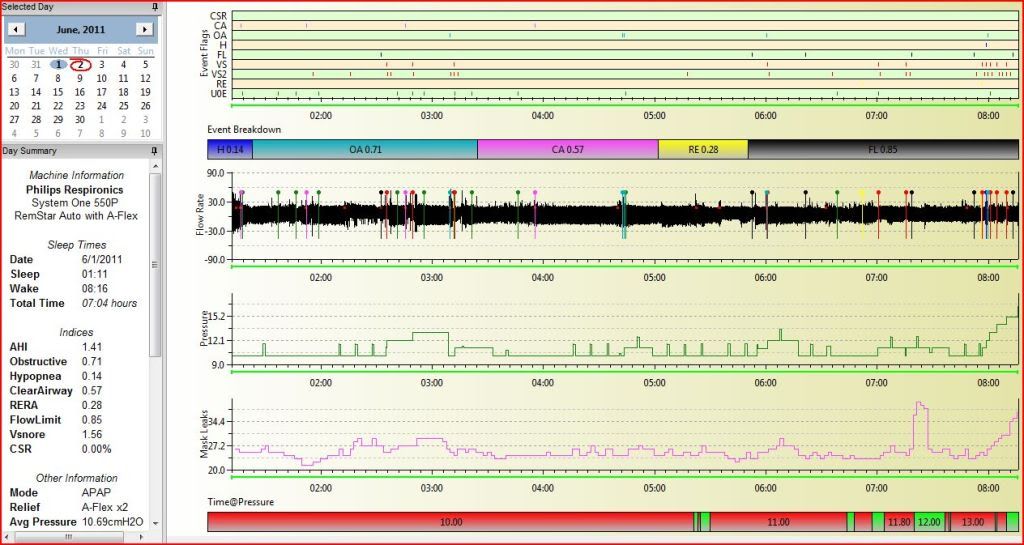
SleepyHead zoom in on flow to get wave form

Encore Viewer does not offer wave form data. Is much more user friendly.
Otherwise the reports are visually identical.
Other choices are Onkor online analyzer and downloadable SleepyHead. Both designed by forum members and looking very promising.
SleepyHead and Onkor let's us zoom in on timeline to see deep into the graphs. Encore either one does not do this.
Examples here below.
Onkor report
Encore Pro report
Encore Pro wave form report
SleepyHead report
SleepyHead zoom in on flow to get wave form
_________________
| Machine: AirCurve™ 10 VAuto BiLevel Machine with HumidAir™ Heated Humidifier |
| Additional Comments: Mask Bleep Eclipse https://bleepsleep.com/the-eclipse/ |
I may have to RISE but I refuse to SHINE.
-
mikeandtain59
Re: Encore Viewer vs. Encore Pro
Wow - thank you, digitaleagle - I will have to hope for a good night's sleep in order to process your hi-tech response! (or else find a teenager who can translate - ha-ha! But seriously, thank you very much for taking the time to explain this all to me.
Tina
Tina
Re: Encore Viewer vs. Encore Pro
BTW I use Vista 32 bit computer and have zero problems with any of the above software choices.
Encore Viewer can be made to run on 64 bit computers but it isn't easy.
Encore Pro offers 32 bit or 64 bit versions.
They are all Windows based software so need at least Windows environment if a Mac or other OS is used.
Encore Viewer can be made to run on 64 bit computers but it isn't easy.
Encore Pro offers 32 bit or 64 bit versions.
They are all Windows based software so need at least Windows environment if a Mac or other OS is used.
_________________
| Machine: AirCurve™ 10 VAuto BiLevel Machine with HumidAir™ Heated Humidifier |
| Additional Comments: Mask Bleep Eclipse https://bleepsleep.com/the-eclipse/ |
I may have to RISE but I refuse to SHINE.
-
digitaleagle
- Posts: 164
- Joined: Wed Nov 24, 2010 11:35 am
- Location: Des Moines IA
Re: Encore Viewer vs. Encore Pro
There is a problem with the installer of the Encore Viewer software which doesn't allow it to install on a 64 bit OS off of the install CD. It's really not that difficult to make it work. Basically, you just have to install it on a computer that has a 32 bit OS first, find the directory that it installed into, then copy the directory over to the X86 Program Files directory of the 64 bit OS. From there you just set up a shortcut to the application (.exe) file within the directory. Works just fine after that. Why PR hasn't fixed this installation problem is beyond me especially when most new computers are coming with Windows 7 64 bit these days.
There are more detailed instructions on this forum if you do a search.
The only real benefit the Pro version of the software will give you is the Waveform data. That's the only real reason to use it. The Pro software is much more difficult to use and takes longer to display reports, etc. The software was written to manage multiple therapists with multiple patients. The administrative function within the program makes it inherently more difficult to navigate.
If you don't need the waveform data - don't bother with the Pro version. Get the Viewer software as it is much easier to use.
There are more detailed instructions on this forum if you do a search.
The only real benefit the Pro version of the software will give you is the Waveform data. That's the only real reason to use it. The Pro software is much more difficult to use and takes longer to display reports, etc. The software was written to manage multiple therapists with multiple patients. The administrative function within the program makes it inherently more difficult to navigate.
If you don't need the waveform data - don't bother with the Pro version. Get the Viewer software as it is much easier to use.
_________________
| Mask: Swift™ FX Nasal Pillow CPAP Mask with Headgear |
| Additional Comments: The reason we have a concept called time is so all things don't happen at once |
8 posts
• Page 1 of 1