My Sleep Test and Cpap Results

General Discussion on any topic relating to CPAP and/or Sleep Apnea.
egzbuen
Posts: 188
Joined: Thu May 05, 2016 10:06 am

My Sleep Test and Cpap Results

Post by egzbuen » Wed Jun 22, 2016 7:25 am

As you may remember, I was diagnosed to have moderate sleep apnea back in 2010 after going through a diagnostics and titration test at a sleep lab. Here were some of my results:

Image
Image
Image
Image
Image

Despite being diagnosed, I refused to use a machine. Fast forward to 2016, symptoms got worse and my wife couldn't take my snoring anymore. Decided to get tested again and was confirmed to now have severe sleep apnea. Here were the results:

Image
Image
Image
Image
Image

After much research and after having decided to use a machine, I found this site and was suggested to get a machine asap. I ended up buying a Remstar 560 and an APEX travel machine.

After 16 days of use of the 560, I feel a lot better than those days when I stubbornly avoided to use a machine. Although I feel a lot better, I see that my average AHI is still high. Lows of 5 and highs of 10.5. Heck, sleepyhead says my stats are horrible. Image

Attaching now the summary from sleepyhead but will attach the more detailed ones soon.

Image

I initially started with fixed pressure of 4cm at startup and ramp to 7cm. After a week, I raised the start up pressure to 5cm.

1. Do you guys think I should raise my final pressure to a higher one?
2. If yes, by how much?
3. Should I turn off ramp all together?

I shall post the more detailed graphs from sleepyhead soon.

Thanks in advance.

Egzbuen


Sent from heaven

User avatar
Pugsy
Posts: 65164
Joined: Thu May 14, 2009 9:31 am
Location: Missouri, USA

Re: My Sleep Test and Cpap Results

Post by Pugsy » Wed Jun 22, 2016 7:39 am

I will await a detailed report but based on the summary report it looks like the titration RX of 7 might be a little lacking.
Not sure why unless it is related to sleeping position or REM or both. The detailed graphs might give a clue in that regard.

I think I would switch to auto adjusting pressures and start with that minimum of 7 cm and let the machine go higher if it thinks it needs to and I am betting it will think it needs to.
If you want to keep a tight range...maybe try 7 minimum and 10 maximum and see what happens.

_________________
Machine: AirCurve™ 10 VAuto BiLevel Machine with HumidAir™ Heated Humidifier
Additional Comments: Mask Bleep Eclipse https://bleepsleep.com/the-eclipse/
I may have to RISE but I refuse to SHINE.

User avatar
Julie
Posts: 20051
Joined: Tue Feb 28, 2006 12:58 pm

Re: My Sleep Test and Cpap Results

Post by Julie » Wed Jun 22, 2016 7:57 am

I would bump the low pressure to at least 8, and turn off the ramp (I would turn it off for everyone every time if I thought they would do it).

egzbuen
Posts: 188
Joined: Thu May 05, 2016 10:06 am

Re: My Sleep Test and Cpap Results

Post by egzbuen » Thu Jun 23, 2016 5:06 am

Thanks Pugsy and Julie.

I'll try to upload more Sleepyhead data tonight. But, since we are talking about several graphs, can you give me a heads up as to which graphs would be most important so you guys can give me some inputs on the AHI I'm currently having?

Sent from heaven

User avatar
Pugsy
Posts: 65164
Joined: Thu May 14, 2009 9:31 am
Location: Missouri, USA

Re: My Sleep Test and Cpap Results

Post by Pugsy » Thu Jun 23, 2016 7:34 am

With the Respironics machines I only need these 4 graphs from the right side of graphs in SleepyHead
Events
Flow Rate
Pressure (when using auto adjusting pressures)
Leak
don't need any other graphs

now with ResMed machines sometimes will ask for the Flow limitation graph but Respironics doesn't do a FL graph and instead it flags the FLs on the events graph.

On the left side...hide the calendar and pie chart and include the AHI along with the category breakdown and the statistics..
Usually all this can be done in one screen shot to make it easy to evaluate.
The graphs can be moved and resized so that the 4 graphs are easily evaluated. People who put too many graphs in one screen shot end up making the graphs so small it's hard to evaluate because it really messes with the scale numbers. Especially a problem when looking at the leak graph.

So that you end up with something like this. Everything easily seen and compared in one image.
In this one I made the leak graph a bit larger because I wanted to see the numbers on the left more clearly since I was looking to see just how far I went into large leak territory during that LL flagged time frame. Flow rate got made smaller as I didn't really need it anyway.
My pressure line is going to look weird compared to your pressure line but that's because of the type of machine I am using so don't get in a panic when yours looks different.

Image

_________________
Machine: AirCurve™ 10 VAuto BiLevel Machine with HumidAir™ Heated Humidifier
Additional Comments: Mask Bleep Eclipse https://bleepsleep.com/the-eclipse/
I may have to RISE but I refuse to SHINE.

egzbuen
Posts: 188
Joined: Thu May 05, 2016 10:06 am

Re: My Sleep Test and Cpap Results

Post by egzbuen » Thu Jun 23, 2016 10:51 am

Thank you for the detailed explanation. I just couldn't figure out how to hide the piechart, sorry Image

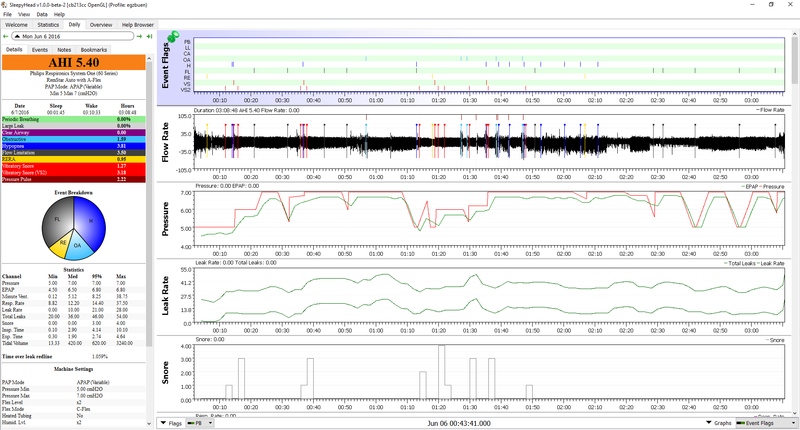
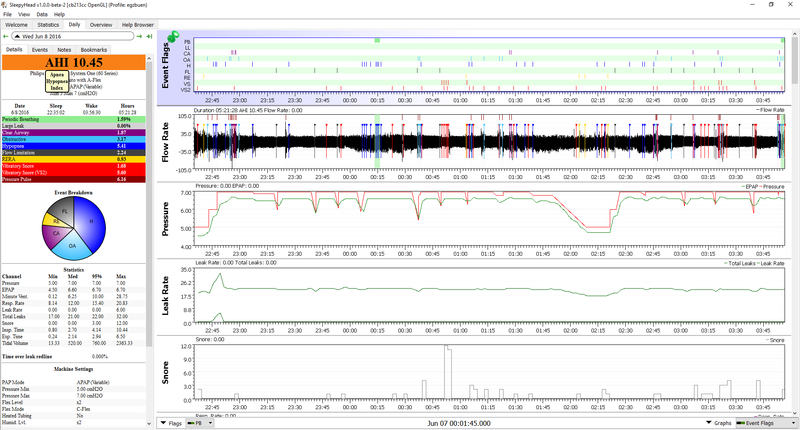
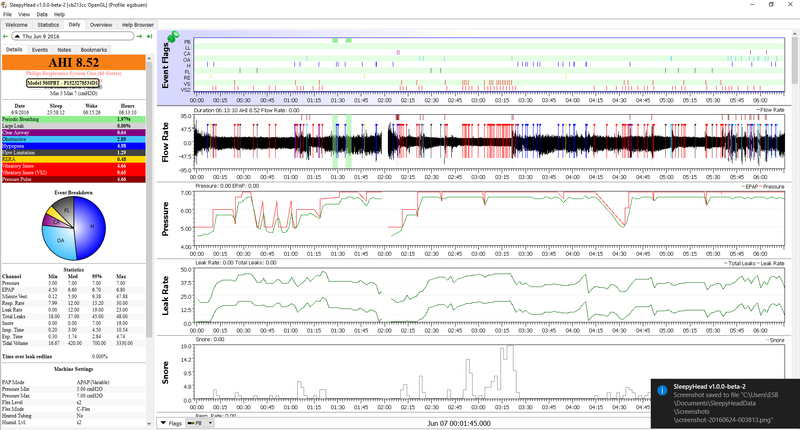
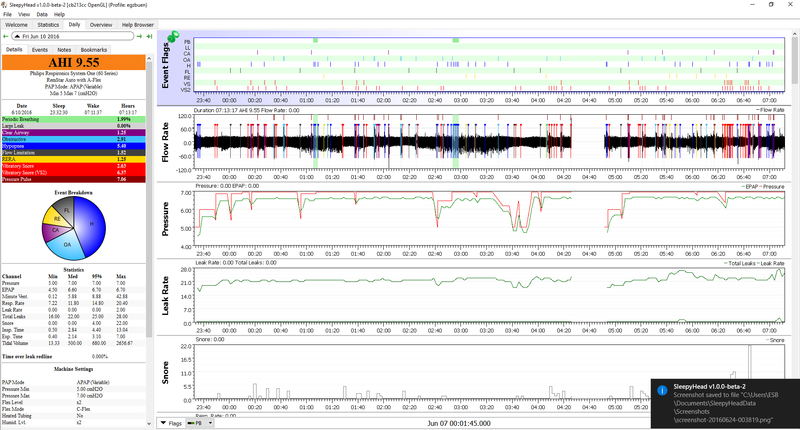
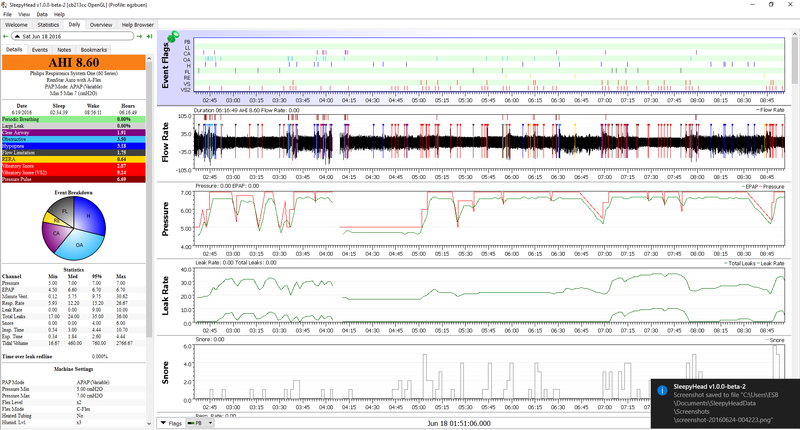
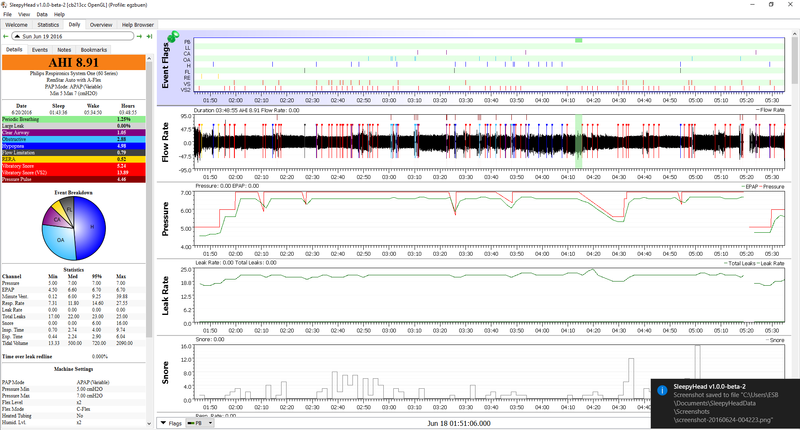
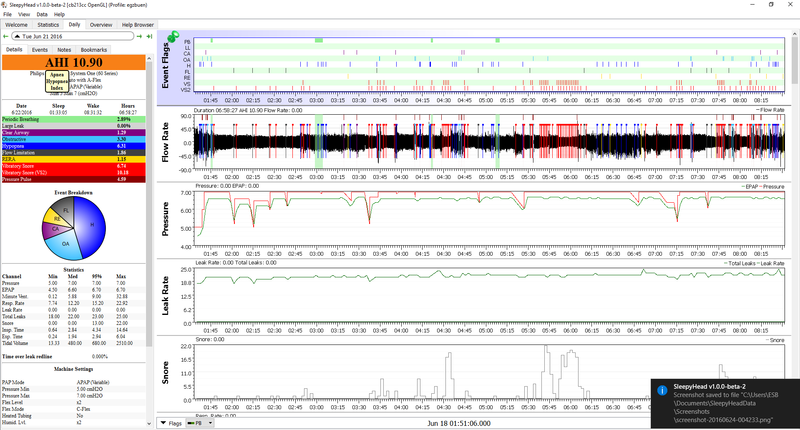
Here are the first few screenshots:

Image
Image
Image
Image

I'll be posting the others in a few.

Thanks again.


Sent from heaven
Last edited by egzbuen on Thu Jun 23, 2016 8:13 pm, edited 1 time in total.

egzbuen
Posts: 188
Joined: Thu May 05, 2016 10:06 am

Re: My Sleep Test and Cpap Results

Post by egzbuen » Thu Jun 23, 2016 10:55 am

Image
Image
Image

Those are basically the data taken from my machine covering the first week of use.

Sent from heaven
Last edited by egzbuen on Thu Jun 23, 2016 8:18 pm, edited 2 times in total.

egzbuen
Posts: 188
Joined: Thu May 05, 2016 10:06 am

Re: My Sleep Test and Cpap Results

Post by egzbuen » Thu Jun 23, 2016 11:14 am

Pardon my first attempt to post Sleepyhead screen grabs. Seems like they are to small. I'll try to readjust them tomorrow and repost as well. I did them in a hurry.

Thanks.

Sent from heaven

User avatar
Pugsy
Posts: 65164
Joined: Thu May 14, 2009 9:31 am
Location: Missouri, USA

Re: My Sleep Test and Cpap Results

Post by Pugsy » Thu Jun 23, 2016 11:51 am

We don't need the snore graph...snores are documented on the Events graph. By including the snore graph the other graphs become even smaller.

For making images so that we can click on them and go see larger if we need to there needs to be a link to the image and you are using a website for hosting images that I have no idea how to tell you to get it done.
Imgur.com is much more user friendly and we are all familiar with it.

I am concerned that the lines in the graphs are all broken up for some reason. In the vague recesses of my memory I remember seeing this problem before but I don't remember the solution...anyone remember?
Are you seeing the original reports like they are showing here? or is this a byproduct of the screenshot?
Something to do with fonts and a different language maybe???

The pie chart...can be turned off in Preferences/Appearance tab by removing the check mark but it may not stick for you...this newest version of SH I am finding has some bugs (at least for me) in that when I make a change in Preferences it won't stick and it should. The pie chart is one of them that won't stay unchecked.

I can't read any of the statistics but overall from the AHI itself and the general appearance of the pressure graph and the presence of snores it appears that your pressure is not optimal.
I can't read what it is or what range you are using but it's not optimal. I think I may have mentioned this either in this thread or another thread...whatever you are using isn't working well and you need more pressure if you are using a single fixed pressure or you need more minimum and maximum if using auto adjusting mode.

_________________
Machine: AirCurve™ 10 VAuto BiLevel Machine with HumidAir™ Heated Humidifier
Additional Comments: Mask Bleep Eclipse https://bleepsleep.com/the-eclipse/
I may have to RISE but I refuse to SHINE.

User avatar
palerider
Posts: 32299
Joined: Wed Dec 16, 2009 5:43 pm
Location: Dallas(ish).

Re: My Sleep Test and Cpap Results

Post by palerider » Thu Jun 23, 2016 2:12 pm

Pugsy wrote:I am concerned that the lines in the graphs are all broken up for some reason. In the vague recesses of my memory I remember seeing this problem before but I don't remember the solution...anyone remember?
I think it's whatever software he's using to shrink the screenshots, if you zoom in, you can see that the text is also screwed up.

_________________
Mask: Bleep DreamPort CPAP Mask Solution
Additional Comments: S9 VPAP Auto
Get OSCAR

Accounts to put on the foe list: dataq1, clownbell, gearchange, lynninnj, mper!?, DreamDiver, Geer1, almostadoctor, sleepgeek, ajack, stom, mogy, D.H., They often post misleading, timewasting stuff.

egzbuen
Posts: 188
Joined: Thu May 05, 2016 10:06 am

Re: My Sleep Test and Cpap Results

Post by egzbuen » Thu Jun 23, 2016 6:46 pm

My bad. Looks like my phone app, Tapatalk, is shrinking the image file. Looking at the image file prior to upload via Tapatalk shows everything is A-OK.

I will re-upload tonight using a web-based image host site.

Thanks everyone.

Sent from heaven

egzbuen
Posts: 188
Joined: Thu May 05, 2016 10:06 am

Re: My Sleep Test and Cpap Results

Post by egzbuen » Thu Jun 23, 2016 8:17 pm

Done editing. Uploaded the image files to a Web based image hosting site instead.

Hope the above is more readable this time.

Thanks.

Sent from heaven

egzbuen
Posts: 188
Joined: Thu May 05, 2016 10:06 am

Re: My Sleep Test and Cpap Results

Post by egzbuen » Thu Jun 23, 2016 8:26 pm

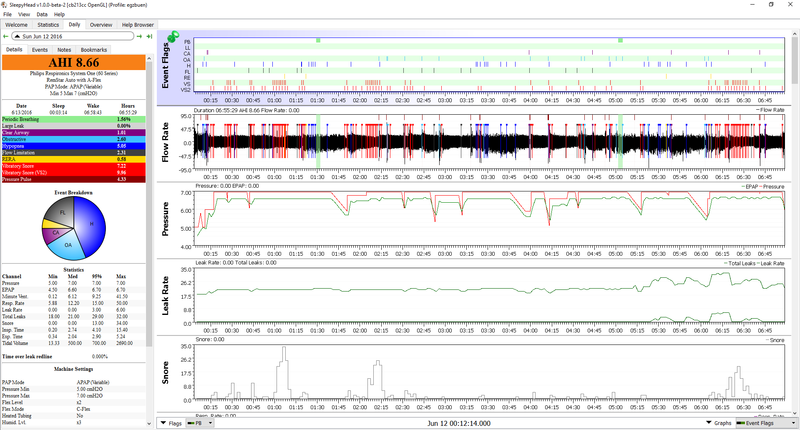
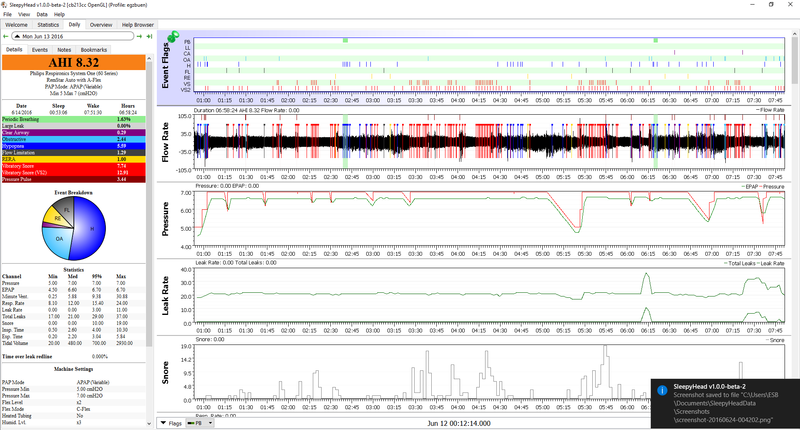
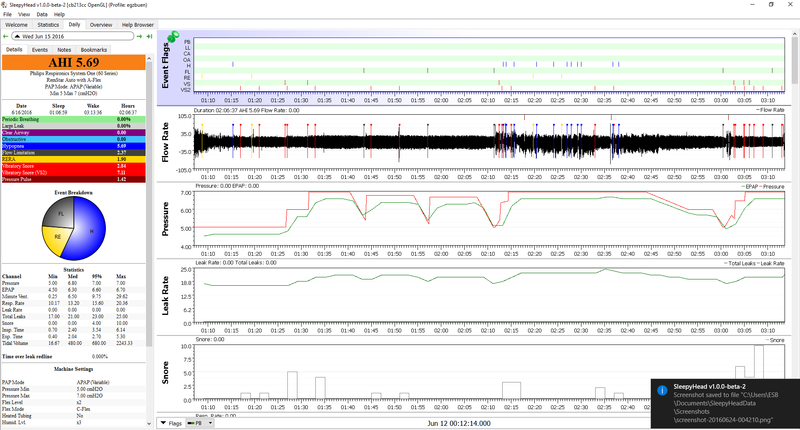
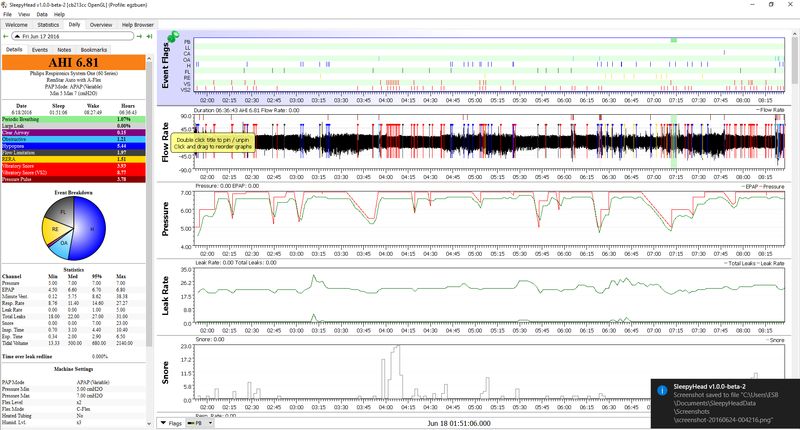
Meanwhile, these are my stats for June 12 to June 21:

Image
Image
Image
Image
Image
Image
Image
Image
Image

User avatar
Pugsy
Posts: 65164
Joined: Thu May 14, 2009 9:31 am
Location: Missouri, USA

Re: My Sleep Test and Cpap Results

Post by Pugsy » Thu Jun 23, 2016 8:37 pm

Your current settings appear to be 7 min and 7 max in apap mode.
It's not enough pressure.
It's not holding the airway open well enough to prevent the apnea events, snores, FLs, etc from happening.

_________________
Machine: AirCurve™ 10 VAuto BiLevel Machine with HumidAir™ Heated Humidifier
Additional Comments: Mask Bleep Eclipse https://bleepsleep.com/the-eclipse/
I may have to RISE but I refuse to SHINE.

egzbuen
Posts: 188
Joined: Thu May 05, 2016 10:06 am

Re: My Sleep Test and Cpap Results

Post by egzbuen » Thu Jun 23, 2016 9:22 pm

Pugsy wrote:Your current settings appear to be 7 min and 7 max in apap mode.
It's not enough pressure.
It's not holding the airway open well enough to prevent the apnea events, snores, FLs, etc from happening.
Thanks Pugsy.

Do you suggest I bump it up a notch or go for 9 or 10 at once as max pressure?