Page 3 of 6
Posted: Sat Oct 22, 2005 12:42 pm
by Guest
I doubt it.
Posted: Sat Oct 22, 2005 1:02 pm
by Sleepless on LI
I have all updates and patches, service packs, etc. for Windows XP Home and I also have the "overseas" reader, none of which I've had a problem with. The overseas reader is made by the same company who makes the ones for Respironics, from what I've been told. Just because we didn't pay more for it in the US doesn't mean they won't work. That is a wrong assumption. I would say, 99% of the users on this site that have bought them from the Hong Kong site have had success with getting them to work with no problem at all.
It MAY be a defective reader, which can happen no matter where you buy it, but I am not putting too much weight on that being the problem. It's a real pain, though, until you can figure out how to get it to work.
BP, did you try a totally fresh install again?
Posted: Sat Oct 22, 2005 3:47 pm
by CollegeGirl
I had the same error message when I first installed, BP. My fix was to plug the card reader directly into my PC's USB port rather than a hub, but, as you said, you've already done that. Here's the directions I had. Did you do *everything* in this list (I never saw you mention the two updates from the encore pro website):
1. Buy the Encore Pro software (and ONLY the software) from cpap.com.
2. Separately, buy the card reader (Model DT3500) from 2factors.com (and ask for $6 shipping!).
http://www.2factors.com/index.php?sp=&p ... s=&lang=en
3. Download MyEncore if you want it (optional).
4. Install the EncorePro software & drivers.
5. Go to
http://software.respironics.com/cgi-bin ... ge=[Encore] and download two updates: (a) Encore Pro v1.4i Rev 4 Upgrade and (b) Encore Pro v1.4i Service Pack 1.
6. On the Encore Pro CD, there is a subdirectory called "Smart Card Readers". There is a file in named setup.exe that will install the Infineer/Mako drivers. You'll want to choose the DT3500 (USB) option when it asks you.
7. Reboot if it asks you to (can't remember), plug in your reader, and go.
8. Start Encore Pro, go to Preferences, make sure you've chosen "USB" as Smart Card Reader Type.
9. Install MyEncore.
Two caveats: Make SURE you have installed Encore Pro software/drivers before you plug in your reader, and make sure you have downloaded data into Encore Pro before you try to start the MyEncore program.
Posted: Sat Oct 22, 2005 4:21 pm
by Sleepless on LI
Collegegirl,
Exactly what I was told to do and did, and it all worked perfectly.
Posted: Sat Oct 22, 2005 4:25 pm
by biggziff
As I said before. I have it installed on 3 machines now. 2 are laptops running XP Pro SP2 all updates installed (IBM). One is a MS Vista install on a desktop. Worked fine on all out of the box (Dell Opti).
Have you considered checking the USB root system drivers to see if there is an update? How about a BIOS update?
Obviously you have tested the ports on the machine with another USB device?
How about trying the reader on another machine? Neighbor, friend, etc?
Think basic troubleshooting
Posted: Sat Oct 22, 2005 4:27 pm
by biggziff
Sleepless on LI wrote:Collegegirl,
Exactly what I was told to do and did, and it all worked perfectly.
If he bought his software recently, the updates and SP do NOT apply. They're shipping the most recent version. Mine came with all the updates, etc.
Posted: Sat Oct 22, 2005 4:34 pm
by Sleepless on LI
biggziff wrote:Sleepless on LI wrote:Collegegirl,
Exactly what I was told to do and did, and it all worked perfectly.
If he bought his software recently, the updates and SP do NOT apply. They're shipping the most recent version. Mine came with all the updates, etc.
I just did them. Don't know if I need them or not, but just to be safe. What version is your EncorePro? Mine is 1.4.99.
Posted: Sat Oct 22, 2005 4:46 pm
by BP
The current shipped version of encore pro, at least from cpap.com is 1.4.91, I think the service pack takes it to 1.4.99.
But encore pro isn't the issue here, the drivers and the device are the problem, or at least the first hurdle to overcome. When Lori runs her infineer utility the reader is detected, mine is not. That means the reader isn't being seen even by it's own utility. That's bad!! Don't get me wrong, I am going to follow the "correct" steps again, to the letter, which I have already done, except for applying the respironics updates.
I'm going to try again right now. If that doesn't work I have another machine I'm going to try it on, just with windows xp pro pre-sp1. That should eliminate windows as the problem.
I'll keep you posted,
BP
Posted: Sat Oct 22, 2005 4:54 pm
by Sleepless on LI
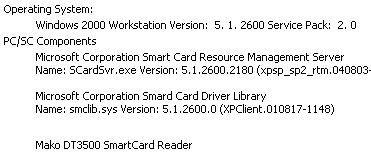
I did send this info to your email address. Don't know why it didn't make it to you.
Posted: Sat Oct 22, 2005 5:05 pm
by BP
Lori, sorry I probably wasn't clear. I got that information, what I asked for earlier today was another test.
BP wrote:Lori, if you get a chance do me a favor. Select Infineer , Inc. USB 0 from your select reader list, and then do a reader status. I think you might get something different than what you got before.
If you're busy don't worry about it, mayber someone else can do it. It's not critical, but it may tell me a bit more about your installation.
Thanks,
BP
Posted: Sat Oct 22, 2005 5:10 pm
by Sleepless on LI
BP,
I am unclear, then, what it is you are asking for. If I move my arrow/cursor away from the info that says Infineer, Inc. USB 0, it goes away. Tell me exactly what you need and I'm more than happy to help you out. I'll be waiting.
Posted: Sat Oct 22, 2005 5:15 pm
by biggziff
Reader plugged in:
Event state SCARD_STATE_EMPTY
Negotiated Protocol Protocol Indeterminate
Card State SCARD_UNKNOWN
Reader not plugged in:
Event state <this area is now empty>
Negotiated Protocol Protocol Indeterminate
Card State SCARD_UNKNOWN
Posted: Sat Oct 22, 2005 5:16 pm
by Sleepless on LI
biggziff wrote:Reader plugged in:
Event state SCARD_STATE_EMPTY
Negotiated Protocol Protocol Indeterminate
Card State SCARD_UNKNOWN
Reader not plugged in:
Event state <this area is now empty>
Negotiated Protocol Protocol Indeterminate
Card State SCARD_UNKNOWN
I think he's looking for other info as I sent this to him yesterday.
Posted: Sat Oct 22, 2005 5:23 pm
by BP
Sorry Lori, what I wanted was to actually select the device in the drop down list, not just view it, just as if you would select any item from a drop down list. That will actually load the device into the utility software. They do this because you may have multiple card readers on a given machine, and they want to know which one to work with. Remember, mako/infineer don't have any direct association with encore pro, or respironics for that matter. You can use this reader with any software that has the capability.
biggziff, actually did what I wanted. This proves that the utility detects the reader fine. This would most likely be the case even if you used the drivers from their site, and never even installed encore pro. Now, of course, encore pro would not work since they have some "special" drivers for the reader.
Thanks all.
Posted: Sat Oct 22, 2005 5:41 pm
by BP
Ok, just did a complete reinstall from a fresh system, restored from Thursday, before any of this started.
I followed CollegeGirl's, and others, instructions, TO THE LETTER. Everything went fine with the installation, the final software response was that the device is "ready for use". Unfortunately, niether the infineer utility, nor encore pro can see the reader.
I think this time I'm going to restore and just install the drivers that came with the reader. This will leave encore pro out of it. I realize encore pro won't work with these drivers, but if the utility works that's at least a step in the right direction.
-BP